Subtitles Visualizer
🟡 Updated this year⚠️ Install Order · 2 steps
Install in this order, then this mod last — most mods fail to load without their framework and dependencies in place.
🖼️ Gallery (3 images)
🔍 Analysis
- 👍 1.2% endorsement rate — high engagement, a strong quality signal
- 🏆 #539 of 885 fabric mods in this game by downloads
📋 About This Mod
# Subtitles Visualizer Subtitles Visualizer turns Minecraft's soundscape into a readable, directional HUD. Instead of leaving every sound as a flat subtitle line, it places compact markers near where sounds are happening and moves off-screen sounds to the edge of your view, helping you tell whether that villager, skeleton, splash, glass break, footstep, or distant danger came from behind you, above you, below you, or just out of sight. It is built for players who rely on subtitles, play with low volume, stream, listen to music while playing, or simply want stronger spatial awareness in caves, villages, farms, raids, bases, and busy multiplayer worlds. <iframe width="560" height="315" src="https://www.youtube-nocookie.com/embed/jK-LF1OAuNU" title="YouTube video player" frameborder="0" allow="accelerometer; autoplay; clipboard-write; encrypted-media; gyroscope; picture-in-picture; web-share" allowfullscreen></iframe> ## Highlights - In-world sound markers that point toward the sound's location. - Edge cues for sounds outside your current view. - Smart labels, icons, and readable fallback names. - Filters for noisy sound categories, specific sounds, entities, block groups, and subtitle entries. - Controls for local-player sounds and player footsteps. - HUD safe areas for chat, hotbar, scoreboard, minimaps, and vanilla subtitles. - Performance-minded marker limits, merging, and cleanup for busy scenes. - A detailed in-game configuration screen for shaping the experience around how you play. ## Feature Details <details> <summary><strong>In-world sound markers</strong></summary> Sound markers appear around your view in the direction the sound came from, giving Minecraft subtitles a sense of space. A marker can show the sound name, an icon, and optional direction information, then fade away once the sound is no longer relevant. - See where sound events are happening instead of only reading that they happened. - Follow nearby activity during mining, exploring, farming, building, or fighting. - Keep track of repeated sounds without the screen filling with duplicates. - Let important sounds remain visible long enough to react, while old markers clean themselves up. </details> <details> <summary><strong>Directional edge cues</strong></summary> When a sound happens outside your current view, Subtitles Visualizer can pin the marker to the screen edge so you still know where to turn. This is especially useful for caves, dense forests, underwater areas, raids, and crowded bases. - Off-screen sounds stay readable instead of disappearing from awareness. - Optional arrows and direction tokens help show whether a sound came from the north, south, east, west, or a diagonal direction. - Edge cues can be used for every sound, only certain sounds, or only certain categories. - Helpful for quickly finding mobs, villagers, water movement, block activity, and other nearby events. </details> <details> <summary><strong>Smart labels, icons, and fallback names</strong></summary> The mod tries to show sounds in a way that feels readable at a glance. When a clean label is available, it uses it. When a sound does not have a perfect display name, it can fall back to a readable placeholder or a cleaned-up subtitle-style name. - Recognizable labels for many common Minecraft sounds. - Icons for many sound origins, entities, blocks, and general sound types. - Optional placeholder text for unknown or unusual sounds. - Humanized fallback names so technical-looking subtitle entries can still be understandable. - Text-only display options when you prefer labels over icon-heavy markers. </details> <details> <summary><strong>Entity and block attribution</strong></summary> Subtitles Visualizer can connect sounds to nearby entities and block groups, making markers feel more specific. Instead of only seeing a generic sound, you can get clearer context such as a villager sound, a glass sound, a wooden block sound, or another recognizable origin. - Helps identify what made the sound when multiple things are nearby. - Supports entity-focused markers for mobs, villagers, players, and other sound-making creatures. - Supports block-group markers for materials such as stone, wood, gravel, glass, wool, metal, sand, slime, snow, and vegetation. - Makes busy scenes easier to read by turning raw sound events into player-friendly context. </details> <details> <summary><strong>Local-player and footstep controls</strong></summary> Your own sounds can be useful sometimes and distracting other times. Subtitles Visualizer includes controls for keeping your personal movement and footsteps from overpowering the sounds you actually want to notice. - Ignore sounds made by the local player. - Show all player footsteps when you want full awareness. - Hide only your own footsteps while still seeing other players' footsteps. - Hide all player footsteps when movement markers are too noisy. - Useful for multiplayer, parkour, combat, building sessions, and
# Subtitles Visualizer
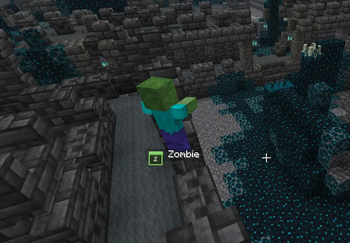
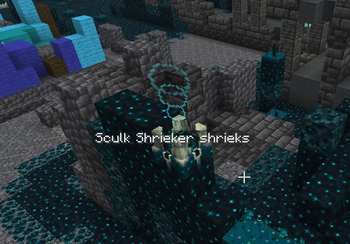
Subtitles Visualizer turns Minecraft's soundscape into a readable, directional HUD. Instead of leaving every sound as a flat subtitle line, it places compact markers near where sounds are happening and moves off-screen sounds to the edge of your view, helping you tell whether that villager, skeleton, splash, glass break, footstep, or distant danger came from behind you, above you, below you, or just out of sight.
It is built for players who rely on subtitles, play with low volume, stream, listen to music while playing, or simply want stronger spatial awareness in caves, villages, farms, raids, bases, and busy multiplayer worlds.
## Highlights
- In-world sound markers that point toward the sound's location.
- Edge cues for sounds outside your current view.
- Smart labels, icons, and readable fallback names.
- Filters for noisy sound categories, specific sounds, entities, block groups, and subtitle entries.
- Controls for local-player sounds and player footsteps.
- HUD safe areas for chat, hotbar, scoreboard, minimaps, and vanilla subtitles.
- Performance-minded marker limits, merging, and cleanup for busy scenes.
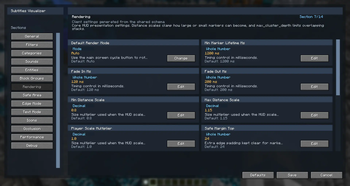
- A detailed in-game configuration screen for shaping the experience around how you play.
## Feature Details
In-world sound markers
Sound markers appear around your view in the direction the sound came from, giving Minecraft subtitles a sense of space. A marker can show the sound name, an icon, and optional direction information, then fade away once the sound is no longer relevant.
- See where sound events are happening instead of only reading that they happened.
- Follow nearby activity during mining, exploring, farming, building, or fighting.
- Keep track of repeated sounds without the screen filling with duplicates.
- Let important sounds remain visible long enough to react, while old markers clean themselves up.
Directional edge cues
When a sound happens outside your current view, Subtitles Visualizer can pin the marker to the screen edge so you still know where to turn. This is especially useful for caves, dense forests, underwater areas, raids, and crowded bases.
- Off-screen sounds stay readable instead of disappearing from awareness.
- Optional arrows and direction tokens help show whether a sound came from the north, south, east, west, or a diagonal direction.
- Edge cues can be used for every sound, only certain sounds, or only certain categories.
- Helpful for quickly finding mobs, villagers, water movement, block activity, and other nearby events.
Smart labels, icons, and fallback names
The mod tries to show sounds in a way that feels readable at a glance. When a clean label is available, it uses it. When a sound does not have a perfect display name, it can fall back to a readable placeholder or a cleaned-up subtitle-style name.
- Recognizable labels for many common Minecraft sounds.
- Icons for many sound origins, entities, blocks, and general sound types.
- Optional placeholder text for unknown or unusual sounds.
- Humanized fallback names so technical-looking subtitle entries can still be understandable.
- Text-only display options when you prefer labels over icon-heavy markers.
Entity and block attribution
Subtitles Visualizer can connect sounds to nearby entities and block groups, making markers feel more specific. Instead of only seeing a generic sound, you can get clearer context such as a villager sound, a glass sound, a wooden block sound, or another recognizable origin.
- Helps identify what made the sound when multiple things are nearby.
- Supports entity-focused markers for mobs, villagers, players, and other sound-making creatures.
- Supports block-group markers for materials such as stone, wood, gravel, glass, wool, metal, sand, slime, snow, and vegetation.
- Makes busy scenes easier to read by turning raw sound events into player-friendly context.
Local-player and footstep controls
Your own sounds can be useful sometimes and distracting other times. Subtitles Visualizer includes controls for keeping your personal movement and footsteps from overpowering the sounds you actually want to notice.
- Ignore sounds made by the local player.
- Show all player footsteps when you want full awareness.
- Hide only your own footsteps while still seeing other players' footsteps.
- Hide all player footsteps when movement markers are too noisy.
- Useful for multiplayer, parkour, combat, building sessions, and
📊 Mod Details
- Game
- Minecraft Mods
- Author
- Pepsied
- Version
- 1.0.2
- Downloads
- 1,037
- Endorsements
- 12
- Category
- fabric
- Created
- 4/29/2026
- Updated
- 5/18/2026
- Game Versions
- 26.1, 26.1.1, 26.1.2
- Tags
- game-mechanics, mobs, utility
🔧 How to Install Minecraft Mods Mods
Download from Modrinth. Use Prism Launcher or drop into your mods folder.
📖 Full step-by-step install guide for Minecraft Mods →
Visit the official mod page for specific installation instructions for this mod.
🎮 Need cheat codes or console commands? Check ur gaming wiki for Minecraft Mods commands, item IDs, and more.
❓ Frequently Asked Questions
Which Minecraft Mods versions does Subtitles Visualizer support?
The author lists 26.1, 26.1.1, 26.1.2. Other versions may work but are untested by the author.
What is the latest version of Subtitles Visualizer?
Version 1.0.2, published 2026-05-18 with 1,037 downloads recorded at the source.
Keep browsing — more Minecraft Mods mods await