Stylish Effects
🟡 Updated this year⚠️ Install Order · 2 steps
Install in this order, then this mod last — most mods fail to load without their framework and dependencies in place.
🖼️ Gallery (1 images)

🔍 Analysis
- 👍 0.0% endorsement rate
- 🏆 #593 of 1284 fabric mods in this game by downloads
📋 About This Mod
<p><img src="https://i.imgur.com/fmWwWkZ.png" width="854" height="240" /></p> <p><img src="https://i.imgur.com/askYVd2.png" width="854" height="14" /></p> <p style="text-align: center; line-height: 36px;"><img src="https://img.shields.io/badge/Available%20for%20Minecraft-1.19%20%7C%201.18%20%7C%201.17%20%7C%201.16-ecebe6?labelColor=2F4858&style=for-the-badge" width="386" height="28" /> <img src="https://img.shields.io/badge/Install%20on-Client%20Only-ecebe6?labelColor=2F4858&style=for-the-badge" width="210" height="28" /></p> <p style="text-align: center; line-height: 36px;"><a href="https://www.curseforge.com/minecraft/mc-mods/stylish-effects/files/all?filter-status=1&filter-game-version=2020709689%3A7498"><img src="https://bit.ly/3yrSsw7" width="320" height="28" /></a> <a href="https://www.curseforge.com/minecraft/mc-mods/puzzles-lib"><img src="https://bit.ly/3jr9xQw" width="215" height="28" /></a></p> <p style="text-align: center; line-height: 36px;"><a href="https://www.curseforge.com/minecraft/mc-mods/stylish-effects/files/all?filter-status=1&filter-game-version=2020709689%3A7499"><img src="https://bit.ly/3nRXr4m" width="325" height="28" /></a> <a href="https://www.curseforge.com/minecraft/mc-mods/fabric-api"><img src="https://bit.ly/30lZmFY" width="208" height="28" /></a> <a href="https://www.curseforge.com/minecraft/mc-mods/puzzles-lib"><img src="https://bit.ly/3jr9xQw" width="215" height="28" /></a> <a href="https://www.curseforge.com/minecraft/mc-mods/forge-config-api-port-fabric"><img src="https://bit.ly/3clkhvn" width="299" height="28" /></a></p> <p><img src="https://i.imgur.com/askYVd2.png" width="854" height="14" /></p> <p><span style="font-size: 20px;"><strong>📖 About:</strong></span></p> <p><span style="font-size: 14px;"><strong>Stylish Effects</strong> completely overhauls how status effects are displayed. There are multiple modes to choose and countless configuration options available to create the effects display of your dreams.</span></p> <p><img src="https://i.imgur.com/askYVd2.png" width="854" height="14" /></p> <p><span style="font-size: 20px;"><strong>📚 Contents:</strong></span></p> <p><span style="font-size: 14px;">First of all, the crummy little vanilla hud effects display is replaced with a fancier version which includes an effect timer as well as the current effect amplifier. This display is also now used in the inventory, as it's way more compact and allows for many more effects to be shown before they start to overlap. And this new inventory display is no longer limited to the player inventory, now you can see your active effects in every container!</span></p> <p><span style="font-size: 14px;">But wait, now that status effects are shown small and compact with just an icon, how will you find out how your active effects are called? Don't worry, a handy tooltip is added for that. The tooltip will be even more useful when <span style="font-size: 14px;"><a href="https://www.curseforge.com/minecraft/mc-mods/just-enough-effect-descriptions-jeed"><span style="font-size: 14px;"><strong>Just Enough Effect Descriptions</strong></span></a> by <span style="font-size: 14px;"><a href="https://www.curseforge.com/members/mehvahdjukaar"><span style="font-size: 14px;"><strong>MehVahdJukaar</strong></span></a> is installed.</span></span></span></p> <p><span style="font-size: 14px;">You like the vanilla inventory status effect display and want to keep it or even use it on the hud as well? No problem! You can choose any widget mode you want, or even none. Alongside that there are many configurable settings, such as the screen side for effects, amount of rows and columns, a custom alpha value, text colors, custom screen positions, and much, much more.</span></p> <p><img src="https://i.imgur.com/askYVd2.png" width="854" height="14" /></p> <p><span style="font-size: 20px;"><strong>📷 Media:</strong></span></p> <table style="text-align: center;"> <tbody> <tr> <td><img src="https://media.forgecdn.net/attachments/480/288/2022-07-23_22.png" width="410" height="231" /></td> <td>  </td> <td><img src="https://media.forgecdn.net/attachments/480/290/2022-07-23_22.png" width="410" height="231" /></td> </tr> <tr> <td><strong>Stylish effects in action being very stylish</strong></td> <td>  </td> <td><strong>Various effect render types can be chosen and configured</strong></td> </tr> <tr> <td> </td> </tr> <tr> <td><img src="https://media.forgecdn.net/attachments/480/291/2022-07-23_22.png" width="410" height="231" /></td> <td>  </td> <td><img src="https://media.forgecdn.net/attachments/480/292/2022-07-23_22.png" width="410" height="231" /></td> </tr> <tr> <td><strong>Compact effects replace the vanilla display inside of the inventory</strong></td> <td>  </td> <td><strong>The effects display is shown in every container, not just the inventory</strong></td> </tr> <tr> <td> </td> </tr> <tr> <td><img src="https://media.forgecdn.n




📖 About:
Stylish Effects completely overhauls how status effects are displayed. There are multiple modes to choose and countless configuration options available to create the effects display of your dreams.
📚 Contents:
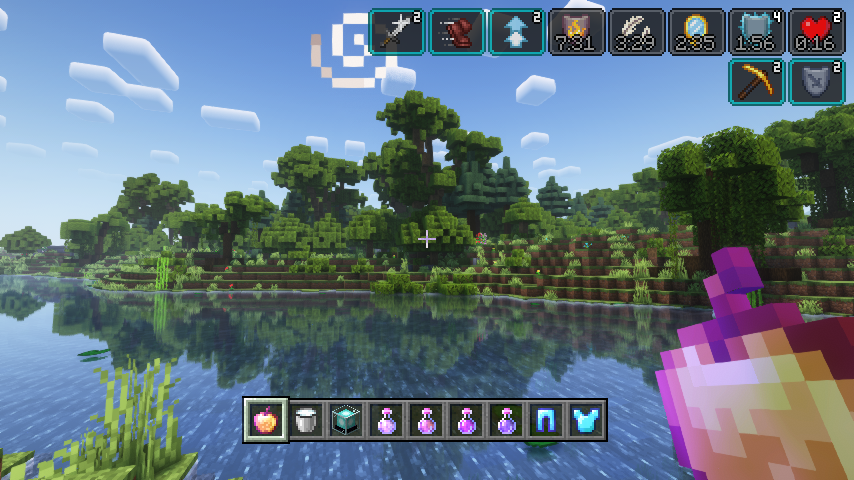
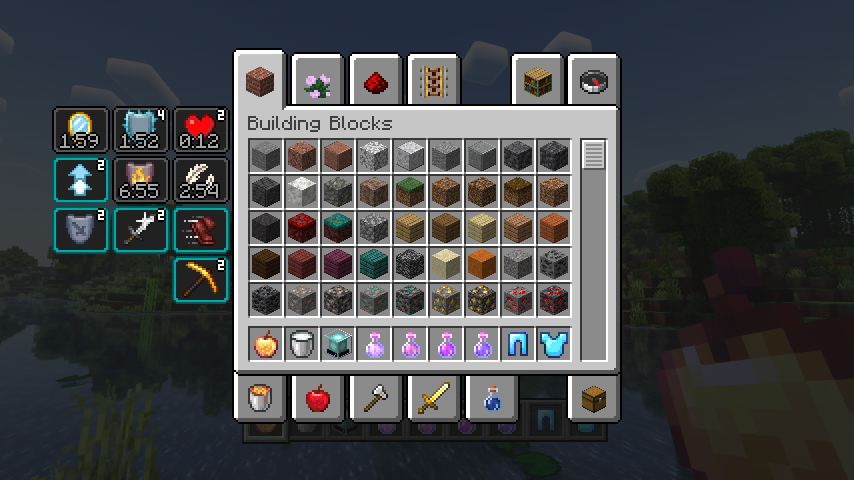
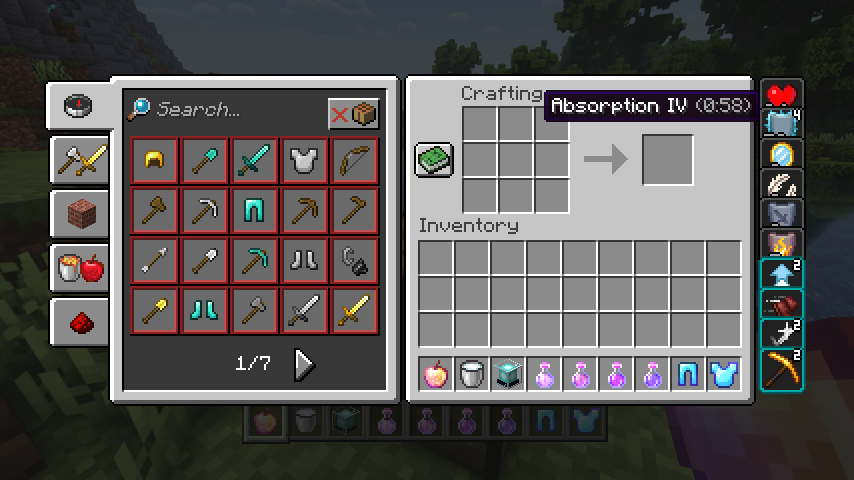
First of all, the crummy little vanilla hud effects display is replaced with a fancier version which includes an effect timer as well as the current effect amplifier. This display is also now used in the inventory, as it's way more compact and allows for many more effects to be shown before they start to overlap. And this new inventory display is no longer limited to the player inventory, now you can see your active effects in every container!
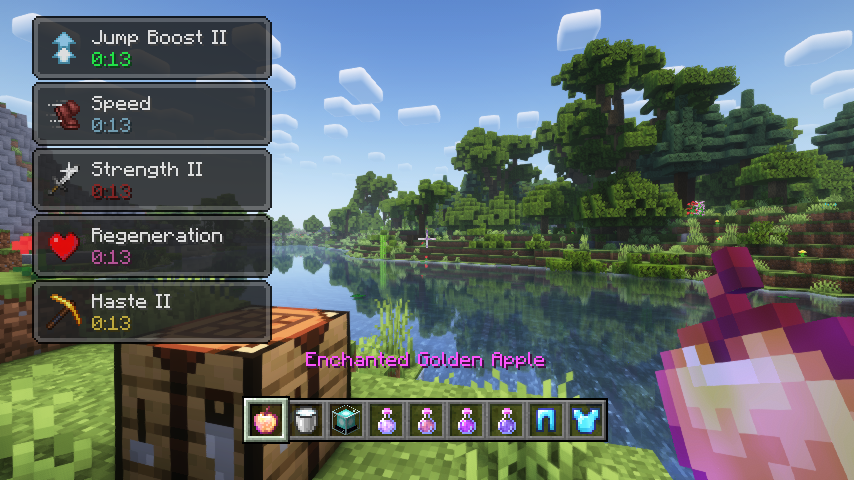
But wait, now that status effects are shown small and compact with just an icon, how will you find out how your active effects are called? Don't worry, a handy tooltip is added for that. The tooltip will be even more useful when Just Enough Effect Descriptions by MehVahdJukaar is installed.
You like the vanilla inventory status effect display and want to keep it or even use it on the hud as well? No problem! You can choose any widget mode you want, or even none. Alongside that there are many configurable settings, such as the screen side for effects, amount of rows and columns, a custom alpha value, text colors, custom screen positions, and much, much more.
📷 Media:
 |
 |
|
| Stylish effects in action being very stylish | Various effect render types can be chosen and configured | |
 |
 |
|
| Compact effects replace the vanilla display inside of the inventory | The effects display is shown in every container, not just the inventory | |
 🤖 AI-enhanced — based on mod data 🤖 AI-enhanced — based on mod data
📊 Mod Details
🔧 How to Install Minecraft Mods ModsDownload from Modrinth. Use Prism Launcher or drop into your mods folder. 📖 Full step-by-step install guide for Minecraft Mods → Visit the official mod page for specific installation instructions for this mod. 🎮 Need cheat codes or console commands? Check ur gaming wiki for Minecraft Mods commands, item IDs, and more. ❓ Frequently Asked QuestionsWhich Minecraft Mods versions does Stylish Effects support?The author lists 1.20.1. Other versions may work but are untested by the author. What is the latest version of Stylish Effects?Version v8.0.4-1.20.1-Fabric, published 2026-08-12 with 1.9M downloads recorded at the source. Keep browsing — more Minecraft Mods mods await |