Structure Explorer
🟡 Updated this year⚠️ Install Order · 2 steps
Install in this order, then this mod last — most mods fail to load without their framework and dependencies in place.
🖼️ Gallery (12 images)

🔍 Analysis
- 👍 1.1% endorsement rate — high engagement, a strong quality signal
- 🏆 #275 of 556 adventure mods in this game by downloads
📋 About This Mod
# Structure Explorer **This mod adds incentive to players to try and discover all the structures there are in the world!** I wanted to make a server that incentivized exploring all areas of the world, and with more structures being added every few months, but I couldn't find any mod that tracked the discovered structures. I tried making it for myself many moons ago and failed, but tried again and got it done in just two days. It works by automatically checking every 5s (by default), any moving players, to see if they are within a structure, and adds that to a list of discovered structures for that player. !(https://cdn.modrinth.com/data/cached_images/9e2952d67575095eccf35971a024de24035ee957.jpeg) ## ⌨ Commands Primary command: `/explorer` - Alias: `/discoveries` | Command | Description | |---|---| | `/explorer page? <n>` | Your discovered structures. Page is optional | | `/explorer player <name> page? <n>` | View another player's discoveries. Page is optional | | `/explorer structure <id>` | Who has discovered a specific structure | | `/explorer instances <id> page? <n>` | Your recorded instances of a specific structure. Page is optional | | `/explorer here` | Show the info panel for the structure you are currently standing in | | `/explorer leaderboard page? <n>` | Top players ranked by discovery count. Page is optional | | `/explorer playerinstances <player> <id>` | **** View any player's instances | | `/explorer reload` | **** Reload config and translations | --- ## 📝 Config File - `structure_explorer.json` Located at: `config/structure_explorer/structure_explorer.json` | Key | Default | Description | |---|---|---| | `checkIntervalMs` | `5000` | How often (in ms) the mod checks if a player has entered a structure. Lower = more responsive, slightly more server load. | | `showNthDiscoverer` | `true` | Whether to show discoverer badges in chat notifications, e.g. `` or ``. | | `useMonthDayYear` | `false` | Timestamp format. `false` = DD/MM/YYYY HH:MM:SS - `true` = MM/DD/YYYY HH:MM:SS | | `trackInstances` | `true` | Whether to record coordinates and timestamps for each structure instance visited. When `false`, only which structure *types* have been discovered is tracked. | | `sounds.newDiscoverySound` | `true` | Plays sound effect for a new Discovery found. | | `sounds.newInstanceSound` | `true` | Plays sound effect for a new Instance found. | --- ## 🛠 For Mod Makers Structure Explorer can pick up structure names two ways - pick whichever suits you. ### Option 1 - Lang file *(simplest)* If your mod already has a lang file, Structure Explorer reads it automatically. Just add entries using this key format: ```json "structure.<namespace>.<path>": "Display Name" ``` Example in `assets/mymod/lang/en_us.json`: ```json { "structure.mymod.cool_dungeon": "Cool Dungeon" } ``` No extra files needed - names are picked up automatically (see scenarios below for exactly how they're displayed). > **Note:** This only works for lang files bundled directly inside a mod's JAR (`assets/<namespace>/lang/en_us.json`). Structure Explorer runs server-side and cannot read resource pack lang files - those only exist on the client and are never visible to the server. If your lang entries live in a separate resource pack rather than your mod's JAR, use Option 2 below instead. ### Option 2 - translations.json *(full control)* For full control over prefix, suffix, colors, and exact names, bundle a file inside your mod jar at `data/<your_modid>/structure_explorer/translations.json`, using the same (#-translations) as the server admin config. It loads **before** `config/translations/` files, so server admins can always override it. --- ### How the two interact Say Katter's Structures has `"structure.kattersstructures.sky_dungeo": "Sky Dungeon"` in its lang file. Here's how the final display name is decided: **Scenario 1 - No lang entry and no translation entry exist at all** > e.g. for `kattersstructures:ancient_ruins` with nothing defined anywhere > Result: **Ancient Ruins ** > Both the structure path and the namespace are auto-prettified (underscores → spaces, each word capitalized) and combined - this is the raw fallback. **Scenario 2 - Lang name exists, no translation entry for the namespace anywhere (mod-bundled or server config)** > Result: **Sky Dungeon ** > The namespace gets auto-prettified and appended in brackets since nothing customizes it. **Scenario 3 - A translation entry overrides this specific structure's name** ```json { "translations": { "kattersstructures": { "suffix": " ", "suffix_color": "gray", "structures": { "sky_dungeo": "Big Sky Fortress" } } } } ``` > Result: **Big Sky Fortress ** > The override name is used, styling is applied, and the auto-bracket disappears. **Scenario 4 -
# Structure Explorer
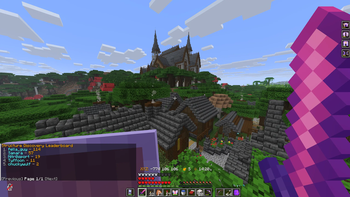
This mod adds incentive to players to try and discover all the structures there are in the world!
I wanted to make a server that incentivized exploring all areas of the world, and with more structures being added every few months, but I couldn't find any mod that tracked the discovered structures. I tried making it for myself many moons ago and failed, but tried again and got it done in just two days.
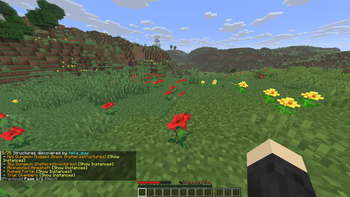
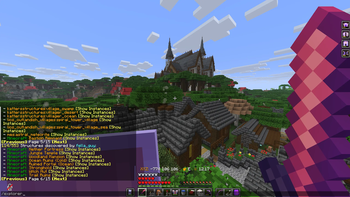
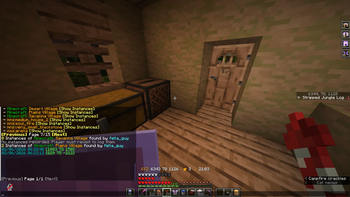
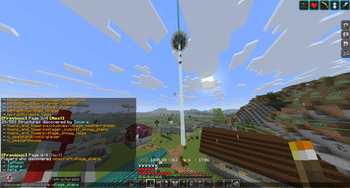
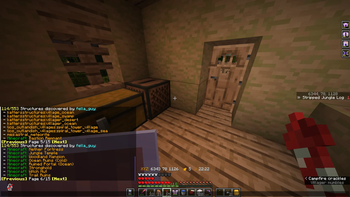
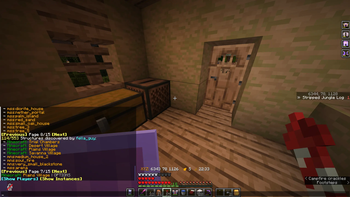
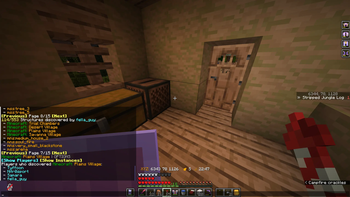
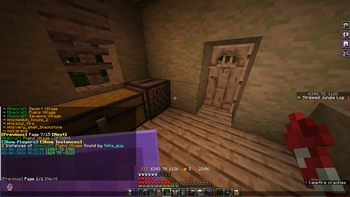
It works by automatically checking every 5s (by default), any moving players, to see if they are within a structure, and adds that to a list of discovered structures for that player. !(https://cdn.modrinth.com/data/cached_images/9e2952d67575095eccf35971a024de24035ee957.jpeg)
## ⌨ Commands
Primary command: `/explorer` - Alias: `/discoveries`
| Command | Description |
|---|---|
| `/explorer page?
## 📝 Config File - `structure_explorer.json`
Located at: `config/structure_explorer/structure_explorer.json`
| Key | Default | Description | |---|---|---| | `checkIntervalMs` | `5000` | How often (in ms) the mod checks if a player has entered a structure. Lower = more responsive, slightly more server load. | | `showNthDiscoverer` | `true` | Whether to show discoverer badges in chat notifications, e.g. `` or ``. | | `useMonthDayYear` | `false` | Timestamp format. `false` = DD/MM/YYYY HH:MM:SS - `true` = MM/DD/YYYY HH:MM:SS | | `trackInstances` | `true` | Whether to record coordinates and timestamps for each structure instance visited. When `false`, only which structure types have been discovered is tracked. | | `sounds.newDiscoverySound` | `true` | Plays sound effect for a new Discovery found. | | `sounds.newInstanceSound` | `true` | Plays sound effect for a new Instance found. |
## 🛠 For Mod Makers
Structure Explorer can pick up structure names two ways - pick whichever suits you.
### Option 1 - Lang file (simplest)
If your mod already has a lang file, Structure Explorer reads it automatically. Just add entries using this key format:
```json
"structure.
Example in `assets/mymod/lang/en_us.json`: ```json { "structure.mymod.cool_dungeon": "Cool Dungeon" } ```
No extra files needed - names are picked up automatically (see scenarios below for exactly how they're displayed).
> Note: This only works for lang files bundled directly inside a mod's JAR (`assets/
### Option 2 - translations.json (full control)
For full control over prefix, suffix, colors, and exact names, bundle a file inside your mod jar at `data/
### How the two interact
Say Katter's Structures has `"structure.kattersstructures.sky_dungeo": "Sky Dungeon"` in its lang file. Here's how the final display name is decided:
Scenario 1 - No lang entry and no translation entry exist at all > e.g. for `kattersstructures:ancient_ruins` with nothing defined anywhere > Result: Ancient Ruins > Both the structure path and the namespace are auto-prettified (underscores → spaces, each word capitalized) and combined - this is the raw fallback.
Scenario 2 - Lang name exists, no translation entry for the namespace anywhere (mod-bundled or server config) > Result: Sky Dungeon > The namespace gets auto-prettified and appended in brackets since nothing customizes it.
Scenario 3 - A translation entry overrides this specific structure's name ```json { "translations": { "kattersstructures": { "suffix": " ", "suffix_color": "gray", "structures": { "sky_dungeo": "Big Sky Fortress" } } } } ``` > Result: Big Sky Fortress > The override name is used, styling is applied, and the auto-bracket disappears.
**Scenario 4 -
📊 Mod Details
- Game
- Minecraft Mods
- Author
- fella_guy
- Version
- 1.1.5+26.2-fabric
- Downloads
- 662
- Endorsements
- 7
- Category
- adventure
- Created
- 5/24/2026
- Updated
- 6/24/2026
- Game Versions
- 26.2
- Tags
- adventure, minigame, social
🔧 How to Install Minecraft Mods Mods
Download from Modrinth. Use Prism Launcher or drop into your mods folder.
📖 Full step-by-step install guide for Minecraft Mods →
Visit the official mod page for specific installation instructions for this mod.
🎮 Need cheat codes or console commands? Check ur gaming wiki for Minecraft Mods commands, item IDs, and more.
❓ Frequently Asked Questions
Which Minecraft Mods versions does Structure Explorer support?
The author lists 26.2. Other versions may work but are untested by the author.
What is the latest version of Structure Explorer?
Version 1.1.5+26.2-fabric, published 2026-06-24 with 662 downloads recorded at the source.
Keep browsing — more Minecraft Mods mods await