Streamer.craft
🟡 Updated this year⚠️ Install Order · 2 steps
Install in this order, then this mod last — most mods fail to load without their framework and dependencies in place.
🖼️ Gallery (1 images)
🔍 Analysis
- 👍 0.7% endorsement rate
- 🏆 #292 of 888 fabric mods in this game by downloads
📋 About This Mod
# Streamer.craft Trigger Streamer.bot Actions from inside Minecraft! Streamer.bot is a powerful stream automation tool, and this mod allows you to trigger those automations using the in-game chat! Some examples to provide inspiration: - Change scenes in OBS when triggering a trap - Send a message in chat when you hit a target block - Start a poll when it gets dark at night. ## Setup guide Video setup guide: https://www.youtube.com/watch?v=-GzuuOlfyGE ### Step 1: Install the mod There are versions of this mod available for NeoForge and Fabric. You can download the latest version of the mod from the (https://modrinth.com/mod/streamer.craft/versions) ### Step 2: Set up Streamer.bot This mod is designed to work with the stream automation tool (https://streamer.bot). Download the program and unzip it. The settings needed to connect Streamer.bot to the mod are as follows: - Under the "Servers/Clients" tab, click "HTTP Server" and check Start Server (I'd also recommend checking "Auto Start" so the server starts automatically with Streamer.bot) Take note of the IP and port listed in that menu, if those are changed from the defaults you'll need to update the mod's config file. To connect to a Twitch or YouTube chat, sign in to your account in the Platforms tab. To connect to OBS, follow (https://docs.streamer.bot/get-started/setup#obs-studio) to enable OBS's websocket server and add it to Streamer.bot ### Step 3: Make sure it is all working Once you have Streamer.bot set up, start the program and make sure the HTTP server is running. Then, start Minecraft with the mod installed. You'll also want to (https://docs.streamer.bot/guide/actions). Load a world and type `/streamercraft list` in the chat. If everything works, you should see a list of Streamer.bot Actions in the chat. Try pressing the "Click to manually trigger" button to make sure you can trigger actions as well. ## All Commands - `/streamercraft list` - List all available actions - `/streamercraft list <filter>` - List all available actions that contain the filter - `/streamercraft do <action-id>` - Trigger a specific action - `/streamercraft refresh` - Refresh the list of actions
# Streamer.craft
Trigger Streamer.bot Actions from inside Minecraft! Streamer.bot is a powerful stream automation tool, and this mod allows you to trigger those automations using the in-game chat!
Some examples to provide inspiration:
- Change scenes in OBS when triggering a trap
- Send a message in chat when you hit a target block
- Start a poll when it gets dark at night.
## Setup guide
Video setup guide:
https://www.youtube.com/watch?v=-GzuuOlfyGE
### Step 1: Install the mod
There are versions of this mod available for NeoForge and Fabric. You can download the latest version of the mod from the (https://modrinth.com/mod/streamer.craft/versions)
### Step 2: Set up Streamer.bot
This mod is designed to work with the stream automation tool (https://streamer.bot). Download the program and unzip it.
The settings needed to connect Streamer.bot to the mod are as follows:
- Under the "Servers/Clients" tab, click "HTTP Server" and check Start Server (I'd also recommend checking "Auto Start" so the server starts automatically with Streamer.bot)
Take note of the IP and port listed in that menu, if those are changed from the defaults you'll need to update the mod's config file.
To connect to a Twitch or YouTube chat, sign in to your account in the Platforms tab.
To connect to OBS, follow (https://docs.streamer.bot/get-started/setup#obs-studio) to enable OBS's websocket server and add it to Streamer.bot
### Step 3: Make sure it is all working
Once you have Streamer.bot set up, start the program and make sure the HTTP server is running. Then, start Minecraft with the mod installed.
You'll also want to (https://docs.streamer.bot/guide/actions).
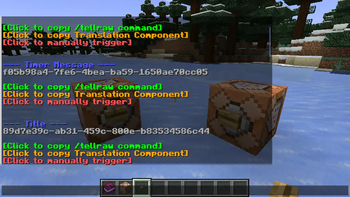
Load a world and type `/streamercraft list` in the chat. If everything works, you should see a list of Streamer.bot Actions in the chat. Try pressing the "Click to manually trigger" button to make sure you can trigger actions as well.
## All Commands
- `/streamercraft list` - List all available actions
- `/streamercraft list
` - List all available actions that contain the filter - `/streamercraft do
` - Trigger a specific action - `/streamercraft refresh` - Refresh the list of actions
📊 Mod Details
- Game
- Minecraft Mods
- Author
- MoSadie
- Version
- 1.0.2-NeoForge
- Downloads
- 874
- Endorsements
- 6
- Category
- fabric
- Created
- 9/3/2024
- Updated
- 11/7/2025
- Game Versions
- 1.21.5, 1.21.6, 1.21.7, 1.21.8, 1.21.9
- Tags
- utility
🔧 How to Install Minecraft Mods Mods
Download from Modrinth. Use Prism Launcher or drop into your mods folder.
📖 Full step-by-step install guide for Minecraft Mods →
Visit the official mod page for specific installation instructions for this mod.
🎮 Need cheat codes or console commands? Check ur gaming wiki for Minecraft Mods commands, item IDs, and more.
❓ Frequently Asked Questions
Which Minecraft Mods versions does Streamer.craft support?
The author lists 1.21.5, 1.21.6, 1.21.7, 1.21.8, 1.21.9, 1.21.10. Other versions may work but are untested by the author.
What is the latest version of Streamer.craft?
Version 1.0.2-NeoForge, published 2025-11-07 with 874 downloads recorded at the source.
Keep browsing — more Minecraft Mods mods await