StatsSigns
🟡 Updated this year⚠️ Install Order · 2 steps
Install in this order, then this mod last — most mods fail to load without their framework and dependencies in place.
🖼️ Gallery (6 images)
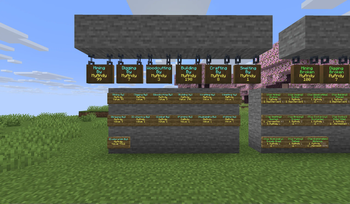
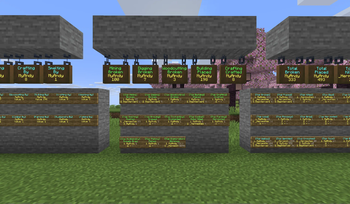
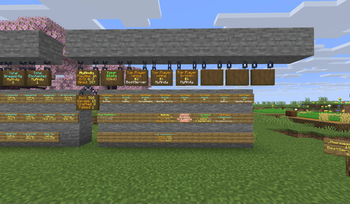

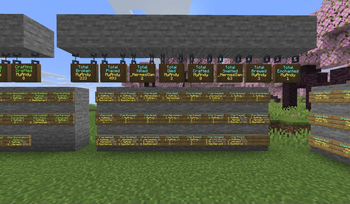
🔍 Analysis
- 🏆 #696 of 907 fabric mods in this game by downloads
📋 About This Mod
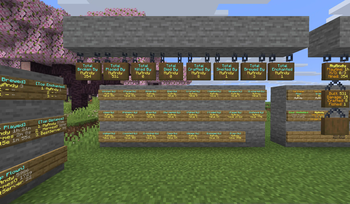
# StatsSigns - Dynamic In-World Statistic Displays **StatsSigns** integrates seamlessly with **StatsMod** to bring your server's detailed player statistics directly into the game world! This Fabric mod allows server owners to create highly customizable and interactive signs that display live leaderboards, individual player profiles, and specific stat totals. From showcasing the top miners to displaying a player's total deaths, StatsSigns provides engaging visual data and clickable actions, enhancing the player experience and offering a powerful administrative tool for server analytics. **REQUIRES (https://modrinth.com/mod/statsmod)** --- ## 🔥 **Key New Feature: Skull Linking** * **Player Head Integration:** Link any placed Player or Mob Skull to a StatsSign. * **Automatic Profile Update:** When the sign updates, the linked skull automatically fetches and displays the profile of the player/rank shown on the sign. * **Recursive Deletion Protection:** Breaking a linked StatsSign will also break the associated skulls. Conversely, breaking a linked skull requires permission and will unlink it from the sign. --- ## Features ### Dynamic & Customizable Sign Displays * **Live Updates:** Signs automatically refresh with the latest statistics at a configurable interval (`update_interval_minutes` in `settings.yml`). * **Extensive Stat Integration:** Pulls any statistic tracked by StatsMod, including total broken/placed blocks, mobs/players killed, distance traveled, and playtime. * **Customizable Formats:** Fully configure the appearance of each sign type using six distinct YAML configuration files, including separate files for standard and hanging signs. * **Standard & Hanging Sign Support:** Supports both regular and hanging signs, with separate customizable formats for each. ### Diverse Sign Types * **Leaderboard Signs:** Display ranked lists of players for any StatsMod statistic, genre, or type. * **Player Profile Signs:** Showcase various statistics for a specific player name defined on Line 3. * **Digit Rank Signs:** Dedicate a sign to a single rank on a leaderboard (e.g., `#1` in Line 3). * **Follower Signs:** Extend leaderboards over multiple signs, linking to a "master" sign through directional path characters (e.g., `>>`, `^`). * Follower signs are also used to automatically sequence Digit Rank signs. * Chains support a depth of up to **30** followers. * A master sign can have up to **5** direct children/followers. ### Interactive Elements & Placeholders * **Clickable Actions:** Configure signs to execute commands (`/profile %player%`), suggest commands, open URLs, copy text to clipboard, or change help pages when clicked. * **Hover Text:** Add rich hover-over text to sign lines using the `{hover text}` syntax. * **Color & Formatting:** Full support for Minecraft color codes (`&c`) and hex colors (`&#RRGGBB`). * **Mirror Text:** Add a `+` on Line 4 of the master sign to mirror its updated text to the back of the sign. * **Extensive Placeholders:** Dynamic placeholders populate sign text with player names, stat values, ranks, and other contextual information. ### Admin & Management Tools * **Easy Sign Creation Command:** Create or convert any placed sign into a StatsSign using a simple command while looking at it: `/signstat <line2> `. * **Glow Ink Sac Support:** Toggle the glow effect on an existing StatsSign by right-clicking it with a Glow Ink Sac. * **Automated & Manual Updates:** * Configurable automatic updates for all signs. * Force an immediate update of all signs with `/statssigns signupdate`. * **Persistent Storage:** All sign data is saved persistently to `data/statssigns.json` using Gson serialization. * **Reload Configs (`/statssigns reload`):** Apply changes to configuration files instantly. * **README Generation:** The mod automatically generates a `README.yml` with a full reference guide for all placeholders and usage. ## Commands * `/statssigns`, `/ss`: Displays the main help interface. * `/statssigns page <number>`: Navigates through help pages. * `/statssigns reload`: Reloads all StatsSigns configurations. * `/statssigns signupdate`: Forces an update on all stat signs. * `/signstat <line2> `: Sets a sign's text and updates its config. ## Permissions StatsSigns integrates with the **Fabric Permissions API (v0)**, falling back to operator levels if no compatible permissions mod is found. <details> <summary>Click to view all permission nodes and their descriptions</summary> * `statsmod.admin`: Grants all permissions for StatsSigns. * `statsmod.createsign`: Allows creating general, non-player-specific StatsSigns. * `statsmod.create.self`: Allows creating any sign type that displays the creator's own statistics. * `statsmod.create.others`: Allows creating any sign type that displays another player's statistics. * `statsmod.create.profile`: Allows creating a Player profile sign for oneself. * `stats
# StatsSigns - Dynamic In-World Statistic Displays
StatsSigns integrates seamlessly with StatsMod to bring your server's detailed player statistics directly into the game world! This Fabric mod allows server owners to create highly customizable and interactive signs that display live leaderboards, individual player profiles, and specific stat totals. From showcasing the top miners to displaying a player's total deaths, StatsSigns provides engaging visual data and clickable actions, enhancing the player experience and offering a powerful administrative tool for server analytics.
REQUIRES (https://modrinth.com/mod/statsmod)**
## 🔥 Key New Feature: Skull Linking*
Player Head Integration: Link any placed Player or Mob Skull to a StatsSign. Automatic Profile Update: When the sign updates, the linked skull automatically fetches and displays the profile of the player/rank shown on the sign. Recursive Deletion Protection: Breaking a linked StatsSign will also break the associated skulls. Conversely, breaking a linked skull requires permission and will unlink it from the sign.
## Features
### Dynamic & Customizable Sign Displays Live Updates: Signs automatically refresh with the latest statistics at a configurable interval (`update_interval_minutes` in `settings.yml`). Extensive Stat Integration: Pulls any statistic tracked by StatsMod, including total broken/placed blocks, mobs/players killed, distance traveled, and playtime. Customizable Formats: Fully configure the appearance of each sign type using six distinct YAML configuration files, including separate files for standard and hanging signs. Standard & Hanging Sign Support: Supports both regular and hanging signs, with separate customizable formats for each.
### Diverse Sign Types Leaderboard Signs: Display ranked lists of players for any StatsMod statistic, genre, or type. Player Profile Signs: Showcase various statistics for a specific player name defined on Line 3. Digit Rank Signs: Dedicate a sign to a single rank on a leaderboard (e.g., `#1` in Line 3). Follower Signs: Extend leaderboards over multiple signs, linking to a "master" sign through directional path characters (e.g., `>>`, `^`). Follower signs are also used to automatically sequence Digit Rank signs. Chains support a depth of up to 30 followers. A master sign can have up to 5 direct children/followers.
### Interactive Elements & Placeholders Clickable Actions: Configure signs to execute commands (`/profile %player%`), suggest commands, open URLs, copy text to clipboard, or change help pages when clicked. Hover Text: Add rich hover-over text to sign lines using the `{hover text}` syntax. Color & Formatting: Full support for Minecraft color codes (`&c`) and hex colors (`&#RRGGBB`). Mirror Text: Add a `+` on Line 4 of the master sign to mirror its updated text to the back of the sign. Extensive Placeholders: Dynamic placeholders populate sign text with player names, stat values, ranks, and other contextual information.
### Admin & Management Tools
Easy Sign Creation Command: Create or convert any placed sign into a StatsSign using a simple command while looking at it: `/signstat
## Commands
`/statssigns`, `/ss`: Displays the main help interface.
`/statssigns page
## Permissions
StatsSigns integrates with the Fabric Permissions API (v0), falling back to operator levels if no compatible permissions mod is found.
Click to view all permission nodes and their descriptions
`statsmod.admin`: Grants all permissions for StatsSigns. `statsmod.createsign`: Allows creating general, non-player-specific StatsSigns. `statsmod.create.self`: Allows creating any sign type that displays the creator's own statistics. `statsmod.create.others`: Allows creating any sign type that displays another player's statistics. `statsmod.create.profile`: Allows creating a Player profile sign for oneself. * `stats
📊 Mod Details
- Game
- Minecraft Mods
- Author
- official.andy
- Version
- 2.0
- Downloads
- 394
- Endorsements
- 2
- Category
- fabric
- Created
- 7/28/2025
- Updated
- 12/16/2025
- Game Versions
- 1.21.11
- Tags
- game-mechanics, library, management
🔧 How to Install Minecraft Mods Mods
Download from Modrinth. Use Prism Launcher or drop into your mods folder.
📖 Full step-by-step install guide for Minecraft Mods →
Visit the official mod page for specific installation instructions for this mod.
🎮 Need cheat codes or console commands? Check ur gaming wiki for Minecraft Mods commands, item IDs, and more.
❓ Frequently Asked Questions
Which Minecraft Mods versions does StatsSigns support?
The author lists 1.21.11. Other versions may work but are untested by the author.
What is the latest version of StatsSigns?
Version 2.0, published 2025-12-16 with 394 downloads recorded at the source.
Keep browsing — more Minecraft Mods mods await