StarHUD
🟡 Updated this year⚠️ Install Order · 2 steps
Install in this order, then this mod last — most mods fail to load without their framework and dependencies in place.
🖼️ Gallery (7 images)

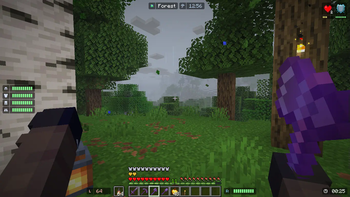
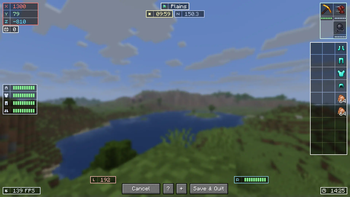


🔍 Analysis
- 👍 0.3% endorsement rate
- 🏆 #82 of 983 fabric mods in this game by downloads
📋 About This Mod
A Minecraft mod that display HUDs in a more fancy way... !(https://cdn.modrinth.com/data/40SFPJ0u/images/2e821d62d249bd79802615eec880ea80cf1566f3.png) ### Requires (https://modrinth.com/mod/cloth-config) <hr> <details> <summary>Features</summary> <details> <summary>List of HUD</summary> - Armor Durability HUD - Coordinate & Nether Coordinate HUD - Direction and Horizontal Yaw HUD - Ping HUD - FPS HUD - System & In-Game Clock HUD (+ Weather Indicator) - Biome Indicator HUD (+ Dimension Indicator) - Inventory HUD (Disabled by default) - Hand Items Indicator HUD (Durability + Item Count) - Status Effect HUD - Day Counter HUD - Targetted Crosshair HUD - TPS HUD - Speed HUD - Combo HUD - Reach HUD - Player Count HUD - Inventory Space HUD </details> <details> <summary>Others</summary> - Drag and Drop HUD Placement - HUD Snapping - Automatic HUD Screen Alignment - Multiple HUD Display Mode (Icon, Info, or Both) - Customizable Data Collection Interval (For faster performance) - HUD Screen Alignment Placement - HUD Growing direction - Grouping System - Conditional Positioning </details> </details> <details> <summary>Configuring the HUD</summary> <details> <summary>Edit HUD Screen</summary> - Press **RIGHT SHIFT** to Open this screen. - Help (indicated by '?') will give you a list of keybinds. - More Options (indicated by '+') will give you advanced HUD positioning. !(https://i.imgur.com/SIyZMb8.png) - Press 'G' or Group / Ungroup HUDs. - Set the gap between each child element on group hud for spaced layout. !(https://imgur.com/q9ocZBm.gif) </details> <details> <summary>Configuration Screen</summary> - You need (https://modrinth.com/mod/modmenu) To access the configuration screen. - Modify the General Setting to your liking. - add a Condition Rule if your HUD is being overlapped by Minecraft's HUDs. - Toggle HUD </details> </details> <details> <summary>Performance Concern</summary> Yes, this mod DOES reduce your FPS. Worst case, if EVERY HUD is rendered, you will have **60%** FPS loss. I highly recommend using (https://modrinth.com/mod/immediatelyfast) for faster HUD Performance (the HUD can be **1.5x** faster). <details> <summary>Worst to Best HUD Performance</summary> 1. Inventory HUD (the more items the worse) 2. Status Effect HUD (The more effects the worse) 3. Targetted Crosshair HUD 4. Durability HUD that uses item as it's icon 5. The rest of the HUD </details> <details> <summary>Performance Tips</summary> - Combine Background on Group HUD (set Group Background: On)\ !(https://imgur.com/d0cQ48B.png) !(https://imgur.com/SKVRDKu.png)\ (16 Draw Calls -> 3 Draw Calls) - Set "Icon to Info Gap": 0 or lower\ !(https://i.imgur.com/Zzl5qMl.png) !(https://i.imgur.com/rWQBzTN.png)\ (4 Draw Calls -> 3 Draw Calls) - Set "Draw Background Rounded": False\ !(https://i.imgur.com/rWQBzTN.png) !(https://i.imgur.com/2J0H6Iz.png)\ (3 Draw Calls -> 1 Draw Call) - Set a Condition for your HUD to only render in a specific condition, disabling them dynamically. - Disable any HUD you rarely / never used. </details> </details> For Support or Suggestion you may go to (https://discord.com/invite/bhXgum44H7) or (https://github.com/Finsider/starhud). <hr> ### CREDITS (https://colorhunt.co/palettes/pastel) and (https://plugins.jetbrains.com/plugin/10044-atom-material-icons): Color Inspirations\ (https://mcchampionship.com/island) and (https://originrealms.com): HUD Inspirations\ (https://modrinth.com/mod/status-effect-bars) and (https://modrinth.com/mod/simple-hud-enhanced): Status Effect HUD Inspiration\ (https://modrinth.com/mod/jade) and (https://modrinth.com/mod/wthit): Targetted Crosshair HUD Inspiration\ (https://modrinth.com/mod/minihud): TPS Tracking Implementation ((https://github.com/maruohon/minihud/blob/5d2449886e26fba45646ea89f5a80f706d196e11/src/main/java/minihud/data/TpsDataManager.java#L70))
A Minecraft mod that display HUDs in a more fancy way...
!(https://cdn.modrinth.com/data/40SFPJ0u/images/2e821d62d249bd79802615eec880ea80cf1566f3.png)
### Requires (https://modrinth.com/mod/cloth-config)
Features
List of HUD
- Armor Durability HUD
- Coordinate & Nether Coordinate HUD
- Direction and Horizontal Yaw HUD
- Ping HUD
- FPS HUD
- System & In-Game Clock HUD (+ Weather Indicator)
- Biome Indicator HUD (+ Dimension Indicator)
- Inventory HUD (Disabled by default)
- Hand Items Indicator HUD (Durability + Item Count)
- Status Effect HUD
- Day Counter HUD
- Targetted Crosshair HUD
- TPS HUD
- Speed HUD
- Combo HUD
- Reach HUD
- Player Count HUD
- Inventory Space HUD
Others
- Drag and Drop HUD Placement
- HUD Snapping
- Automatic HUD Screen Alignment
- Multiple HUD Display Mode (Icon, Info, or Both)
- Customizable Data Collection Interval (For faster performance)
- HUD Screen Alignment Placement
- HUD Growing direction
- Grouping System
- Conditional Positioning
Configuring the HUD
Edit HUD Screen
- Press RIGHT SHIFT to Open this screen.
- - Help (indicated by '?') will give you a list of keybinds.
- - More Options (indicated by '+') will give you advanced HUD positioning.
- !(https://i.imgur.com/SIyZMb8.png)
- - Press 'G' or Group / Ungroup HUDs.
- - Set the gap between each child element on group hud for spaced layout.
- !(https://imgur.com/q9ocZBm.gif)
Configuration Screen
- You need (https://modrinth.com/mod/modmenu) To access the configuration screen.
- Modify the General Setting to your liking.
- add a Condition Rule if your HUD is being overlapped by Minecraft's HUDs.
- Toggle HUD
Performance Concern
Yes, this mod DOES reduce your FPS. Worst case, if EVERY HUD is rendered, you will have 60% FPS loss.
I highly recommend using (https://modrinth.com/mod/immediatelyfast) for faster HUD Performance (the HUD can be 1. 5x faster).
Worst to Best HUD Performance
1. Inventory HUD (the more items the worse) 2. Status Effect HUD (The more effects the worse) 3. Targetted Crosshair HUD 4. Durability HUD that uses item as it's icon 5. The rest of the HUD
Performance Tips
- Combine Background on Group HUD (set Group Background: On)\
- !(https://imgur.com/d0cQ48B.png)
- !(https://imgur.com/SKVRDKu.png)\
- (16 Draw Calls -> 3 Draw Calls)
- Set "Icon to Info Gap": 0 or lower\
- !(https://i.imgur.com/Zzl5qMl.png)
- !(https://i.imgur.com/rWQBzTN.png)\
- (4 Draw Calls -> 3 Draw Calls)
- Set "Draw Background Rounded": False\
- !(https://i.imgur.com/rWQBzTN.png)
- !(https://i.imgur.com/2J0H6Iz.png)\
- (3 Draw Calls -> 1 Draw Call)
- Set a Condition for your HUD to only render in a specific condition, disabling them dynamically.
- Disable any HUD you rarely / never used.
For Support or Suggestion you may go to (https://discord.com/invite/bhXgum44H7) or (https://github.com/Finsider/starhud).
### CREDITS (https://colorhunt.co/palettes/pastel) and (https://plugins.jetbrains.com/plugin/10044-atom-material-icons): Color Inspirations\ (https://mcchampionship.com/island) and (https://originrealms.com): HUD Inspirations\ (https://modrinth.com/mod/status-effect-bars) and (https://modrinth.com/mod/simple-hud-enhanced): Status Effect HUD Inspiration\ (https://modrinth.com/mod/jade) and (https://modrinth.com/mod/wthit): Targetted Crosshair HUD Inspiration\ (https://modrinth.com/mod/minihud): TPS Tracking Implementation ((https://github.com/maruohon/minihud/blob/5d2449886e26fba45646ea89f5a80f706d196e11/src/main/java/minihud/data/TpsDataManager.java#L70))
📊 Mod Details
- Game
- Minecraft Mods
- Author
- Finside
- Version
- 2.5.2-26.2-neoforge
- Downloads
- 82,403
- Endorsements
- 282
- Category
- fabric
- Created
- 1/14/2025
- Updated
- 7/27/2026
- Game Versions
- 26.2
- Tags
- utility
🔧 How to Install Minecraft Mods Mods
Download from Modrinth. Use Prism Launcher or drop into your mods folder.
📖 Full step-by-step install guide for Minecraft Mods →
Visit the official mod page for specific installation instructions for this mod.
🎮 Need cheat codes or console commands? Check ur gaming wiki for Minecraft Mods commands, item IDs, and more.
❓ Frequently Asked Questions
Which Minecraft Mods versions does StarHUD support?
The author lists 26.2. Other versions may work but are untested by the author.
What is the latest version of StarHUD?
Version 2.5.2-26.2-neoforge, published 2026-07-27 with 82,403 downloads recorded at the source.
Keep browsing — more Minecraft Mods mods await