Star Rating
🟡 Updated this year⚠️ Install Order · 2 steps
Install in this order, then this mod last — most mods fail to load without their framework and dependencies in place.
🖼️ Gallery (2 images)
🔍 Analysis
- 🏆 #458 of 590 adventure mods in this game by downloads
📋 About This Mod
# May the stars guide your adventure! **Have you ever tended your crops in Stardew Valley, hoping for that iridium-quality harvest?** **Now, that excitement comes to Minecraft!** Star Rating adds random quality tiers to your food, weapons, tools, and armor — from ordinary Iron Star to legendary Netherite Star, and even the hidden Iridium Star. Every item receives its own independent chance to gain a star when picked up, with rarer stars being harder to obtain. Different stars grant powerful bonuses such as attack damage, mining speed, armor, health regeneration, and more, with unique effects tailored to weapons, tools, armor, and food. All star values, weights, and effects are fully configurable, and you can even create your own custom star tiers to shape your adventure exactly the way you like. With a built-in coin economy and anvil upgrade system, you can use star coins to try to upgrade an item’s star — enjoy the thrill of a mystery box combined with strategic planning. Ready to make every sword and every loaf of bread shine? ### 🌟 Highlights: - **Inspired by Stardew Valley** — core mechanics pay tribute to the beloved quality rating system. - **Per‑Item Rolling** — each item in a stack is rolled independently; you might get multiple stars from one pickup. - **Type‑Specific Bonuses** — weapons, tools, armor, and food each have unique bonuses, viewable by holding Shift. - **Iridium Easter Egg** — Netherite star items have a 1% chance to become an Iridium Star with a special texture and increased value. - **Fully Configurable** — add, remove, or tweak star tiers via JSON files; no restart required. - **Coin Economy** — craft, upgrade, and recycle star coins for a complete progression loop. ### ⚙️ Configuration Guide: **Main Config File:** .minecraft/config/star_rating/star_rating-common.toml – Controls global parameters and feature toggles. ``` star_chance = 0.5 # Probability of an item getting a star (0.0 ~ 1.0) enable_food_stars = true # Enable star effects for food enable_weapon_stars = true # Enable star effects for weapons enable_tool_stars = true # Enable star effects for tools (mining speed & fortune) enable_armor_stars = true # Enable star effects for armor ``` Changes take effect after /reload or rejoining the world. **Star Effect Files:** Inside config/star_rating/effects/, each star has its own .json file named after the star ID (e.g., iron_star_rating.json). You can add, delete, or modify these files to define star weights and specific bonuses. Full field list (all numeric fields are optional, defaulting to 0 or 1.0): ``` { "star": "iron_star_rating", // Star ID (required) "weight": 25, // Random weight (required, higher = more common) "extraDamage": 1.0, // Extra attack damage "attackSpeed": 0.5, // Extra attack speed "reach": 0.5, // Extra reach distance "damageMultiplier": 0.1, // Multiplicative damage bonus (0.1 = +10%) "armor": 1, // Extra armor points "toughness": 0.5, // Extra armor toughness "damageReduction": 0.02, // Damage reduction percentage (0.02 = 2%) "breakSpeedMultiplier": 1.05, // Mining speed multiplier (1.05 = +5%) "looting": 1, // Extra looting level "fortune": 1, // Extra fortune level "extraHunger": 4, // Extra hunger/saturation from food "regenDuration": 5, // Regeneration duration (seconds) "regenAmplifier": 0, // Regeneration level (0 = I) "resistanceDuration": 5, // Resistance duration (seconds) "resistanceAmplifier": 0, // Resistance level (0 = I) "absorption": 6, // Absorption health (temporary HP) "sell": } ``` Tip: You only need to include the fields you want to set; omitted fields will use their default values. To add a completely new star, simply create a new JSON file in this directory – the mod will load it automatically. **Custom Textures:** Star icons are stored under assets/star_rating/textures/gui/stars/ and must match the star ID exactly (e.g., diamond_star_rating.png). When adding a new star, remember to provide the corresponding texture. You can easily supply these textures using a Resource Pack or KubeJS, without needing to modify the mod itself.
# May the stars guide your adventure!
Have you ever tended your crops in Stardew Valley, hoping for that iridium-quality harvest?
Now, that excitement comes to Minecraft!
Star Rating adds random quality tiers to your food, weapons, tools, and armor — from ordinary Iron Star to legendary Netherite Star, and even the hidden Iridium Star.
Every item receives its own independent chance to gain a star when picked up, with rarer stars being harder to obtain. Different stars grant powerful bonuses such as attack damage, mining speed, armor, health regeneration, and more, with unique effects tailored to weapons, tools, armor, and food.
All star values, weights, and effects are fully configurable, and you can even create your own custom star tiers to shape your adventure exactly the way you like.
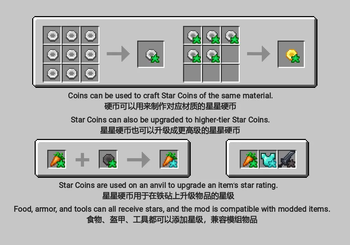
With a built-in coin economy and anvil upgrade system, you can use star coins to try to upgrade an item’s star — enjoy the thrill of a mystery box combined with strategic planning.
Ready to make every sword and every loaf of bread shine?
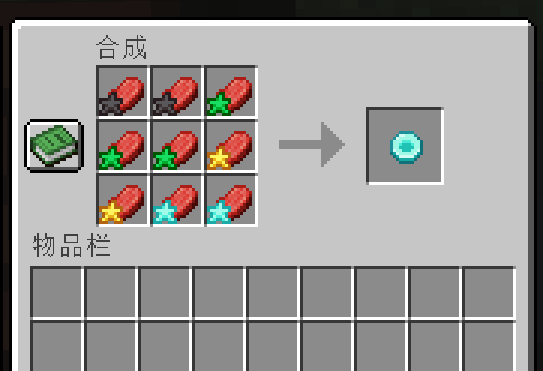
### 🌟 Highlights: - Inspired by Stardew Valley — core mechanics pay tribute to the beloved quality rating system. - Per‑Item Rolling — each item in a stack is rolled independently; you might get multiple stars from one pickup. - Type‑Specific Bonuses — weapons, tools, armor, and food each have unique bonuses, viewable by holding Shift. - Iridium Easter Egg — Netherite star items have a 1% chance to become an Iridium Star with a special texture and increased value. - Fully Configurable — add, remove, or tweak star tiers via JSON files; no restart required. - Coin Economy — craft, upgrade, and recycle star coins for a complete progression loop.
### ⚙️ Configuration Guide: Main Config File:
.minecraft/config/star_rating/star_rating-common.toml – Controls global parameters and feature toggles.
star_chance = 0. 5 # Probability of an item getting a star (0. 0 ~ 1. 0) enable_food_stars = true # Enable star effects for food enable_weapon_stars = true # Enable star effects for weapons enable_tool_stars = true # Enable star effects for tools (mining speed & fortune) enable_armor_stars = true # Enable star effects for armor ```
Changes take effect after /reload or rejoining the world.
Star Effect Files:
Inside config/star_rating/effects/, each star has its own .json file named after the star ID (e.g., iron_star_rating.json).
You can add, delete, or modify these files to define star weights and specific bonuses.
Full field list (all numeric fields are optional, defaulting to 0 or 1. 0):
``` { "star": "iron_star_rating", // Star ID (required) "weight": 25, // Random weight (required, higher = more common) "extraDamage": 1. 0, // Extra attack damage "attackSpeed": 0. 5, // Extra attack speed "reach": 0. 5, // Extra reach distance "damageMultiplier": 0. 1, // Multiplicative damage bonus (0. 1 = +10%) "armor": 1, // Extra armor points "toughness": 0. 5, // Extra armor toughness "damageReduction": 0. 02, // Damage reduction percentage (0. 02 = 2%) "breakSpeedMultiplier": 1. 05, // Mining speed multiplier (1. 05 = +5%) "looting": 1, // Extra looting level "fortune": 1, // Extra fortune level "extraHunger": 4, // Extra hunger/saturation from food "regenDuration": 5, // Regeneration duration (seconds) "regenAmplifier": 0, // Regeneration level (0 = I) "resistanceDuration": 5, // Resistance duration (seconds) "resistanceAmplifier": 0, // Resistance level (0 = I) "absorption": 6, // Absorption health (temporary HP) "sell": [ // Selling table (for potential extension, unused in current version) {"item": "star_rating:gold_coin", "count": 1, "weight": 10} ] } ```
Tip: You only need to include the fields you want to set; omitted fields will use their default values. To add a completely new star, simply create a new JSON file in this directory – the mod will load it automatically.
Custom Textures:
Star icons are stored under assets/star_rating/textures/gui/stars/ and must match the star ID exactly (e.g., diamond_star_rating.png). When adding a new star, remember to provide the corresponding texture.
You can easily supply these textures using a Resource Pack or KubeJS, without needing to modify the mod itself.
📊 Mod Details
- Game
- Minecraft Mods
- Author
- xianziyu
- Version
- 1.4.0
- Downloads
- 494
- Endorsements
- 3
- Category
- adventure
- Created
- 6/13/2026
- Updated
- 6/24/2026
- Game Versions
- 1.20.1
- Tags
- adventure, game-mechanics, utility
🔧 How to Install Minecraft Mods Mods
Download from Modrinth. Use Prism Launcher or drop into your mods folder.
📖 Full step-by-step install guide for Minecraft Mods →
Visit the official mod page for specific installation instructions for this mod.
🎮 Need cheat codes or console commands? Check ur gaming wiki for Minecraft Mods commands, item IDs, and more.
❓ Frequently Asked Questions
Which Minecraft Mods versions does Star Rating support?
The author lists 1.20.1. Other versions may work but are untested by the author.
What is the latest version of Star Rating?
Version 1.4.0, published 2026-06-24 with 494 downloads recorded at the source.
Keep browsing — more Minecraft Mods mods await