Stack Size 1024
🟡 Updated this year⚠️ Install Order · 2 steps
Install in this order, then this mod last — most mods fail to load without their framework and dependencies in place.
🖼️ Gallery (1 images)
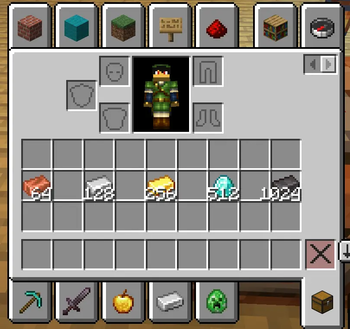
🔍 Analysis
- 👍 0.1% endorsement rate
- 🏆 #113 of 920 fabric mods in this game by downloads
📋 About This Mod
# Stack Size 1024 Choose the maximum stack size for normal Minecraft items on Fabric `1.21.11`, from the vanilla value up to `8192`. This mod is made for players who want larger, cleaner storage without changing every special-case item in the game. ## Features - Lets you choose the maximum stack size for items that normally stack to `64` or `16` - Available options: - `Vanilla` - `128` - `256` - `512` - `1024` - `2048` - `4096` - `8192` - Adds a settings screen in `Mod Menu` - Keeps items with special limits like `1` unchanged - Raises inventory slot limits together with the selected stack size - Syncs the active value from server to player in multiplayer - Fixes the save/load validation problem that can cause large stacks to be skipped during save ## How It Works If `Mod Menu` is installed, you can change the stack size from the mod settings screen. In singleplayer, your selected value is used for your world. In multiplayer, the server's value becomes the active one while you are connected, so everyone uses the same limit. ## Compatibility - Minecraft: `1.21.11` - Loader: `Fabric` - Requires: `Fabric API` - Optional: `Mod Menu` ## Important Notes - This mod only changes normal stackable items. - Items that are normally non-stackable are left alone. - Very large stack counts can still look a bit cramped in some vanilla screens because Minecraft was originally designed around smaller numbers. - If you lower the selected stack size later, already existing large stacks are kept, but new merging follows the currently selected value. ## Why This Mod Exists Most stack size mods only raise the visible limit and stop there. This mod also handles the save/load side more carefully, so larger stacks are much safer to use in real worlds.
# Stack Size 1024
Choose the maximum stack size for normal Minecraft items on Fabric `1. 21. 11`, from the vanilla value up to `8192`.
This mod is made for players who want larger, cleaner storage without changing every special-case item in the game.
## Features
- Lets you choose the maximum stack size for items that normally stack to `64` or `16`
- Available options:
- - `Vanilla`
- - `128`
- - `256`
- - `512`
- - `1024`
- - `2048`
- - `4096`
- - `8192`
- Adds a settings screen in `Mod Menu`
- Keeps items with special limits like `1` unchanged
- Raises inventory slot limits together with the selected stack size
- Syncs the active value from server to player in multiplayer
- Fixes the save/load validation problem that can cause large stacks to be skipped during save
## How It Works
If `Mod Menu` is installed, you can change the stack size from the mod settings screen.
In singleplayer, your selected value is used for your world.
In multiplayer, the server's value becomes the active one while you are connected, so everyone uses the same limit.
## Compatibility
- Minecraft: `1. 21. 11`
- Loader: `Fabric`
- Requires: `Fabric API`
- Optional: `Mod Menu`
## Important Notes
- This mod only changes normal stackable items.
- Items that are normally non-stackable are left alone.
- Very large stack counts can still look a bit cramped in some vanilla screens because Minecraft was originally designed around smaller numbers.
- If you lower the selected stack size later, already existing large stacks are kept, but new merging follows the currently selected value.
## Why This Mod Exists
Most stack size mods only raise the visible limit and stop there. This mod also handles the save/load side more carefully, so larger stacks are much safer to use in real worlds.
📊 Mod Details
- Game
- Minecraft Mods
- Author
- makarkozyrev14
- Version
- 1.0.1
- Downloads
- 5,800
- Endorsements
- 7
- Category
- fabric
- Created
- 4/22/2026
- Updated
- 4/25/2026
- Game Versions
- 1.21.11
- Tags
- game-mechanics, management, storage
🔧 How to Install Minecraft Mods Mods
Download from Modrinth. Use Prism Launcher or drop into your mods folder.
📖 Full step-by-step install guide for Minecraft Mods →
Visit the official mod page for specific installation instructions for this mod.
🎮 Need cheat codes or console commands? Check ur gaming wiki for Minecraft Mods commands, item IDs, and more.
❓ Frequently Asked Questions
Which Minecraft Mods versions does Stack Size 1024 support?
The author lists 1.21.11. Other versions may work but are untested by the author.
What is the latest version of Stack Size 1024?
Version 1.0.1, published 2026-04-25 with 5,800 downloads recorded at the source.
Keep browsing — more Minecraft Mods mods await