Somewhat Sophisticated Vinyl Decor
🟡 Updated this year⚠️ Install Order · 2 steps
Install in this order, then this mod last — most mods fail to load without their framework and dependencies in place.
🖼️ Gallery (6 images)
🔍 Analysis
- 👍 0.7% endorsement rate
- 🏆 #20 of 67 neoforge mods in this game by downloads
📋 About This Mod
<center> # !(https://github.com/AzulConspirator/OngakuMod/blob/main/img/proj_title.png?raw=true) </center> Music Disc collection mod focused on making discs worth displaying again. Instead of keeping rare discs locked away in chests or leaving them in item frames collecting dust, **SSV Decor** lets you display your collection whilst still being able to listen to it. - Display them as vinyl records or album covers - Play them directly from your collection - Keep your favourite discs visible while still using them | Made for NeoForge 1.21.1 | -- ## Features <details> <summary> Disc Displays </summary> - Store and display your music disc collection - Displayed discs are dynamically color-sampled from their textures - should work with modded music discs (item texture depended) - supports custom Per Displayed Disc textures via resource pack (check template (https://modrinth.com/resourcepack/ssv-decor-custom)) </details> | Includes Disc Racks, Disc Boxes, and Wall Mounts. | -- !(https://cdn.modrinth.com/data/xVfyaI9r/images/b0e62f0aecab612cca3f72274e0e6500d6a0cab0.png) | Also Comes with Optional Resource pack, Custom Displays for Vanilla Discs | -- <details> <summary> Sound Box </summary> A jukebox controller/Hub for your displayed disc collection. it physically moves the disc from your collection into the jukebox. Connect it to your Disc Displays: - Browse your stored discs - Play discs through a nearby vanilla jukebox - Automatically return discs after playback - Support autoplay playlists - Skip or exclude tracks from autoplay </details> !(https://cdn.modrinth.com/data/xVfyaI9r/images/9f0c9404743a205e2abbcd60aed8732876525588.png) <details> <summary> Speaker </summary> Extend your Sound Box playback area. Speakers connect to a Sound Box and allow music to be heard further away. </details> !(https://cdn.modrinth.com/data/xVfyaI9r/images/bd4eb570280c4dd1c4e53fa81358cd78d183d2ac.png) <details> <summary> Audio Relay </summary> remote connection to your Collection. Links to a Sound Box, to have access to to soundbox on-the-go. - have access to a limited version of sound box UI - able used as Item and Block (Shift Right-Click to Place) </details> !(https://cdn.modrinth.com/data/xVfyaI9r/images/26405773315548e6f145db65dc908894ecc3c99f.png) ## Usage 1. Place a Sound Box next to a jukebox to get started. 2. Crouch + Right-Click with a **Tuning Fork**, On a Sound Box to get its ID. 3. then Right-Click any Disc Display to link to that Soundbox. - Content of Connected displays will appear in the Sound Box interface. - The same linking process works with Speakers. - Audio Relay Connects by Right-click on a Sound Box - Sound Box works by moving discs between connected display storage and the adjacent jukebox. - Disc Displays can also be used as decoration on their own, without a Sound Box. --- ## Technical Notes <details> - Music Disc detection is based on the **JUKEBOX_PLAYABLE** item component - Disc/Cover Display Model uses (https://minecraft.wiki/w/Model), same as Leather Armor, samples set various pixels in the Disc item texture (Higher-resolution textures should work, but this has not been tested) - After playback: 1. Discs are returned to their original slot whenever possible 2. If the original slot is unavailable, another empty slot is used 3. If no storage space is available, the disc is ejected from the jukebox as an item - Multiplayer/server stability is still being tested, especially for networking-related features - I didnt add any range limitations on Linking, theoretically it should work from any loaded chunk but suggest keep it within 64 blocks. </details> ``` if any bug found when using this mod, please report it at the Github Page ``` ## Planned - (https://modrinth.com/resourcepack/ssv-decor-custom) ] ~~Disc Color System turn into fallback, support texture per displayed disc/cover~~ - ~~portable solution~~ - more speaker variants - Support Newer MC Versions (mainly 26.3) (I will Once Cobblemon & Create moved to those versions as well) ## Compatibility <details> <summary> <a href="https://modrinth.com/mod/etched">Etched</a> </summary> - able to store disc in storage - disc displays shows the same color as the etched discs - able to play from SoundBox and Audio Relay - dedicated support for custom Display textures (check template (https://modrinth.com/resourcepack/ssv-decor-custom) ) - only plays the 1st Track in Etched Disc - Disc are assumed to be 5 minutes duration, used for Autoplay, it cant be pulled dynamically. ```txt to keep inline with this mod core design focus,so no album support, as the whole point is to showcase the disc and
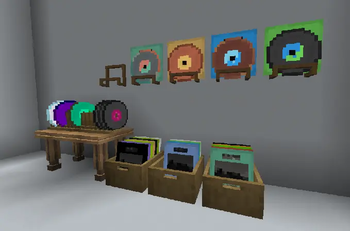
Music Disc collection mod focused on making discs worth displaying again.
Instead of keeping rare discs locked away in chests or leaving them in item frames collecting dust, SSV Decor lets you display your collection whilst still being able to listen to it.
- Display them as vinyl records or album covers
- Play them directly from your collection
- Keep your favourite discs visible while still using them
| Made for NeoForge 1. 21. 1 | --
## Features
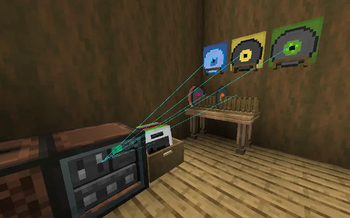
Disc Displays
- Store and display your music disc collection
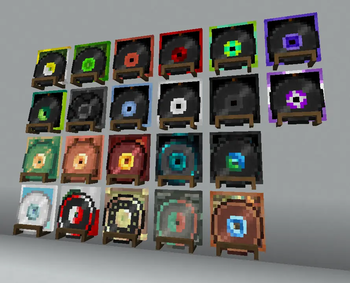
- Displayed discs are dynamically color-sampled from their textures
- should work with modded music discs (item texture depended)
- supports custom Per Displayed Disc textures via resource pack (check template (https://modrinth.com/resourcepack/ssv-decor-custom))
| Includes Disc Racks, Disc Boxes, and Wall Mounts. [ Table not Included ] | --
!(https://cdn.modrinth.com/data/xVfyaI9r/images/b0e62f0aecab612cca3f72274e0e6500d6a0cab0.png)
| Also Comes with Optional Resource pack, Custom Displays for Vanilla Discs | --
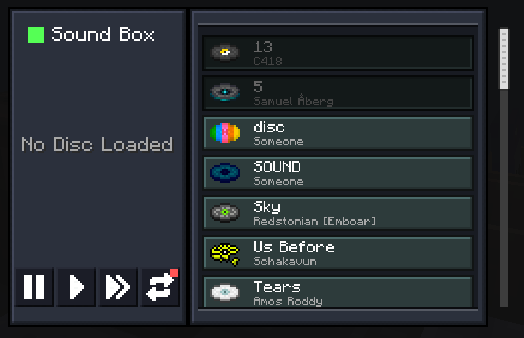
Sound Box
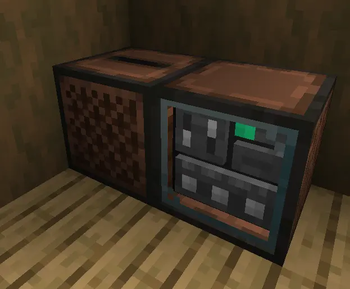
A jukebox controller/Hub for your displayed disc collection. it physically moves the disc from your collection into the jukebox.
Connect it to your Disc Displays:
- Browse your stored discs
- Play discs through a nearby vanilla jukebox
- Automatically return discs after playback
- Support autoplay playlists
- Skip or exclude tracks from autoplay
!(https://cdn.modrinth.com/data/xVfyaI9r/images/9f0c9404743a205e2abbcd60aed8732876525588.png)
Speaker
Extend your Sound Box playback area.
Speakers connect to a Sound Box and allow music to be heard further away.
!(https://cdn.modrinth.com/data/xVfyaI9r/images/bd4eb570280c4dd1c4e53fa81358cd78d183d2ac.png)
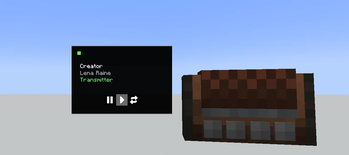
Audio Relay
remote connection to your Collection. Links to a Sound Box, to have access to to soundbox on-the-go.
- have access to a limited version of sound box UI
- able used as Item and Block (Shift Right-Click to Place)
!(https://cdn.modrinth.com/data/xVfyaI9r/images/26405773315548e6f145db65dc908894ecc3c99f.png)
1. Place a Sound Box next to a jukebox to get started. 2. Crouch + Right-Click with a Tuning Fork, On a Sound Box to get its ID. 3. then Right-Click any Disc Display to link to that Soundbox.
- Content of Connected displays will appear in the Sound Box interface.
- The same linking process works with Speakers.
- Audio Relay Connects by Right-click on a Sound Box
- Sound Box works by moving discs between connected display storage and the adjacent jukebox.
- Disc Displays can also be used as decoration on their own, without a Sound Box.
## Technical Notes
``` if any bug found when using this mod, please report it at the Github Page ```
- [ added since 1. 1. 0, check resource pack template (https://modrinth.com/resourcepack/ssv-decor-custom) ] ~~Disc Color System turn into fallback, support texture per displayed disc/cover~~
- [ added since 1. 3. 1, Implemented Audio Relay Item ] ~~portable solution~~
- more speaker variants
- Support Newer MC Versions (mainly 26. 3) (I will Once Cobblemon & Create moved to those versions as well)
## Compatibility
Etched
- able to store disc in storage
- disc displays shows the same color as the etched discs
- able to play from SoundBox and Audio Relay
- dedicated support for custom Display textures (check template (https://modrinth.com/resourcepack/ssv-decor-custom) )
- only plays the 1st Track in Etched Disc
- Disc are assumed to be 5 minutes duration, used for Autoplay, it cant be pulled dynamically.
```txt
to keep inline with this mod core design focus,so no album support, as the whole point is to showcase the disc and
📊 Mod Details
- Game
- Minecraft Mods
- Author
- AzulConspirator
- Version
- 1.3.9
- Downloads
- 1,148
- Endorsements
- 8
- Category
- neoforge
- Created
- 5/30/2026
- Updated
- 7/8/2026
- Game Versions
- 1.21.1
- Tags
- storage, utility
🔧 How to Install Minecraft Mods Mods
Download from Modrinth. Use Prism Launcher or drop into your mods folder.
📖 Full step-by-step install guide for Minecraft Mods →
Visit the official mod page for specific installation instructions for this mod.
🎮 Need cheat codes or console commands? Check ur gaming wiki for Minecraft Mods commands, item IDs, and more.
❓ Frequently Asked Questions
Which Minecraft Mods versions does Somewhat Sophisticated Vinyl Decor support?
The author lists 1.21.1. Other versions may work but are untested by the author.
What is the latest version of Somewhat Sophisticated Vinyl Decor?
Version 1.3.9, published 2026-07-08 with 1,148 downloads recorded at the source.
Keep browsing — more Minecraft Mods mods await