Sol's Damage & Health Indicator
🟡 Updated this year⚠️ Install Order · 2 steps
Install in this order, then this mod last — most mods fail to load without their framework and dependencies in place.
🖼️ Gallery (6 images)
🔍 Analysis
- 👍 0.1% endorsement rate
- 🏆 #465 of 551 adventure mods in this game by downloads
📋 About This Mod
# **Sol's Damage Indicator** Supports Minecraft Forge 1.16.5, 1.20.1! **Author:** solmochi **Need help, want to suggest a feature, or found a bug?** **Join our community to catch exclusive early previews and upcoming changelogs before they go live!** (https://img.shields.io/badge/Discord-Join_Server-5865F2?style=for-the-badge&logo=discord&logoColor=white)](https://discord.com/invite/PzYsNxanTA) *** ## Description Sol's Indicator is **a visual combat HUD mod that shows exactly how much damage you deal in real-time**. **See floating damage numbers on enemies, track your hit combos with a stylish center-screen HUD, monitor any entity's health with a crosshair indicator, and watch boss fights come alive with custom RPG-themed boss bars featuring per-player damage rankings and cinematic death animations.** ⚠️ Works in two modes — **install on both server and client for full accuracy (melee, projectiles, spells, abilities),** or **use client-only for basic melee tracking.** **✅ Fully functionable and playable on a Single-Player World.** *** ## Features ### Damage Indicator HUD * **Hit Counter & Combo Tracker** — Displays hit count, "HIT" / "CRIT" text, and cumulative damage dealt on the center-right of your screen * **Throbbing Pulse Animation** — Each hit triggers a scale pulse that stacks during rapid combos * **Critical Hit Detection** — Crits display in green with "CRIT" text; relic crits show the multiplier (e.g., "CRIT 2.1x") in bright green * **Summary Phase** — After 3.5 seconds of no hits, transitions to a summary showing total damage dealt with a dramatic pulsed "DAMAGE" label * **Auto-Fade** — HUD fades out after 5 seconds of inactivity, then resets for the next combat * **Configurable Position** — Can be placed on center-left or center-right of the screen ### Floating Damage Numbers * **World-Space Numbers** — Damage numbers float upward from hit entities and fade out over 1.5 seconds * **Color-Coded** — Red for normal hits, green for vanilla crits, bright green for relic system crits * **Crit Multiplier Display** — Relic crits show the multiplier suffix (e.g., "12.50 2.1x") * **Spawn Animation** — Numbers scale up with a quick throb on spawn, then settle * **Random Spread** — Multiple simultaneous numbers spread out slightly to avoid overlap * **Billboard Rendering** — Numbers always face the camera in 3D world space ### Custom Boss Bar HUD * **RPG-Themed Design** — Fully replaces vanilla boss bars with a styled panel featuring gold frames, gradient health bars, and entity portraits * **Entity Portraits** — Renders a live 3D model of the boss entity inside a framed portrait box * **Dynamic Sizing** — Bar width auto-expands to fit long entity names and HP text * **Color-Matched Bars** — Health bar color adapts to the entity's custom name color, boss bar color setting, or mob type (red/green/blue) * **HP Numbers** — Shows exact current HP / max HP (formatted: e.g., "125.4K / 500.0K") * **Entity Titles** — Displays CustomNPC titles below the entity name when available * **Multiple Boss Bars** — Supports configurable max boss bars on screen (default: 3) with "+N more" overflow label * **Compact Mode** — 2nd+ boss bars use a compact layout showing only your own damage contribution * **Stale Data Cleanup** — Automatically clears damage progress when entities heal to full or die ### Boss Damage Progress * **Per-Player Damage Tracking** — Server tracks cumulative damage dealt by each player to boss entities * **Damage Percentage Display** — Shows each player's damage as a percentage of the boss's max HP (e.g., "PlayerName: 10.83%") * **RPG Rank Styling** — Top contributors get medal icons: crown for #1, diamonds for #2–3, arrows for #4+ * **2-Column Grid Layout** — Top 5 contributors displayed in an organized grid with a "Damage Progress" header * **Self-Highlighting** — Your own name is highlighted in green; other players appear in white * **Self-Append** — If you're not in the top 5, your entry is appended separately so you always see your contribution * **Auto-Detection** — Uses reflection to detect any entity with a `ServerBossInfo` field (supports vanilla + all modded bosses) * **Inactivity Pruning** — Players are removed from the damage list after configurable minutes of inactivity (default: 5 min) ### Boss Death Animation * **Cinematic Kill Sequence** — When a boss dies, plays a 10-second dramatic overlay with multiple phases: ### Entity Health Indicator * **Crosshair Target Health** — Shows a health bar panel for the entity you're looking at * **RPG Panel Design** — Matches the boss bar style with gold frame, portrait, and gradient health bar * **Live Entity Portrait** — Renders a 3D model of the targeted entity * **HP & Armor Display** — Shows heart icon + current/max HP and diamond armor icon with armor value * **Modded Entity Support** — Formats names from registry paths (e.g., "cartaddo
# Sol's Damage Indicator
Supports Minecraft Forge 1. 16. 5, 1. 20. 1!
Author: solmochi
Need help, want to suggest a feature, or found a bug?
Join our community to catch exclusive early previews and upcoming changelogs before they go live!
[!(https://img.shields.io/badge/Discord-Join_Server-5865F2?style=for-the-badge&logo=discord&logoColor=white)](https://discord.com/invite/PzYsNxanTA)
## Description
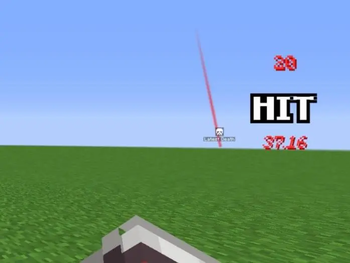
Sol's Indicator is a visual combat HUD mod that shows exactly how much damage you deal in real-time. See floating damage numbers on enemies, track your hit combos with a stylish center-screen HUD, monitor any entity's health with a crosshair indicator, and watch boss fights come alive with custom RPG-themed boss bars featuring per-player damage rankings and cinematic death animations.
✅ Fully functionable and playable on a Single-Player World.
## Features
### Damage Indicator HUD
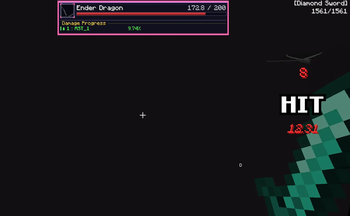
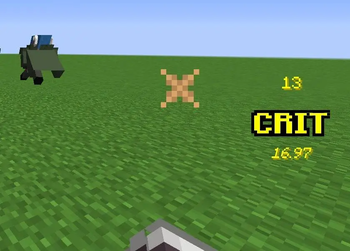
Hit Counter & Combo Tracker — Displays hit count, "HIT" / "CRIT" text, and cumulative damage dealt on the center-right of your screen Throbbing Pulse Animation — Each hit triggers a scale pulse that stacks during rapid combos Critical Hit Detection — Crits display in green with "CRIT" text; relic crits show the multiplier (e.g., "CRIT 2. 1x") in bright green Summary Phase — After 3. 5 seconds of no hits, transitions to a summary showing total damage dealt with a dramatic pulsed "DAMAGE" label Auto-Fade — HUD fades out after 5 seconds of inactivity, then resets for the next combat Configurable Position — Can be placed on center-left or center-right of the screen
### Floating Damage Numbers
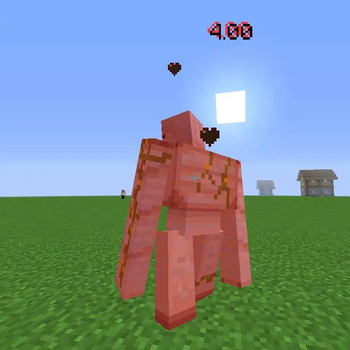
World-Space Numbers — Damage numbers float upward from hit entities and fade out over 1. 5 seconds Color-Coded — Red for normal hits, green for vanilla crits, bright green for relic system crits Crit Multiplier Display — Relic crits show the multiplier suffix (e.g., "12. 50 2. 1x") Spawn Animation — Numbers scale up with a quick throb on spawn, then settle Random Spread — Multiple simultaneous numbers spread out slightly to avoid overlap Billboard Rendering — Numbers always face the camera in 3D world space
### Custom Boss Bar HUD
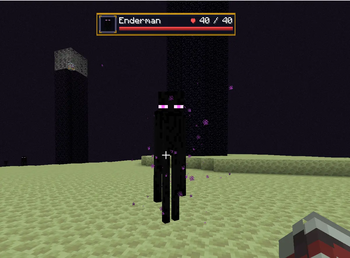
RPG-Themed Design — Fully replaces vanilla boss bars with a styled panel featuring gold frames, gradient health bars, and entity portraits Entity Portraits — Renders a live 3D model of the boss entity inside a framed portrait box Dynamic Sizing — Bar width auto-expands to fit long entity names and HP text Color-Matched Bars — Health bar color adapts to the entity's custom name color, boss bar color setting, or mob type (red/green/blue) HP Numbers — Shows exact current HP / max HP (formatted: e.g., "125. 4K / 500. 0K") Entity Titles — Displays CustomNPC titles below the entity name when available Multiple Boss Bars — Supports configurable max boss bars on screen (default: 3) with "+N more" overflow label Compact Mode — 2nd+ boss bars use a compact layout showing only your own damage contribution Stale Data Cleanup — Automatically clears damage progress when entities heal to full or die
### Boss Damage Progress
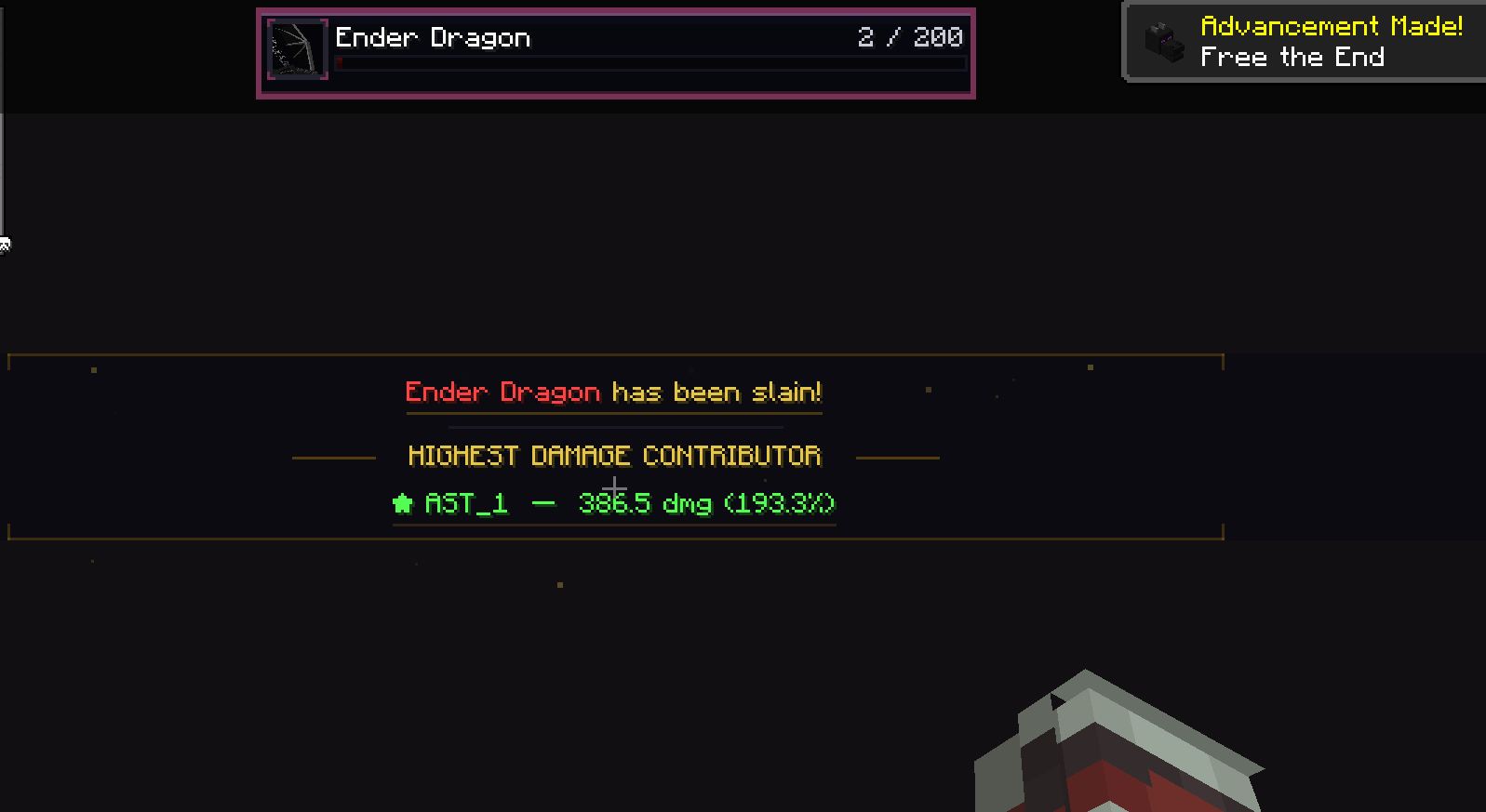
Per-Player Damage Tracking — Server tracks cumulative damage dealt by each player to boss entities Damage Percentage Display — Shows each player's damage as a percentage of the boss's max HP (e.g., "PlayerName: 10. 83%") RPG Rank Styling — Top contributors get medal icons: crown for #1, diamonds for #2–3, arrows for #4+ 2-Column Grid Layout — Top 5 contributors displayed in an organized grid with a "Damage Progress" header Self-Highlighting — Your own name is highlighted in green; other players appear in white Self-Append — If you're not in the top 5, your entry is appended separately so you always see your contribution Auto-Detection — Uses reflection to detect any entity with a `ServerBossInfo` field (supports vanilla + all modded bosses) Inactivity Pruning — Players are removed from the damage list after configurable minutes of inactivity (default: 5 min)
### Boss Death Animation
Cinematic Kill Sequence — When a boss dies, plays a 10-second dramatic overlay with multiple phases:
### Entity Health Indicator
Crosshair Target Health — Shows a health bar panel for the entity you're looking at RPG Panel Design — Matches the boss bar style with gold frame, portrait, and gradient health bar Live Entity Portrait — Renders a 3D model of the targeted entity HP & Armor Display — Shows heart icon + current/max HP and diamond armor icon with armor value * Modded Entity Support — Formats names from registry paths (e.g., "cartaddo
📊 Mod Details
- Game
- Minecraft Mods
- Author
- solmochi
- Version
- 1.21.11-v1.1.9
- Downloads
- 978
- Endorsements
- 1
- Category
- adventure
- Created
- 5/17/2026
- Updated
- 7/24/2026
- Game Versions
- 1.21.11
- Tags
- adventure, equipment, utility
🔧 How to Install Minecraft Mods Mods
Download from Modrinth. Use Prism Launcher or drop into your mods folder.
📖 Full step-by-step install guide for Minecraft Mods →
Visit the official mod page for specific installation instructions for this mod.
🎮 Need cheat codes or console commands? Check ur gaming wiki for Minecraft Mods commands, item IDs, and more.
❓ Frequently Asked Questions
Which Minecraft Mods versions does Sol's Damage & Health Indicator support?
The author lists 1.21.11. Other versions may work but are untested by the author.
What is the latest version of Sol's Damage & Health Indicator?
Version 1.21.11-v1.1.9, published 2026-07-24 with 978 downloads recorded at the source.
Keep browsing — more Minecraft Mods mods await