SleepCycle
🟡 Updated this year⚠️ Install Order · 2 steps
Install in this order, then this mod last — most mods fail to load without their framework and dependencies in place.
🖼️ Gallery (6 images)

🔍 Analysis
- 👍 0.3% endorsement rate
- 🏆 #417 of 893 fabric mods in this game by downloads
📋 About This Mod
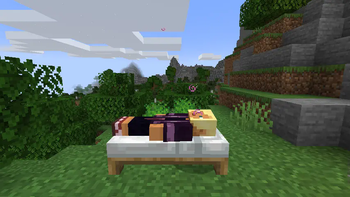
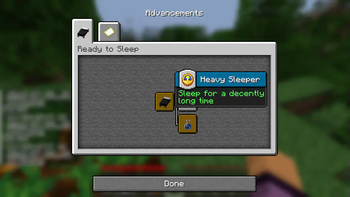
Minecraft-SleepCycle =============== ## Overview The **SleepCycle** Mod for Minecraft enhances the sleeping mechanics by allowing time to pass progressively while players are asleep, rather than skipping the night instantly. This mod introduces new effects, custom advancements, and statistics related to sleep. Works in Minecraft 1.21 Now uses Architectury API (1.0.4) ## Features ### Progressive Time Passage - **Gradual Night Transition**: Time progresses gradually while players are asleep, creating a more immersive experience. - **Customizable Tick Speed**: The speed at which time progresses can be configured, allowing for a customizable experience. ### New Effects - **Well Rested**: Gain this effect by sleeping for a sufficient amount of time. It provides beneficial buffs for a limited duration. - **Tired**: This effect is applied if the player sleeps for too long, resulting in temporary debuffs. ### Custom Advancements - **Ready to Sleep**: Earn this advancement to open the advancement progression by making a bed. - **Well Rested**: Earn this advancement by earning a Well Rested sleep - **Feeling Tired**: Earn this advancement by earning a Tired sleep - **Heavy Sleeper**: Earn this advancement by sleeping uninterrupted for a set duration (e.g., 5 minutes). ### Custom Statistics - **Time Slept**: Tracks the total time spent sleeping. - **Well Rested Sleeps**: Counts the number of times the player has gained the Well Rested effect. - **Tired Sleeps**: Counts the number of times the player has gained the Tired effect. - **Health Regained**: Tracks the total amount of health regained while sleeping. ### Sound Effects - **Positive Sound Cue**: Plays when the Well Rested effect is applied. - **Negative Sound Cue**: Plays when the Tired effect is applied. ## Installation 1. Download the **SleepCycle** Mod file. 2. Ensure you have Minecraft Fabric Loader installed. 3. Place the mod file into your Minecraft `mods` folder. 4. Start Minecraft using the Fabric profile. ## Configuration ### Mod Configuration File - Located in the config folder, the configuration file allows you to customize various aspects of the mod, such as tick speed and effect durations. - I'm not actually sure that this works but I hope so. ## Usage ### Sleeping Mechanics - **Use a Bed**: Interact with a bed to start sleeping. Time will begin to progress gradually. - **Healing and Effects**: While sleeping, you will gradually regain health. Depending on the duration of your sleep, you may receive the Well Rested or Tired effect. - **Sound Cues**: Positive and negative sound cues will indicate the application of Well Rested or Tired effects, respectively. ### Advancements and Statistics - **Track Your Progress**: Custom advancements and statistics will help you track your sleeping habits.
Minecraft-SleepCycle ===============
## Overview
The SleepCycle Mod for Minecraft enhances the sleeping mechanics by allowing time to pass progressively while players are asleep, rather than skipping the night instantly. This mod introduces new effects, custom advancements, and statistics related to sleep. Works in Minecraft 1. 21 Now uses Architectury API (1. 0. 4)
## Features
### Progressive Time Passage
- Gradual Night Transition: Time progresses gradually while players are asleep, creating a more immersive experience.
- Customizable Tick Speed: The speed at which time progresses can be configured, allowing for a customizable experience.
### New Effects
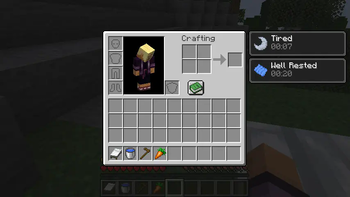
- Well Rested: Gain this effect by sleeping for a sufficient amount of time. It provides beneficial buffs for a limited duration.
- Tired: This effect is applied if the player sleeps for too long, resulting in temporary debuffs.
### Custom Advancements
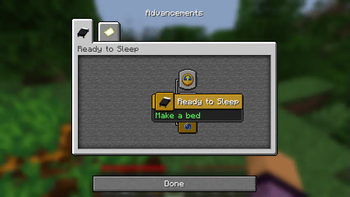
- Ready to Sleep: Earn this advancement to open the advancement progression by making a bed.
- Well Rested: Earn this advancement by earning a Well Rested sleep
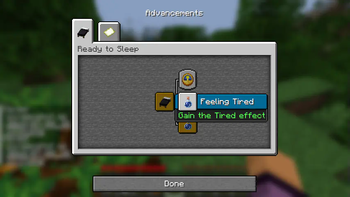
- Feeling Tired: Earn this advancement by earning a Tired sleep
- Heavy Sleeper: Earn this advancement by sleeping uninterrupted for a set duration (e.g., 5 minutes).
### Custom Statistics
- Time Slept: Tracks the total time spent sleeping.
- Well Rested Sleeps: Counts the number of times the player has gained the Well Rested effect.
- Tired Sleeps: Counts the number of times the player has gained the Tired effect.
- Health Regained: Tracks the total amount of health regained while sleeping.
### Sound Effects
- Positive Sound Cue: Plays when the Well Rested effect is applied.
- Negative Sound Cue: Plays when the Tired effect is applied.
## Installation
1. Download the SleepCycle Mod file. 2. Ensure you have Minecraft Fabric Loader installed. 3. Place the mod file into your Minecraft `mods` folder. 4. Start Minecraft using the Fabric profile.
## Configuration
### Mod Configuration File
- Located in the config folder, the configuration file allows you to customize various aspects of the mod, such as tick speed and effect durations.
- I'm not actually sure that this works but I hope so.
### Sleeping Mechanics
- Use a Bed: Interact with a bed to start sleeping. Time will begin to progress gradually.
- Healing and Effects: While sleeping, you will gradually regain health. Depending on the duration of your sleep, you may receive the Well Rested or Tired effect.
- Sound Cues: Positive and negative sound cues will indicate the application of Well Rested or Tired effects, respectively.
### Advancements and Statistics
- Track Your Progress: Custom advancements and statistics will help you track your sleeping habits.
📊 Mod Details
- Game
- Minecraft Mods
- Author
- VgLevelUp
- Version
- 1.0.4
- Downloads
- 7,677
- Endorsements
- 21
- Category
- fabric
- Created
- 7/9/2024
- Updated
- 6/29/2026
- Game Versions
- 26.1.2
- Tags
- game-mechanics, utility
🔧 How to Install Minecraft Mods Mods
Download from Modrinth. Use Prism Launcher or drop into your mods folder.
📖 Full step-by-step install guide for Minecraft Mods →
Visit the official mod page for specific installation instructions for this mod.
🎮 Need cheat codes or console commands? Check ur gaming wiki for Minecraft Mods commands, item IDs, and more.
❓ Frequently Asked Questions
Which Minecraft Mods versions does SleepCycle support?
The author lists 26.1.2. Other versions may work but are untested by the author.
What is the latest version of SleepCycle?
Version 1.0.4, published 2026-06-29 with 7,677 downloads recorded at the source.
Keep browsing — more Minecraft Mods mods await