SkyOcean
🟡 Updated this year⚠️ Install Order · 2 steps
Install in this order, then this mod last — most mods fail to load without their framework and dependencies in place.
🖼️ Gallery (7 images)

🔍 Analysis
- 👍 0.0% endorsement rate
- 🏆 #619 of 1284 fabric mods in this game by downloads
📋 About This Mod
# SkyOcean <div align="center"> (https://img.shields.io/discord/1296157888343179264?color=8c03fc&label=Discord&logo=discord&logoColor=white)](https://discord.gg/FsRc2GUwZR) (https://img.shields.io/modrinth/dt/dIczrQAR?style=flat&logo=modrinth)](https://modrinth.com/mod/skyocean) </div> SkyOcean is a mod that aims to improve the playing experience while staying true to the Hypixel SkyBlock style, meaning that we aim to integrate with the base game in a seamless way. ## Installation Guide - Prerequisites: (https://modrinth.com/mod/fabric-language-kotlin) - Download into your favourite launcher or into your mods folder directly ## Features <details> <summary>Screens</summary> - Item Value Screen - When hovering over an item in any inventory, you can press `J` to open the item value screen. - This screen shows a breakdown of item value sources by category, such as item stars, recombs, and more. - Item Search Screen - Press `o` or run `/skyocean search` to open the item search screen. - Allowing you to search through the following: - Island Chests - Storage (Backpack/Enderchest) - Wardrobe - Sacks - Accessory Bag - Forge - Inventory (overworld) - Vault - Museum - Rift (Inventory/Enderchest) - Drill & Rod upgrades (upgrade parts that are applied) - and way more... - Using Right Click on any sack item will open an input to get that item from the sack. - Item Customisation Screen - Run `/skyocean customize` while having an item selected to either customize it with subcommands or a gui - Allows you to customize the following attributes: - Name (with custom colors and gradients) - Item Model - Item Color (static or gradients) - Armor Trim - Enchantment Glint - Skins (static and animated) </details> <details> <summary>Commands</summary> - /skyocean calc \<equation> - performs a mathematical equation and prints the result - /skyocean sendcoords - sends the current coordinates in all chat - /skyocean search - opens the item search screen - /skyocean recipe \<recipe> - Sets the selected recipe as the active Craft Helper Item. - /skyocean recipe amount \<amount> - Sets the amount of items to craft for the Craft Helper. - /skyocean recipe skyshards - Sets the (https://skyshards.com/) Tree as the active Craft Helper Tree from your clipboard. - /skyocean recipe clear </details> <details> <summary>General config</summary> - Option to disable text shadows for all SkyOcean messages. - Prefix gradient - SkyOcean Item Modify Indicator </details> <details> <summary>Chat Config</summary> - Profile In Chat - Adds a bingo/ironman/stranded icon next to a player's chat message. - Piggy Bank Repair Helper - When you die and the piggy bank breaks, you can click on the chat message to get 8 Enchanted Pork from your sacks. - Sack Notification - Specify for which sack items you want to receive a notification when you gain them, e.g. `Glossy Gemstone`. - White non mesages - Makes messages from players without rank white. </details> <details> <summary>Slayer Config</summary> - Highlight own slayer boss - Highlight mini bosses - Extra option to change color for high tier minis - Highlight blaze in attunement color </details> <details> <summary>Fishing Config</summary> - Trophy Fish Numbers - Shows the number of Trophy Fish you have caught in the chat message of the specific fish you caught. - Best used with the (https://modrinth.com/mod/skyblock-profile-viewer) mod to update your data when out of sync. - Hook Text Scale - Change the scale of the text that appears when you're about to hook a fish. - Lava Replacement - Visually replace lava with water in the Crimson Isle. - Bobber Fix - Fixes fishing bobbers rubberbanding when fishing. - Bobber Timer - Shows a timer above your bobber to indicate how long it has been in the liquid. - Hide other Bobbers - Hides other players' fishing bobbers, so you can see your own bobber more clearly. - Hotspot Highlight - Highlights hotspots with a color fitting to their type. - Renders a circle around the hotspot and fills it with the color. </details> <details> <summary>Foraging Config</summary> - HOTF - Show level as amount - Show total progress - Show shift-click cost - Show total amount left - Galatea - Mute the Phantoms - Shulker Overwrite - Allows you to overwrite the Shulker's color with a custom one. </details> <details> <summary>Garden Config</summary> - Pest Bait Type - While in a Trap inventory, view what bait type attracts what pests. - Desk Pest Highlight - In the "Configure Plots" screen, highlight what plots have pests on them. </details> <details> <summary>Inventory Config</summary> - Sack Value
[!(https://img.shields.io/discord/1296157888343179264?color=8c03fc&label=Discord&logo=discord&logoColor=white)](https://discord.gg/FsRc2GUwZR) [!(https://img.shields.io/modrinth/dt/dIczrQAR?style=flat&logo=modrinth)](https://modrinth.com/mod/skyocean)
SkyOcean is a mod that aims to improve the playing experience while staying true to the Hypixel SkyBlock style, meaning that we aim to integrate with the base game in a seamless way.
## Installation Guide
- Prerequisites: (https://modrinth.com/mod/fabric-language-kotlin)
- Download into your favourite launcher or into your mods folder directly
## Features
Screens
- Item Value Screen
- - When hovering over an item in any inventory, you can press `J` to open the item value screen.
- - This screen shows a breakdown of item value sources by category, such as item stars, recombs, and more.
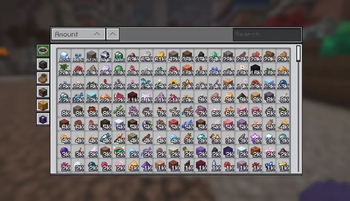
- Item Search Screen
- - Press `o` or run `/skyocean search` to open the item search screen.
- - Allowing you to search through the following:
- - Island Chests
- - Storage (Backpack/Enderchest)
- - Wardrobe
- - Sacks
- - Accessory Bag
- - Forge
- - Inventory (overworld)
- - Vault
- - Museum
- - Rift (Inventory/Enderchest)
- - Drill & Rod upgrades (upgrade parts that are applied)
- - and way more...
- - Using Right Click on any sack item will open an input to get that item from the sack.
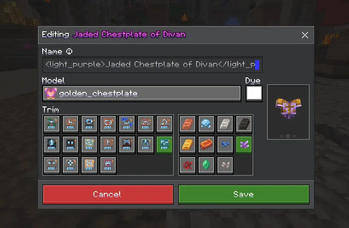
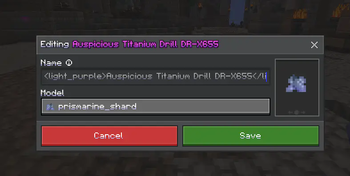
- Item Customisation Screen
- - Run `/skyocean customize` while having an item selected to either customize it with subcommands or a gui
- - Allows you to customize the following attributes:
- - Name (with custom colors and gradients)
- - Item Model
- - Item Color (static or gradients)
- - Armor Trim
- - Enchantment Glint
- - Skins (static and animated)
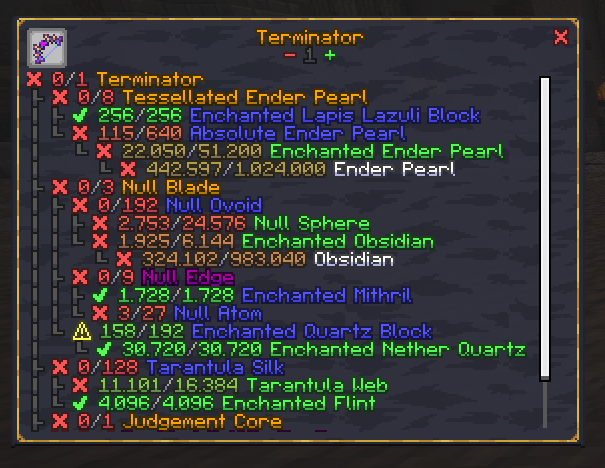
Commands
- /skyocean calc \
- performs a mathematical equation and prints the result - /skyocean sendcoords - sends the current coordinates in all chat
- /skyocean search - opens the item search screen
- /skyocean recipe \
[\ ] - Sets the selected recipe as the active Craft Helper Item. - - /skyocean recipe amount \
- Sets the amount of items to craft for the Craft Helper. - - /skyocean recipe skyshards - Sets the (https://skyshards.com/) Tree as the active Craft Helper Tree from your clipboard.
- - /skyocean recipe clear
General config
- Option to disable text shadows for all SkyOcean messages.
- Prefix gradient
- SkyOcean Item Modify Indicator
Chat Config
- Profile In Chat
- - Adds a bingo/ironman/stranded icon next to a player's chat message.
- Piggy Bank Repair Helper
- - When you die and the piggy bank breaks, you can click on the chat message to get 8 Enchanted Pork from your sacks.
- Sack Notification
- - Specify for which sack items you want to receive a notification when you gain them, e.g. `Glossy Gemstone`.
- White non mesages
- - Makes messages from players without rank white.
Slayer Config
- Highlight own slayer boss
- Highlight mini bosses
- - Extra option to change color for high tier minis
- Highlight blaze in attunement color
Fishing Config
- Trophy Fish Numbers
- - Shows the number of Trophy Fish you have caught in the chat message of the specific fish you caught.
- - Best used with the (https://modrinth.com/mod/skyblock-profile-viewer) mod to update your data when out of sync.
- Hook Text Scale
- - Change the scale of the text that appears when you're about to hook a fish.
- Lava Replacement
- - Visually replace lava with water in the Crimson Isle.
- Bobber Fix
- - Fixes fishing bobbers rubberbanding when fishing.
- Bobber Timer
- - Shows a timer above your bobber to indicate how long it has been in the liquid.
- Hide other Bobbers
- - Hides other players' fishing bobbers, so you can see your own bobber more clearly.
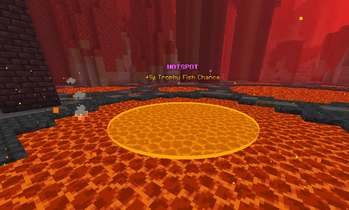
- Hotspot Highlight
- - Highlights hotspots with a color fitting to their type.
- - Renders a circle around the hotspot and fills it with the color.
Foraging Config
- HOTF
- - Show level as amount
- - Show total progress
- - Show shift-click cost
- - Show total amount left
- Galatea
- - Mute the Phantoms
- - Shulker Overwrite
- - Allows you to overwrite the Shulker's color with a custom one.
Garden Config
- Pest Bait Type
- - While in a Trap inventory, view what bait type attracts what pests.
- Desk Pest Highlight
- - In the "Configure Plots" screen, highlight what plots have pests on them.
Inventory Config
- Sack Value
📊 Mod Details
- Game
- Minecraft Mods
- Author
- j10a1n15
- Version
- 1.17.2
- Downloads
- 1,801,117
- Endorsements
- 57
- Category
- fabric
- Created
- 4/14/2025
- Updated
- 7/20/2026
- Game Versions
- 26.2
- Tags
- utility
🔧 How to Install Minecraft Mods Mods
Download from Modrinth. Use Prism Launcher or drop into your mods folder.
📖 Full step-by-step install guide for Minecraft Mods →
Visit the official mod page for specific installation instructions for this mod.
🎮 Need cheat codes or console commands? Check ur gaming wiki for Minecraft Mods commands, item IDs, and more.
❓ Frequently Asked Questions
Which Minecraft Mods versions does SkyOcean support?
The author lists 26.2. Other versions may work but are untested by the author.
What is the latest version of SkyOcean?
Version 1.17.2, published 2026-07-20 with 1.8M downloads recorded at the source.
Keep browsing — more Minecraft Mods mods await