Skylume ☆ Hypixel Skyblock
🟡 Updated this year⚠️ Install Order · 2 steps
Install in this order, then this mod last — most mods fail to load without their framework and dependencies in place.
🖼️ Gallery (4 images)
🔍 Analysis
- 🏆 #853 of 909 fabric mods in this game by downloads
📋 About This Mod
!(https://cdn.modrinth.com/data/cached_images/60757aaf4905b2a0e78b350ccf56bf9632f7147a.png)
# ✦ SkyLume ✦
A modern quality-of-life mod for Hypixel SkyBlock.
SkyLume is a client-side Fabric mod focused on useful SkyBlock tools, responsive interfaces and extensive customization without automating gameplay.
## 📖 Features
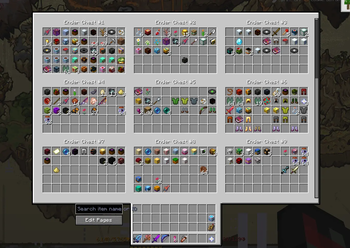
📦 Storage Search and Overview
A fast and interactive interface for browsing your SkyBlock Storage.
- View saved Ender Chest and Backpack pages in one interface
- Search indexed items by name or SkyBlock item ID
- Open a matching Storage page directly from the overview
- Interact with items through the real server-side Storage container
- Automatically refresh saved previews and the search index when items move
- Preserve search state, scroll position and selected pages
- Dim non-matching items with a configurable highlight colour
- Use Edit Pages without leaving the Storage workflow
- Return directly to the Storage overlay from Edit Pages
- Open the Farming or Hunting Toolkit directly from Storage
- Return directly to the Storage overlay from Toolkit screens
- Preserve full SkyBlock item lore and compatible price additions
- Compatible with supported inventory shortcuts and REI screen exclusion
Only pages opened by the player are indexed. SkyLume does not attempt to access unloaded Storage data.
📍 Waypoints and Routes
Create, organize and follow local SkyBlock waypoints.
- Create a temporary waypoint with `/sl w here`
- Create a waypoint with `/sl w
` - Coordinates can also use comma-separated formats
- Add `perm` to save a permanent waypoint
- Create waypoints from your current position or crosshair using keybinds
- Click explicitly formatted coordinates in chat to save them
- Configure colour, beam thickness, beacon, tracer and through-wall rendering
- Organize waypoints into expandable nested groups
- Build sequential routes from multiple waypoints
- Toggle individual waypoints, complete groups or complete routes
- Reset or restart a route from the Waypoint Manager
- Disabled route points are skipped without breaking route progression
- Advance routes automatically by reaching their configured radius
- Filter visibility by island or zone
- Search, edit, hide, restore and delete saved waypoints
- Import and export local waypoint data
- Deduplicate shared waypoint messages
- Use local history and undo controls
SkyLume only shares waypoints through explicit player actions.
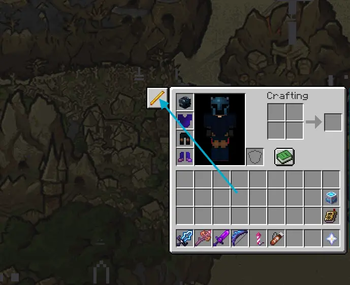
⚡ Inventory Buttons
Create programmable buttons around supported inventory screens.
- Choose a button name, item icon, tooltip and command
- Select icons through a visual Minecraft item picker
- Drag buttons around the inventory
- Resize buttons with the mouse wheel in placement mode
- Organize buttons using the dedicated Quick Access editor
- Execute only when the player explicitly clicks the button
Open the editor from SkyLume settings or with `/sl quick-access`.
💬 Chat Quality of Life
Client-side chat tools inspired by established chat mods.
- Copy the chat message currently under the mouse cursor
- Configurable mouse-button selection for copying
- Preserve readable characters and Minecraft formatting correctly
- Show movable local feedback after copying or performing other actions
- Search messages using an explicit search button
- Reset chat search automatically when chat closes
- Compact repeated messages with configurable counter formats
- Choose parentheses, brackets or custom compactor formatting
- Configure compactor prefix, suffix and colour
- Keep an extended configurable chat history for the current session
- Highlight player names or custom phrases
- Create multiple local highlight rules
- Filter matching messages through editable local rules
- Show configurable local toast notifications
- Preserve original hover and click events where possible
No chat messages are sent automatically.
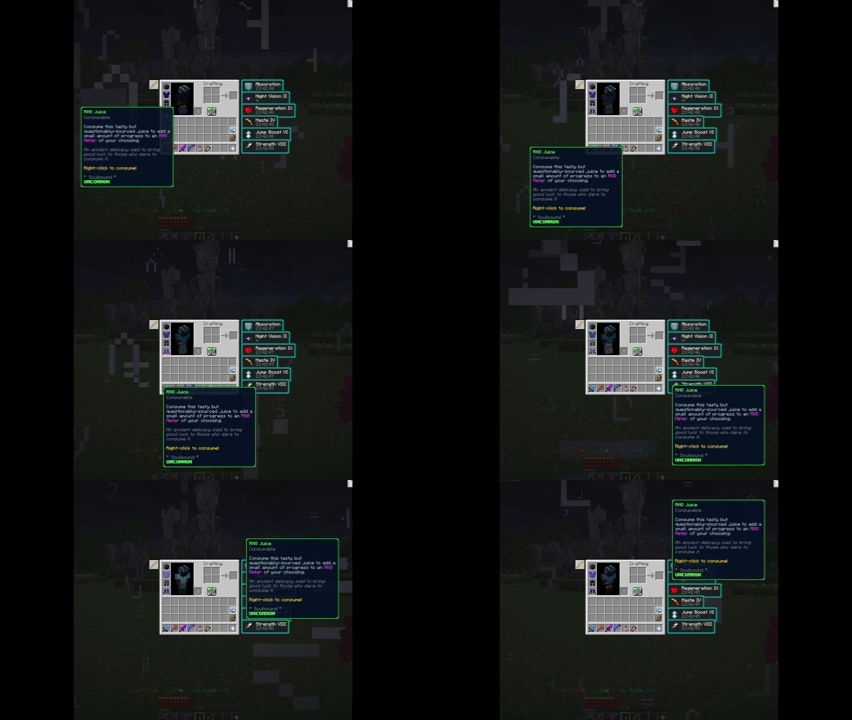
🖱️ Movable Tooltips
Make long SkyBlock item descriptions easier to read.
- Move an entire tooltip vertically or horizontally
- Configure movement speed and movement keys
- Use smooth interpolated movement
- Allow clipped tooltips to move beyond the screen boundary
- Automatically avoid screens where tooltip movement would interfere with normal scrolling
This feature moves the complete tooltip rather than altering or truncating its contents.
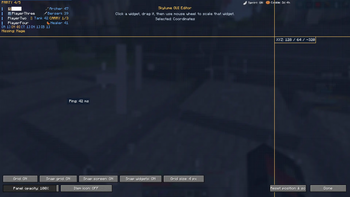
🎛️ HUD and Interface Editor
Arrange SkyLume HUD elements through a dedicated editor.
- Drag each element independently
- Scale elements individually
- Snap to a configurable grid
- Snap to screen edges
- Snap to other SkyLume widgets
- Use alignment guides
- Configure panel opacity from 0–100%
- Add optio
📊 Mod Details
- Game
- Minecraft Mods
- Author
- Olihal
- Version
- 2.2.0
- Downloads
- 244
- Endorsements
- 1
- Category
- fabric
- Created
- 8/2/2026
- Updated
- 8/9/2026
- Game Versions
- 26.1, 26.1.1, 26.1.2
- Tags
- utility
🔧 How to Install Minecraft Mods Mods
Download from Modrinth. Use Prism Launcher or drop into your mods folder.
📖 Full step-by-step install guide for Minecraft Mods →
Visit the official mod page for specific installation instructions for this mod.
🎮 Need cheat codes or console commands? Check ur gaming wiki for Minecraft Mods commands, item IDs, and more.
❓ Frequently Asked Questions
Which Minecraft Mods versions does Skylume ☆ Hypixel Skyblock support?
The author lists 26.1, 26.1.1, 26.1.2. Other versions may work but are untested by the author.
What is the latest version of Skylume ☆ Hypixel Skyblock?
Version 2.2.0, published 2026-08-09 with 244 downloads recorded at the source.
Keep browsing — more Minecraft Mods mods await