SkyCubed
🟡 Updated this year⚠️ Install Order · 2 steps
Install in this order, then this mod last — most mods fail to load without their framework and dependencies in place.
🖼️ Gallery (7 images)
🔍 Analysis
- 👍 0.0% endorsement rate
- 🏆 #534 of 653 adventure mods in this game by downloads
📋 About This Mod
# SkyCubed SkyCubed is a Hypixel SkyBlock UI overhaul mod, changing all aspects of the UI in-game to be more inline into it looking like its own game ## Installation Guide - Prerequisites: (https://modrinth.com/mod/fabric-language-kotlin) - Download into your favourite launcher or into your mods folder directly - Recommended mods to go with it - (https://modrinth.com/mod/skyblock-custom-scoreboard) ## Preview - To check out the features you can go to the (#features) below. - If you would like to see how it looks check out the (https://modrinth.com/project/skycubed/gallery) ## Credits - (https://thatgravyboat.tech) - Main Developer - (https://modrinth.com/mod/skyblock-custom-scoreboard) - Main Contributor - (https://modrinth.com/mod/skyocean) - Main Contributor - (https://github.com/DeDiamondPro/SkyGuide) - Map Data - (https://alyportfolio.carrd.co/) - Info Display, RPG HUD, and general palette textures - (https://modrinth.com/user/Bellz) - Various little info icons. - M1lkys - Emotional Support ## Features <details> <summary>General Config</summary> - Hidden Actionbar Widgets - Hidden HUD Elements - Quick Access to other SkyCubed configs - Minecraft Keybinds Screen - SkyCubed Notifications - SkyCubed SackHud Edit Screen </details> <details> <summary>Overlay Config</summary> - Info Overlay - Shows generalised information about your current location centered at the top of the screen. - RPG Overlay - RPG style display with health, mana, (skyblock) xp, and air (if in water). - Text Overlay - Movable text overlays for health, mana, defense and speed. - Tablist Overlay - A compact tablist with player sorting options. - Sack Overlay - Displays specified items from your sacks with their amounts. - You can customize the items shown using `/skycubed sackhud`. - Trophy Fish Overlay - Displays the amount of each trophy fish you have caught. - Has different toggles to show not unlocked ones, a checkmark or cross for caught/not caught, and more. - Best used with the (https://modrinth.com/mod/skyblock-profile-viewer) mod to update your data when out of sync. - Map Overlay - Displays a map of the current area you are in. - Highlights NPCs and other important locations. - Can be toggled to show a minimap or a full screen map. - Also has a rounded shape option as well as an option to rotate the minimap in the players looking direction. - Dungeon Map Overlay - Displays the current Dungeon map on your screen. - With customizable colors. - Pickup Log Overlay - Displays the items you have picked up or dropped on screen. - Has an option for a compact view, sack items, and more. - Commissions Overlay - Displays your current commissions and their progress on screen. - NPC Overlay - Displays NPC messages on screen like in other games. - Cold Overlay - When freezing in the Glacite Tunnels or Mineshafts, the vanilla freezing overlay appears on your screen. - Bossbar Hider - Hides the vanilla bossbar with or without the bossbar title. - Movable Hotbar - Wind Overlay </details> <details> <summary>Screens Config</summary> - Show Equipment - Like armor, equipment will show up next to your player in the inventory. - Wardrobe Overlay - In the wardrobe, your armor will be displayed on a player for a better view. </details> <details> <summary>Items Config</summary> - Item Bars - Adds durability bars to items like drill to show fuel percentage and for snowballs in snow launchers. - Cooldowns - Applies the vanilla cooldown effect to items with cooldowns, like the Grappling Hook. </details> <details> <summary>Chat Config</summary> - Modify Hypixel Commands - Adds Tab completion to various Hypixel commands. - Chat Colors - Changes the color of the tab next to chat messages based on their type, such as private messages, guild messages, system messages, and public messages. - Compact Chat - Compacts certain chat messages to reduce clutter, such as Hypixel experience gains, cooldowns, and pickaxe abilities. - Messages to clean - Allows you to write your own filters using (https://regex101.com/) to remove unwanted chat messages. </details> <details> <summary>Notifications Config</summary> - Notifications - Customizable notifications for various events, actions, and general time sensitive messages. - Will show up as a toast notification in the top right corner of the screen. - You can view all notifications in the SkyCubed Notifications screen, which can be found on the top right of the escape menu. </details> <details> <summary>Rendering Config</summary> - Show own Nametag - While in f3, displays your own nametag above your player. </details>
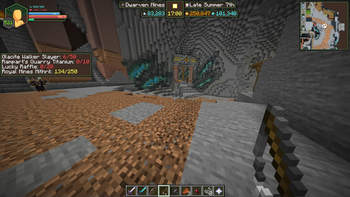
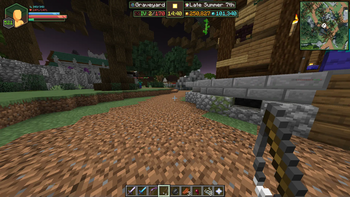
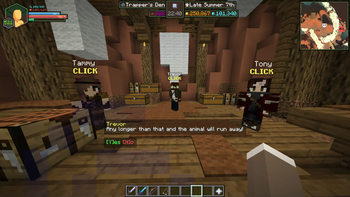
SkyCubed is a Hypixel SkyBlock UI overhaul mod, changing all aspects of the UI in-game to be more inline into it looking like its own game
## Installation Guide - Prerequisites: (https://modrinth.com/mod/fabric-language-kotlin) - Download into your favourite launcher or into your mods folder directly - Recommended mods to go with it - (https://modrinth.com/mod/skyblock-custom-scoreboard)
## Preview - To check out the features you can go to the (#features) below. - If you would like to see how it looks check out the (https://modrinth.com/project/skycubed/gallery)
## Credits - (https://thatgravyboat.tech) - Main Developer - (https://modrinth.com/mod/skyblock-custom-scoreboard) - Main Contributor - (https://modrinth.com/mod/skyocean) - Main Contributor - (https://github.com/DeDiamondPro/SkyGuide) - Map Data - (https://alyportfolio.carrd.co/) - Info Display, RPG HUD, and general palette textures - (https://modrinth.com/user/Bellz) - Various little info icons. - M1lkys - Emotional Support
## Features
General Config
- Hidden Actionbar Widgets
- Hidden HUD Elements
- Quick Access to other SkyCubed configs
- - Minecraft Keybinds Screen
- - SkyCubed Notifications
- - SkyCubed SackHud Edit Screen
Overlay Config
- Info Overlay
- - Shows generalised information about your current location centered at the top of the screen.
- RPG Overlay
- - RPG style display with health, mana, (skyblock) xp, and air (if in water).
- Text Overlay
- - Movable text overlays for health, mana, defense and speed.
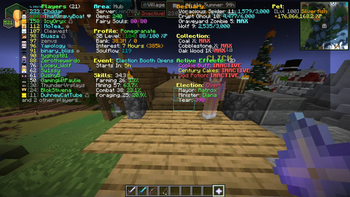
- Tablist Overlay
- - A compact tablist with player sorting options.
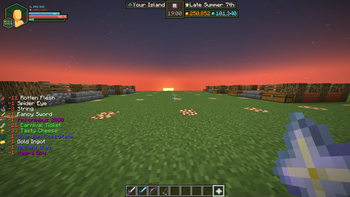
- Sack Overlay
- - Displays specified items from your sacks with their amounts.
- - You can customize the items shown using `/skycubed sackhud`.
- Trophy Fish Overlay
- - Displays the amount of each trophy fish you have caught.
- - Has different toggles to show not unlocked ones, a checkmark or cross for caught/not caught, and more.
- - Best used with the (https://modrinth.com/mod/skyblock-profile-viewer) mod to update your data when out of sync.
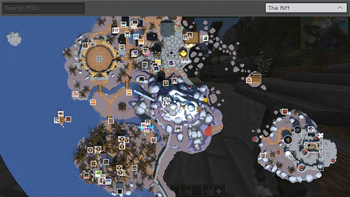
- Map Overlay
- - Displays a map of the current area you are in.
- - Highlights NPCs and other important locations.
- - Can be toggled to show a minimap or a full screen map.
- - Also has a rounded shape option as well as an option to rotate the minimap in the players looking direction.
- Dungeon Map Overlay
- - Displays the current Dungeon map on your screen.
- - With customizable colors.
- Pickup Log Overlay
- - Displays the items you have picked up or dropped on screen.
- - Has an option for a compact view, sack items, and more.
- Commissions Overlay
- - Displays your current commissions and their progress on screen.
- NPC Overlay
- - Displays NPC messages on screen like in other games.
- Cold Overlay
- - When freezing in the Glacite Tunnels or Mineshafts, the vanilla freezing overlay appears on your screen.
- Bossbar Hider
- - Hides the vanilla bossbar with or without the bossbar title.
- Movable Hotbar
- Wind Overlay
Screens Config
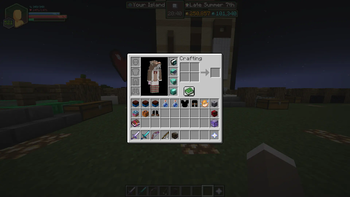
- Show Equipment
- - Like armor, equipment will show up next to your player in the inventory.
- Wardrobe Overlay
- - In the wardrobe, your armor will be displayed on a player for a better view.
Items Config
- Item Bars
- - Adds durability bars to items like drill to show fuel percentage and for snowballs in snow launchers.
- Cooldowns
- - Applies the vanilla cooldown effect to items with cooldowns, like the Grappling Hook.
Chat Config
- Modify Hypixel Commands
- - Adds Tab completion to various Hypixel commands.
- Chat Colors
- - Changes the color of the tab next to chat messages based on their type, such as private messages, guild messages, system messages, and public messages.
- Compact Chat
- - Compacts certain chat messages to reduce clutter, such as Hypixel experience gains, cooldowns, and pickaxe abilities.
- Messages to clean
- - Allows you to write your own filters using (https://regex101.com/) to remove unwanted chat messages.
Notifications Config
- Notifications
- - Customizable notifications for various events, actions, and general time sensitive messages.
- - Will show up as a toast notification in the top right corner of the screen.
- - You can view all notifications in the SkyCubed Notifications screen, which can be found on the top right of the escape menu.
Rendering Config
- Show own Nametag
- - While in f3, displays your own nametag above your player.
📊 Mod Details
- Game
- Minecraft Mods
- Author
- j10a1n15
- Version
- 1.9.2
- Downloads
- 113,810
- Endorsements
- 47
- Category
- adventure
- Created
- 12/16/2024
- Updated
- 8/14/2026
- Game Versions
- 26.2
- Tags
- adventure, management, utility
🔧 How to Install Minecraft Mods Mods
Download from Modrinth. Use Prism Launcher or drop into your mods folder.
📖 Full step-by-step install guide for Minecraft Mods →
Visit the official mod page for specific installation instructions for this mod.
🎮 Need cheat codes or console commands? Check ur gaming wiki for Minecraft Mods commands, item IDs, and more.
❓ Frequently Asked Questions
Which Minecraft Mods versions does SkyCubed support?
The author lists 26.2. Other versions may work but are untested by the author.
What is the latest version of SkyCubed?
Version 1.9.2, published 2026-08-14 with 113,810 downloads recorded at the source.
Keep browsing — more Minecraft Mods mods await