SimpleScrollToolTips
🟡 Updated this year⚠️ Install Order · 2 steps
Install in this order, then this mod last — most mods fail to load without their framework and dependencies in place.
🖼️ Gallery (1 images)
🔍 Analysis
- 👍 0.4% endorsement rate
- 🏆 #324 of 894 fabric mods in this game by downloads
📋 About This Mod
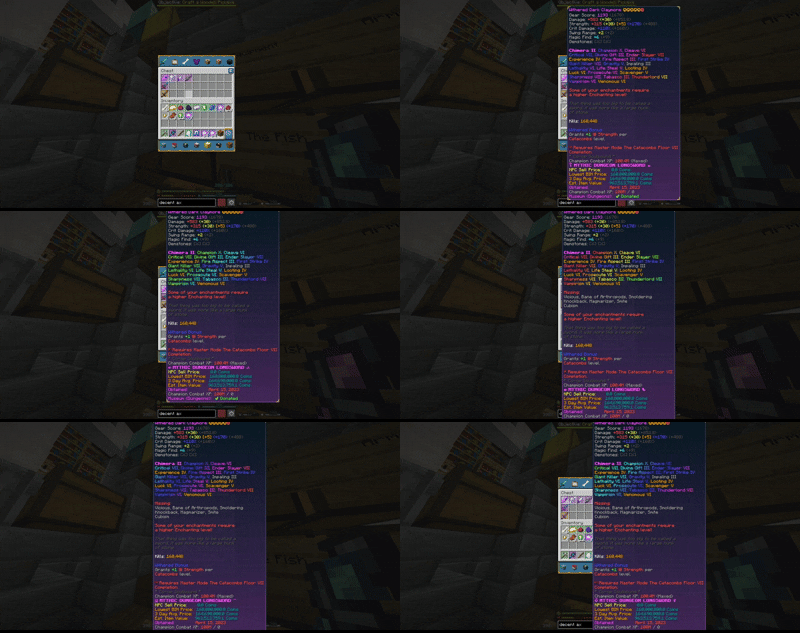
# SimpleScrollToolTips (https://img.shields.io/badge/Minecraft-26.1--26.2-green)](https://minecraft.net) (https://img.shields.io/badge/Mod%20Loader-Fabric-blue)](https://fabricmc.net) (https://img.shields.io/badge/License-MIT-yellow)](LICENSE) (https://img.shields.io/badge/Version-1.0.0-orange)](https://modrinth.com/project/simplescrolltooltips) **Scroll oversized item tooltips so you can actually read the parts that run off your screen.** Ever hovered an item with so many enchantments and stats that its tooltip spills past the top *and* bottom of the screen? Vanilla just clamps it to the edge and the rest is lost. SimpleScrollToolTips lets you scroll — and pan — any tooltip with your mouse wheel or the arrow keys, so the clipped lines come into view. **Author:** Partacus-SPQR **Source:** (https://github.com/Partacus-SPQR/SimpleScrollToolTips) **Download:** (https://modrinth.com/project/simplescrolltooltips) ## Features - **Scroll off-screen tooltips** — read tooltips taller (or wider) than your screen instead of having them clamped to the edge - **Mouse wheel** to scroll vertically, **Shift + wheel** to scroll horizontally - **Arrow-key scrolling** (↑ ↓ ← →), fully rebindable - **Auto-reset** — scroll position resets when you hover a different item - **Adjustable sensitivity** and optional **per-axis inversion** - **Client-side only** — works on any server, including stat-heavy ones like SkyBlock - **(https://modrinth.com/mod/modmenu)** configuration screen ## Controls Scrolling only acts while you're hovering an item that has a tooltip. | Input | Action | |-------|--------| | Mouse wheel | Scroll the tooltip vertically | | Shift + mouse wheel | Scroll the tooltip horizontally | | ↑ / ↓ | Scroll vertically | | ← / → | Scroll horizontally | All keys are rebindable in **Options → Controls → SimpleScrollToolTips**. ## Configuration Edit in **Mod Menu**, or directly in `config/simplescrolltooltips.json`: | Option | Default | Description | |--------|---------|-------------| | `enable` | `true` | Master toggle | | `sensitivity` | `10` | Pixels moved per scroll step | | `auto_reset` | `true` | Reset scroll when hovering a new item | | `invert_horizontal` | `false` | Invert horizontal scroll direction | | `invert_vertical` | `false` | Invert vertical scroll direction | ## Requirements - **Minecraft** 26.1, 26.1.2, or 26.2 - **Fabric Loader** 0.16.0+ - **Fabric API** - **Java** 25 - (optional) **Mod Menu** for in-game config ## Version Compatibility | Minecraft | Mod Version | Fabric Loader | Java | |-----------|-------------|---------------|------| | 26.2 | 1.0.0 | 0.16.0+ | 25 | | 26.1.2 | 1.0.0 | 0.16.0+ | 25 | | 26.1 | 1.0.0 | 0.16.0+ | 25 | ## Installation 1. Install (https://fabricmc.net/use/installer/) for your Minecraft version 2. Install (https://modrinth.com/mod/fabric-api) (and optionally (https://modrinth.com/mod/modmenu)) 3. Drop the matching `simplescrolltooltips-<version>.jar` into your `mods` folder ## Building ```bash ./gradlew buildAllVersions ``` Per-version jars are written to `versions/<mc>/build/libs/`. ## How it works Item tooltips in container screens are positioned by `DefaultTooltipPositioner`, which clamps oversized tooltips to the screen. SimpleScrollToolTips offsets the tooltip position **after** that clamp, letting it move off-screen so the hidden lines scroll into view. ## License (LICENSE)
# SimpleScrollToolTips
[!(https://img.shields.io/badge/Minecraft-26. 1--26. 2-green)](https://minecraft.net) [!(https://img.shields.io/badge/Mod%20Loader-Fabric-blue)](https://fabricmc.net) [!(https://img.shields.io/badge/License-MIT-yellow)](LICENSE) [!(https://img.shields.io/badge/Version-1. 0. 0-orange)](https://modrinth.com/project/simplescrolltooltips)
Scroll oversized item tooltips so you can actually read the parts that run off your screen.
Ever hovered an item with so many enchantments and stats that its tooltip spills past the top and bottom of the screen? Vanilla just clamps it to the edge and the rest is lost. SimpleScrollToolTips lets you scroll — and pan — any tooltip with your mouse wheel or the arrow keys, so the clipped lines come into view.
- Author
- Partacus-SPQR
- Source
- (https://github.com/Partacus-SPQR/SimpleScrollToolTips)
- Download
- (https://modrinth.com/project/simplescrolltooltips)
## Features
- Scroll off-screen tooltips — read tooltips taller (or wider) than your screen instead of having them clamped to the edge
- Mouse wheel to scroll vertically, Shift + wheel to scroll horizontally
- Arrow-key scrolling (↑ ↓ ← →), fully rebindable
- Auto-reset — scroll position resets when you hover a different item
- Adjustable sensitivity and optional per-axis inversion
- Client-side only — works on any server, including stat-heavy ones like SkyBlock
- (https://modrinth.com/mod/modmenu)** configuration screen
## Controls
Scrolling only acts while you're hovering an item that has a tooltip.
| Input | Action | |-------|--------| | Mouse wheel | Scroll the tooltip vertically | | Shift + mouse wheel | Scroll the tooltip horizontally | | ↑ / ↓ | Scroll vertically | | ← / → | Scroll horizontally |
All keys are rebindable in Options → Controls → SimpleScrollToolTips.
## Configuration
Edit in Mod Menu, or directly in `config/simplescrolltooltips.json`:
| Option | Default | Description | |--------|---------|-------------| | `enable` | `true` | Master toggle | | `sensitivity` | `10` | Pixels moved per scroll step | | `auto_reset` | `true` | Reset scroll when hovering a new item | | `invert_horizontal` | `false` | Invert horizontal scroll direction | | `invert_vertical` | `false` | Invert vertical scroll direction |
## Requirements
- Minecraft 26. 1, 26. 1. 2, or 26. 2
- Fabric Loader 0. 16. 0+
- Fabric API
- Java 25
- (optional) Mod Menu for in-game config
## Version Compatibility
| Minecraft | Mod Version | Fabric Loader | Java | |-----------|-------------|---------------|------| | 26. 2 | 1. 0. 0 | 0. 16. 0+ | 25 | | 26. 1. 2 | 1. 0. 0 | 0. 16. 0+ | 25 | | 26. 1 | 1. 0. 0 | 0. 16. 0+ | 25 |
## Installation
1. Install (https://fabricmc.net/use/installer/) for your Minecraft version
2. Install (https://modrinth.com/mod/fabric-api) (and optionally (https://modrinth.com/mod/modmenu))
3. Drop the matching `simplescrolltooltips-
## Building
```bash ./gradlew buildAllVersions ```
Per-version jars are written to `versions/
## How it works
Item tooltips in container screens are positioned by `DefaultTooltipPositioner`, which clamps oversized tooltips to the screen. SimpleScrollToolTips offsets the tooltip position after** that clamp, letting it move off-screen so the hidden lines scroll into view.
📊 Mod Details
- Game
- Minecraft Mods
- Author
- Partacus-SPQR
- Version
- 1.2.0
- Downloads
- 681
- Endorsements
- 3
- Category
- fabric
- Created
- 7/2/2026
- Updated
- 7/23/2026
- Game Versions
- 26.2
- Tags
- utility
🔧 How to Install Minecraft Mods Mods
Download from Modrinth. Use Prism Launcher or drop into your mods folder.
📖 Full step-by-step install guide for Minecraft Mods →
Visit the official mod page for specific installation instructions for this mod.
🎮 Need cheat codes or console commands? Check ur gaming wiki for Minecraft Mods commands, item IDs, and more.
❓ Frequently Asked Questions
Which Minecraft Mods versions does SimpleScrollToolTips support?
The author lists 26.2. Other versions may work but are untested by the author.
What is the latest version of SimpleScrollToolTips?
Version 1.2.0, published 2026-07-23 with 681 downloads recorded at the source.
Keep browsing — more Minecraft Mods mods await