Simple Update Checker
🟡 Updated this year⚠️ Install Order · 2 steps
Install in this order, then this mod last — most mods fail to load without their framework and dependencies in place.
🖼️ Gallery (3 images)
🔍 Analysis
- 👍 0.0% endorsement rate
- 🏆 #20 of 983 fabric mods in this game by downloads
📋 About This Mod
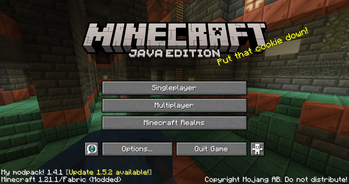
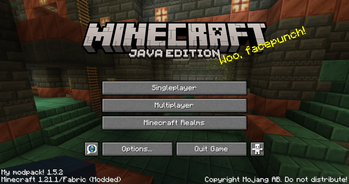
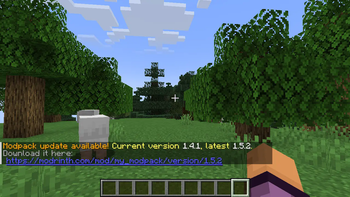
# Simple Update Checker Simple Update Checker is a small mod that adds in-game notification about Modrinth modpack update being available. It works for both servers and clients. The update information is displayed in logs on server/client boot and then in other places depending on where it runs. For clients, it displays update info on main screen (on right side from modpack name/version text), refreshing every hour after the game starts. For servers, it displays it in logs after server starts and for operators on join. After that, it will check it every 12 hours until update is found, after which it will repeat it after double time from last message, up to 14 days of delay (12 hours, 1 day, 2 days, 4 days, 8 days, 14 days). The check can also be triggered manually with `/simpleupdatechecker check` command, with limitation of 15 minutes per refresh. All the checks can be disabled in `simpleupdatechecker_user.json` config or via `/simpleupdatechecker settings` command. ## Configuration (User) You can change settings via `/simpleupdatechecker settings <name> <value>` or within config. Both use same names. You can find the config file in `config/simpleupdatechecker_user.json` and reload it with `/simpleupdatechecker reload` command. ```json5 { // Disables update checking all together "disable_update_checking": false, // Disables showing modpack version and update info in main menu "disable_main_menu": false, // Disables sending info about update in logs after first version check. "disable_logs_first_check": false, // Disables sending info about update in logs after server starts. "disable_logs_server_started": false, // Disables sending info about update in logs repeatedly. "disable_logs_late": false, // Disables sending info about update to level 4 operators when they join. "disable_join_ops": false } ``` ## Configuration (Modpack) This one should only be changed by modpack creator and as such only contains modpack related definitions You can find the config file in `config/simpleupdatechecker_modpack.json` and reload it with `/simpleupdatechecker reload` command. ```json5 { // Slug / Project id on Modrinth, used for lookup. "project_id": "some_project", // Version Number in incremental format, ideally same as one provided on Modrinth. "version_id": "1.0.0", // (Optional, empty to disable) Name of the modpack displayed in main menu and placeholders. Fallbacks to project_id. "display_name": "My modpack!", // (Optional, empty to disable) Modpack version used for display, if you want to make it look different. "display_version": "", // Allowed release types, matches with Modrinth ones. By default it allows all, but you can remove them as you want. // Removing "beta" and "alpha" will prevent from recommending updating to beta and alpha versions. "release_type": , // Maximum (exclusive) version that gets matched, should use same format as version_id / modrinth version numbers. // Prevents from versions equal or newer than provided from being matched as update. "max_exclusive_version": "", // Makes update version use version number for display instead of version name (top field). "use_version_number_for_display": true } ```
# Simple Update Checker Simple Update Checker is a small mod that adds in-game notification about Modrinth modpack update being available. It works for both servers and clients.
The update information is displayed in logs on server/client boot and then in other places depending on where it runs. For clients, it displays update info on main screen (on right side from modpack name/version text), refreshing every hour after the game starts. For servers, it displays it in logs after server starts and for operators on join. After that, it will check it every 12 hours until update is found, after which it will repeat it after double time from last message, up to 14 days of delay (12 hours, 1 day, 2 days, 4 days, 8 days, 14 days). The check can also be triggered manually with `/simpleupdatechecker check` command, with limitation of 15 minutes per refresh.
All the checks can be disabled in `simpleupdatechecker_user.json` config or via `/simpleupdatechecker settings` command.
## Configuration (User)
You can change settings via `/simpleupdatechecker settings
## Configuration (Modpack) This one should only be changed by modpack creator and as such only contains modpack related definitions You can find the config file in `config/simpleupdatechecker_modpack.json` and reload it with `/simpleupdatechecker reload` command. ```json5 { // Slug / Project id on Modrinth, used for lookup. "project_id": "some_project", // Version Number in incremental format, ideally same as one provided on Modrinth. "version_id": "1. 0. 0", // (Optional, empty to disable) Name of the modpack displayed in main menu and placeholders. Fallbacks to project_id. "display_name": "My modpack!", // (Optional, empty to disable) Modpack version used for display, if you want to make it look different. "display_version": "", // Allowed release types, matches with Modrinth ones. By default it allows all, but you can remove them as you want. // Removing "beta" and "alpha" will prevent from recommending updating to beta and alpha versions. "release_type": [ "alpha", "beta", "release" ], // Maximum (exclusive) version that gets matched, should use same format as version_id / modrinth version numbers. // Prevents from versions equal or newer than provided from being matched as update. "max_exclusive_version": "", // Makes update version use version number for display instead of version name (top field). "use_version_number_for_display": true } ```
📊 Mod Details
- Game
- Minecraft Mods
- Author
- Patbox
- Version
- 1.6.0+26.2
- Downloads
- 87,023
- Endorsements
- 35
- Category
- fabric
- Created
- 9/29/2024
- Updated
- 6/19/2026
- Game Versions
- 26.2
- Tags
- utility
🔧 How to Install Minecraft Mods Mods
Download from Modrinth. Use Prism Launcher or drop into your mods folder.
📖 Full step-by-step install guide for Minecraft Mods →
Visit the official mod page for specific installation instructions for this mod.
🎮 Need cheat codes or console commands? Check ur gaming wiki for Minecraft Mods commands, item IDs, and more.
❓ Frequently Asked Questions
Which Minecraft Mods versions does Simple Update Checker support?
The author lists 26.2. Other versions may work but are untested by the author.
What is the latest version of Simple Update Checker?
Version 1.6.0+26.2, published 2026-06-19 with 87,023 downloads recorded at the source.
Keep browsing — more Minecraft Mods mods await