Simple Info HUD
🟠 Updated over a year ago⚠️ Install Order · 2 steps
Install in this order, then this mod last — most mods fail to load without their framework and dependencies in place.
🖼️ Gallery (10 images)
🔍 Analysis
- 🏆 #55 of 532 adventure mods in this game by downloads
📋 About This Mod
Simple Info HUD =============== Minecraft client-side mod for a simple HUD (Heads-on-Display) that shows coordinates, facing direction, world time and other in-game information in a consise format. Designed to be an unbtrusive version of the F3 Debug screen, offering useful info in a single line. Brief summary of the information displayed: - Coordinates - Direction - World and real-life day time. - Biome - FPS Valuable information in very little screen area! > > - Requires (https://fabricmc.net/) and (https://modrinth.com/mod/fabric-api) > - Currently supports only Minecraft 1.16.4/1.16.5, as it was (re-)created for using in (https://skyblock.net/). > Support for all major versions up to latest is planned. Usage and details ------------------ `F4` cycles HUD display mode, configurable in Minecraft "Controls" setting. By default is displays: - Coordinates: ``, `y` being the altitude / layer. - Facing direction: `N`orth, `S`outh, `W`est, `E`ast, `NW`, `NE`, `SW`, `SE`. Example: ` ` Pressing the display mode key once displays additional information: - Exact facing angle, from `-180°` to `+180°` at North. `0°` is South and `+90°` is East. - World time, in `HH:MM` format. To match the (https://minecraft.wiki/w/Clock) item, (https://minecraft.wiki/w/Daylight_cycle). Colors indicate some events during the sunset (dusk), night, and sunrise (dawn): - **`18:00`**: Daytime ends and Sunset begins, Villagers go to their beds and sleep - **`18:32`**: Beds can be used and undead mobs no longer burn - **`19:11`**: Hostile mobs start spawning outdoors - **`04:48`**: Hostile mobs stop spawning outdoors - **`05:27`**: Beds can no longer be used, undead mobs begin to burn - **`06:00`**: Sunrise ends and Daytime begins, Players and Villagers awaken and rise from their beds - The above timestamps are for clear/sunny weather. Rains and Thunderstorms extend bed usage, hostile mob spawning and no burning periods, so they start earlier and end later. - Biome human-friendly name, translated to your current game language Example: ` 18:32 Jungle` Pressing the key again displays more additional information: - World day - Exact world time in (https://minecraft.wiki/w/Tick). A Minecraft Day lasts 24000 ticks. - Real-life local time, in `HH:MM:SS` format. - Frames per second (FPS) Example: ` Day 123 18:32 T12542 21:52:45 Jungle 60 FPS` Press the key once more to disable the HUD, and again to cycle back to displaying simple information. * * * Installation ------------ #### Using a pre-built `jar`: - (https://docs.fabricmc.net/players/installing-fabric) in your Minecraft instance. - Download the mod for your Minecraft version. Releases are found on (https://github.com/MestreLion/SimpleInfoHUD/releases), (https://modrinth.com/mod/simple-info-hud), and on (https://www.curseforge.com/minecraft/mc-mods/simple-info-hud). - Save the downloaded `.jar` file in the `mods` folder of your Minecraft instance, by default `~/.minecraft` in Linux and `%APPDATA%/.mineraft` in Windows if you're using the official Minecraft Launcher from Microsoft. - Similar instructions can be found in this Fabric (https://docs.fabricmc.net/players/installing-mods) - _Note: Besides the Fabric Loader itself, this mod **requires** the (https://modrinth.com/mod/fabric-api)_, also available on (https://www.curseforge.com/minecraft/mc-mods/fabric-api) and (https://github.com/FabricMC/fabric/releases), so repeat the above steps for it. - All the above can be greatly simplified using a launcher such as (https://prismlauncher.org/) #### Compiling from source: - Install Java JDK (_not just the JRE!_), preferably a modern release such as OpenJDK 21 - Clone this repository from (https://github.com/MestreLion/SimpleInfoHUD) - Run `./gradlew build` in the cloned repository directory. ``` sudo apt install default-jdk git clone https://github.com/MestreLion/SimpleInfoHUD.git cd SimpleInfoHUD ./gradlew build ``` The resulting `.jar`s are found at `./build/libs`, and can be used to install the mod. * * * To-Do List ----------- - Use more colors: - Biome, Temperature, etc - Altitude: blue for Sea Level, yellow/cyan/red for top Gold, Diamonds, Lava Lakes, etc - Week/Moon phase. - Allow _basic_ customization, such as HUD position, size and color. - Config file to persist display mode. - Automatic publish on Modrinth, CurseForge and Github releases via Github actions - Branches for distinct major Minecraft versions. Wont-Do List ------------ - Add a ton of features or in-game customization options. There are better mods for that, including (https://github.com/maruohon/minihud). The idea of Simple Info HUD is to keep it sim
Simple Info HUD ===============
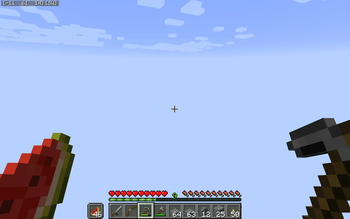
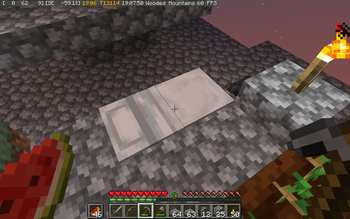
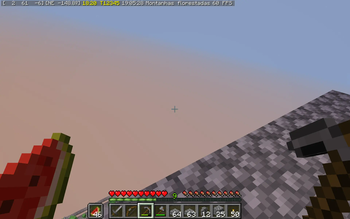
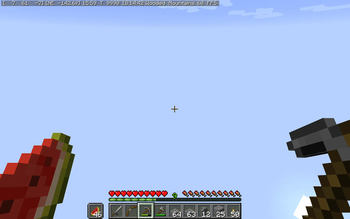
Minecraft client-side mod for a simple HUD (Heads-on-Display) that shows coordinates, facing direction, world time and other in-game information in a consise format.
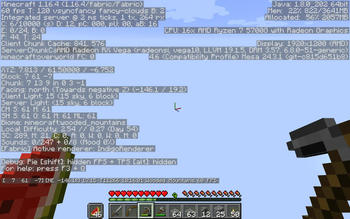
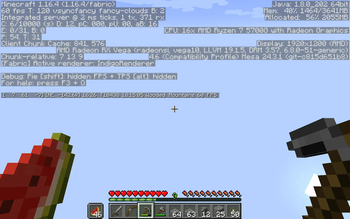
Designed to be an unbtrusive version of the F3 Debug screen, offering useful info in a single line.
Brief summary of the information displayed:
- Coordinates
- Direction
- World and real-life day time.
- Biome
- FPS
Valuable information in very little screen area!
> [!NOTE] > - Requires (https://fabricmc.net/) and (https://modrinth.com/mod/fabric-api) > - Currently supports only Minecraft 1. 16. 4/1. 16. 5, as it was (re-)created for using in (https://skyblock.net/). > Support for all major versions up to latest is planned.
Usage and details ------------------
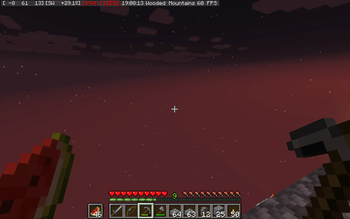
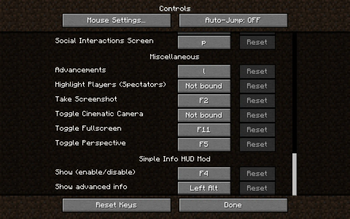
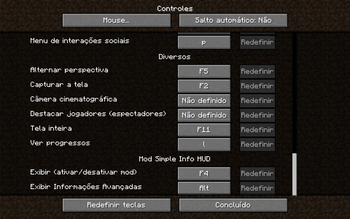
`F4` cycles HUD display mode, configurable in Minecraft "Controls" setting. By default is displays:
- Coordinates: ``, `y` being the altitude / layer.
- Facing direction: `N`orth, `S`outh, `W`est, `E`ast, `NW`, `NE`, `SW`, `SE`.
Pressing the display mode key once displays additional information:
- Exact facing angle, from `-180°` to `+180°` at North. `0°` is South and `+90°` is East.
- World time, in `HH:MM` format. To match the (https://minecraft.wiki/w/Clock) item, (https://minecraft.wiki/w/Daylight_cycle).
- Colors indicate some events during the sunset (dusk), night, and sunrise (dawn):
- - `18:00`: Daytime ends and Sunset begins, Villagers go to their beds and sleep
- - `18:32`: Beds can be used and undead mobs no longer burn
- - `19:11`: Hostile mobs start spawning outdoors
- - `04:48`: Hostile mobs stop spawning outdoors
- - `05:27`: Beds can no longer be used, undead mobs begin to burn
- - `06:00`: Sunrise ends and Daytime begins, Players and Villagers awaken and rise from their beds
- - The above timestamps are for clear/sunny weather.
- Rains and Thunderstorms extend bed usage, hostile mob spawning and no burning periods, so they start earlier and end later.
- Biome human-friendly name, translated to your current game language
` 18:32 Jungle`
Pressing the key again displays more additional information:
- World day
- Exact world time in (https://minecraft.wiki/w/Tick). A Minecraft Day lasts 24000 ticks.
- Real-life local time, in `HH:MM:SS` format.
- Frames per second (FPS)
` Day 123 18:32 T12542 21:52:45 Jungle 60 FPS`
Press the key once more to disable the HUD, and again to cycle back to displaying simple information.
Installation ------------
#### Using a pre-built `jar`: - (https://docs.fabricmc.net/players/installing-fabric) in your Minecraft instance. - Download the mod for your Minecraft version. Releases are found on (https://github.com/MestreLion/SimpleInfoHUD/releases), (https://modrinth.com/mod/simple-info-hud), and on (https://www.curseforge.com/minecraft/mc-mods/simple-info-hud). - Save the downloaded `.jar` file in the `mods` folder of your Minecraft instance, by default `~/.minecraft` in Linux and `%APPDATA%/.mineraft` in Windows if you're using the official Minecraft Launcher from Microsoft. - Similar instructions can be found in this Fabric (https://docs.fabricmc.net/players/installing-mods) - _Note: Besides the Fabric Loader itself, this mod requires the (https://modrinth.com/mod/fabric-api)_, also available on (https://www.curseforge.com/minecraft/mc-mods/fabric-api) and (https://github.com/FabricMC/fabric/releases), so repeat the above steps for it. - All the above can be greatly simplified using a launcher such as (https://prismlauncher.org/)
#### Compiling from source: - Install Java JDK (_not just the JRE!_), preferably a modern release such as OpenJDK 21 - Clone this repository from (https://github.com/MestreLion/SimpleInfoHUD) - Run `./gradlew build` in the cloned repository directory. ``` sudo apt install default-jdk git clone https://github.com/MestreLion/SimpleInfoHUD.git cd SimpleInfoHUD ./gradlew build ``` The resulting `.jar`s are found at `./build/libs`, and can be used to install the mod.
To-Do List -----------
- Use more colors:
- - Biome, Temperature, etc
- - Altitude: blue for Sea Level, yellow/cyan/red for top Gold, Diamonds, Lava Lakes, etc
- Week/Moon phase.
- Allow _basic_ customization, such as HUD position, size and color.
- Config file to persist display mode.
- Automatic publish on Modrinth, CurseForge and Github releases via Github actions
- Branches for distinct major Minecraft versions.
Wont-Do List ------------
- Add a ton of features or in-game customization options. There are better mods for that, including (https://github.com/maruohon/minihud). The idea of Simple Info HUD is to keep it sim
📊 Mod Details
- Game
- Minecraft Mods
- Author
- MestreLion
- Version
- 0.7
- Downloads
- 293
- Endorsements
- 1
- Category
- adventure
- Created
- 12/31/2024
- Updated
- 1/22/2025
- Game Versions
- 1.16.4, 1.16.5
- Tags
- adventure, utility
🔧 How to Install Minecraft Mods Mods
Download from Modrinth. Use Prism Launcher or drop into your mods folder.
📖 Full step-by-step install guide for Minecraft Mods →
Visit the official mod page for specific installation instructions for this mod.
🎮 Need cheat codes or console commands? Check ur gaming wiki for Minecraft Mods commands, item IDs, and more.
❓ Frequently Asked Questions
Which Minecraft Mods versions does Simple Info HUD support?
The author lists 1.16.4, 1.16.5. Other versions may work but are untested by the author.
What is the latest version of Simple Info HUD?
Version 0.7, published 2025-01-22 with 293 downloads recorded at the source.
Keep browsing — more Minecraft Mods mods await