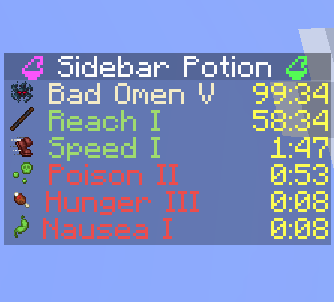
Sidebar Potion display
🟠 Updated over a year ago⚠️ Install Order · 2 steps
Install in this order, then this mod last — most mods fail to load without their framework and dependencies in place.
🖼️ Gallery (2 images)
🔍 Analysis
- 🏆 #44 of 211 decoration mods in this game by downloads
📋 About This Mod
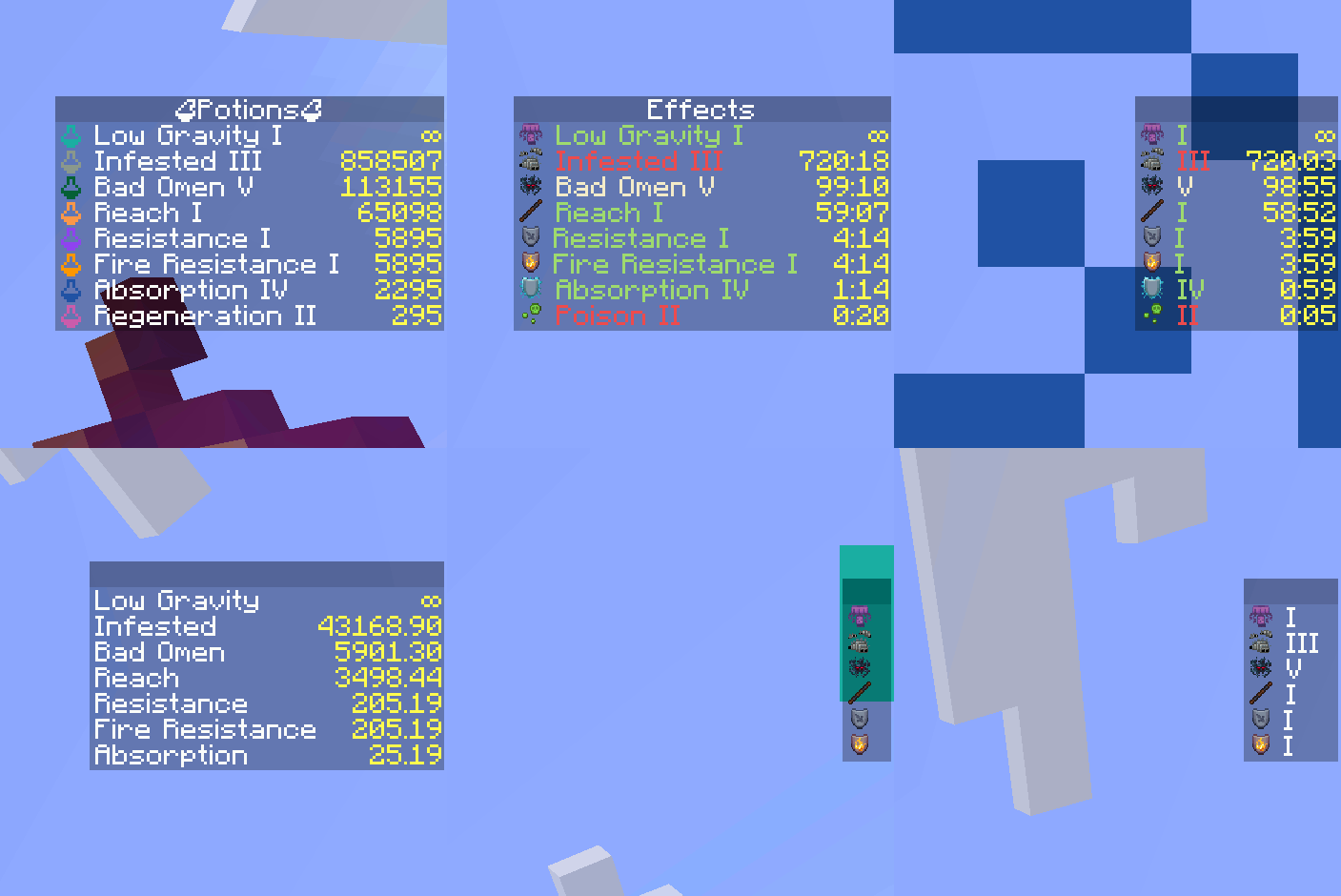
<p align="center"> <img src="https://github.com/C10udburst/sidebar-potion/raw/refs/heads/main/src/main/resources/assets/sidebar-potion/icon.png" width="128" height="128" alt="Sidebar Potion Icon"> </p> <p align="center"> <a href="https://www.minecraft.net/"> <img alt="Minecraft" src="https://img.shields.io/badge/Minecraft-1.21%2B-34D058?logo=mojang-studios&logoColor=white"> </a> <a href="#"> <img alt="Side" src="https://img.shields.io/badge/Side-Server--only-blue"> </a> <a href="https://modrinth.com/mod/"> <img alt="Modrinth" src="https://img.shields.io/badge/Modrinth-Project-00AF5C?logo=modrinth&logoColor=white"> </a> </p> # Sidebar Potion Lightweight server‑side mod that displays players' active status effects in a clean sidebar. The sidebar auto‑updates and hides itself when you have no effects. - Server‑only: install on a dedicated server or single‑player integrated server. Clients do not need the mod. - Configurable: names, colors, potency, icons, and duration format. - Optional (https://modrinth.com/mod/polymer) support: show effect icons using resourcepack. - Supports vanilla and modded effects (e.g. from Enderscapes - works with polymer port) <video autoplay muted> <source src="https://github.com/C10udburst/sidebar-potion/raw/refs/heads/main/.media/demo.mp4" type="video/mp4"> </video> ## Installation - Put the mod on the server (or your single‑player instance). Clients can stay vanilla. - Optional: install (https://modrinth.com/mod/polymer) on the server to enable effect icons for vanilla clients (see below). ## Optional dependency: Polymer If Polymer is installed on the server: - Effect icons can be shown to vanilla clients without a client resource pack. - Set `showIcon` to `true` in the config to display icons. - Set `forceCompatIcons` to `false` to use Polymer icons instead of potion icons. Without Polymer: - Effect icons will be replaced with colored potion icons. ## Configuration <div align="center"> <img src="https://github.com/C10udburst/sidebar-potion/raw/refs/heads/main/.media/anim.gif" width="250" alt="Config Example"> <p>Examples of different configurations</p> </div> A JSON file is created on first run at: - `./config/sidebar-potion.json` Edit the file and run `/reload` to apply changes. Available options (with defaults): - `showEffectName` (boolean, default: `true`): show the effect name. - `colorizeText` (boolean, default: `true`): colorize lines by effect type. - `hideDefaultGui` (boolean, default: `true`): hide the vanilla potion effect HUD. - `showPotency` (boolean, default: `true`): show effect amplifier (e.g. *II*, *III*). - `showIcon` (boolean, default: `true`): show effect icon. - `durationFormat` (string, default: `"mm:ss"`): how effect durations are rendered (see below). - `title` (string, default: `""`): sidebar title text. - `forceCompatIcons` (boolean, default: `false`): force potion icons even if Polymer is installed. ### Duration formats Use one of the following values: - `""` — no duration - `"t"` — ticks - `"s"` — seconds - `"s."` — seconds.milliseconds - `"mm:ss"` — minutes:seconds - `"mm:ss."` — minutes:seconds.milliseconds ### Behavior: - The sidebar is removed for a player when they have no active effects. - The title is taken from `title` and can be empty.




# Sidebar Potion
Lightweight server‑side mod that displays players' active status effects in a clean sidebar. The sidebar auto‑updates and hides itself when you have no effects.
- Server‑only: install on a dedicated server or single‑player integrated server. Clients do not need the mod.
- Configurable: names, colors, potency, icons, and duration format.
- Optional (https://modrinth.com/mod/polymer) support: show effect icons using resourcepack.
- Supports vanilla and modded effects (e.g. from Enderscapes - works with polymer port)
## Installation
- Put the mod on the server (or your single‑player instance). Clients can stay vanilla.
- Optional: install (https://modrinth.com/mod/polymer) on the server to enable effect icons for vanilla clients (see below).
## Optional dependency: Polymer
If Polymer is installed on the server: - Effect icons can be shown to vanilla clients without a client resource pack. - Set `showIcon` to `true` in the config to display icons. - Set `forceCompatIcons` to `false` to use Polymer icons instead of potion icons.
Without Polymer: - Effect icons will be replaced with colored potion icons.
## Configuration

Examples of different configurations
A JSON file is created on first run at: - `./config/sidebar-potion.json`
Edit the file and run `/reload` to apply changes.
Available options (with defaults): - `showEffectName` (boolean, default: `true`): show the effect name. - `colorizeText` (boolean, default: `true`): colorize lines by effect type. - `hideDefaultGui` (boolean, default: `true`): hide the vanilla potion effect HUD. - `showPotency` (boolean, default: `true`): show effect amplifier (e.g. II, III). - `showIcon` (boolean, default: `true`): show effect icon. - `durationFormat` (string, default: `"mm:ss"`): how effect durations are rendered (see below). - `title` (string, default: `""`): sidebar title text. - `forceCompatIcons` (boolean, default: `false`): force potion icons even if Polymer is installed.
### Duration formats
Use one of the following values: - `""` — no duration - `"t"` — ticks - `"s"` — seconds - `"s."` — seconds.milliseconds - `"mm:ss"` — minutes:seconds - `"mm:ss."` — minutes:seconds.milliseconds
### Behavior: - The sidebar is removed for a player when they have no active effects. - The title is taken from `title` and can be empty.
📊 Mod Details
- Game
- Minecraft Mods
- Author
- c10udburst
- Version
- 1.0.0
- Downloads
- 287
- Endorsements
- 1
- Category
- decoration
- Created
- 9/21/2025
- Updated
- 9/18/2025
- Game Versions
- 1.21.8
- Tags
- decoration, technology, utility
🔧 How to Install Minecraft Mods Mods
Download from Modrinth. Use Prism Launcher or drop into your mods folder.
📖 Full step-by-step install guide for Minecraft Mods →
Visit the official mod page for specific installation instructions for this mod.
🎮 Need cheat codes or console commands? Check ur gaming wiki for Minecraft Mods commands, item IDs, and more.
❓ Frequently Asked Questions
Which Minecraft Mods versions does Sidebar Potion display support?
The author lists 1.21.8. Other versions may work but are untested by the author.
What is the latest version of Sidebar Potion display?
Version 1.0.0, published 2025-09-18 with 287 downloads recorded at the source.
Keep browsing — more Minecraft Mods mods await