Showcase
🟡 Updated this year⚠️ Install Order · 2 steps
Install in this order, then this mod last — most mods fail to load without their framework and dependencies in place.
🖼️ Gallery (2 images)
🔍 Analysis
- 👍 0.6% endorsement rate
- 🏆 #460 of 896 fabric mods in this game by downloads
📋 About This Mod
# Showcase Mod > The current description is for V2. For V1, please (https://modrinth.com/mod/showcase/version/1.1.0+mc1.21.6). A server-side Minecraft mod that allows players to share links in chat to showcase items, inventories, containers, villager trades, and statistics through commands or chat keywords. 📖 **(https://showcase-fabric.vercel.app)** ## ✨ Features - **Comprehensive Sharing**: Items, inventories, containers, and villager trades - **Server-Side**: No client installation required - **Interactive Previews**: Auto-unpack containers, view books and maps - **Multi-Language**: Support for 17+ languages - **Persistent Storage**: Shares saved until expiration - **Permission System**: LuckPerms integration - **Configurable Chat Keywords**: Customizable trigger words for quick sharing - **Statistics Tracking**: Player statistics with detailed categorization - **Developer Placeholders**: PlaceholderAPI integration for other plugins - **Chat Item Icons**: Customizable item icons in chat messages (Experimental) <details> <summary><strong>About Chat Item Icons</strong> (Experimental)</summary> Displays item icons in chat messages for shared items. **Why Resource Pack?** As a server-side mod, we use Minecraft's custom font system to render icons. **Setup**: 1. Generate resource pack at (https://iconifycraft.vercel.app/) 2. Host the pack on a web server 3. Enable in `config/showcase/config.yml`: `itemIcons.enabled = true` 4. Add to `server.properties`: ```properties resource-pack=<your-hosted-pack-url> resource-pack-sha1=<pack-sha1-hash> require-resource-pack=true ``` **Config Options**: ```yaml itemIcons: enabled: false # Enable/disable icons fontNamespace: "iconifycraft" # Resource pack namespace includeInItemNames: true # Show icons in item names ``` ⚠Warning: Experimental feature. Current support for displaying blocks, including chests and ender chests, is incomplete. </details> ## ⌨️ Commands > 💡 **(https://showcase-fabric.vercel.app/docs/commands/player-commands)** with examples and permissions ### Player Commands ``` /showcase <type> ``` **Types**: `item`, `inventory`, `hotbar`, `enderchest`, `container`, `merchant`, `stats` **Duration formats**: `30s`, `5m`, `1h`, `1h30m` or raw seconds (e.g. `300`) **Other Commands**: - `/showcase cancel <id>` - Cancel your share - `/showcase-view <id>` - View shared content ### Admin Commands ``` /admin-showcase <type> <player> /showcase-manage <action> ``` **Actions**: `reload`, `list `, `cancel <id|player>` ### Chat Keywords Players can type keywords in square brackets to quickly share content: **Default Keywords** (configurable in `config.yml`): - `` or `` - Share held item - `` or `` - Share inventory - `` or `` - Share hotbar - `` or `` - Share ender chest - `` or `` - Share statistics Example: `Check out my !` → automatically replaced with clickable share link ## 🔌 Developer API > 🔗 **(https://showcase-fabric.vercel.app/docs/developers/api-overview)** - Integration guides and examples ### PlaceholdersAPI Integration **Basic Sharing**: ``` %showcase:item% - Share held item %showcase:inventory% - Share inventory %showcase:hotbar% - Share hotbar %showcase:ender_chest% - Share ender chest %showcase:stats% - Share statistics ``` **Essential Statistics**: ``` %showcase:shares_count% - Number of active shares %showcase:total_views% - Total views received %showcase:can_share_item% - Permission check (true/false) %showcase:has_admin_perms% - Admin check (true/false) ``` 📚 **(https://showcase-fabric.vercel.app/docs/developers/placeholderapi)** ## ⚙️ Configuration > ⚙️ **(https://showcase-fabric.vercel.app/docs/configuration/config-file)** - Complete settings guide Main configuration file: `config/showcase/config.yml` (YAML format) **Key Settings**: - Share cooldowns and permissions - Chat keywords and triggers - Statistics tracking options - Performance optimization - Multi-language support 📖 **(https://showcase-fabric.vercel.app/docs/configuration/config-file)** | 🔐 **(https://showcase-fabric.vercel.app/docs/configuration/permissions)** ## 📚 Documentation & Resources - **(https://showcase-fabric.vercel.app)** - Full feature documentation - **(https://showcase-fabric.vercel.app/docs/getting-started/installation)** - Installation and setup guide - **(https://showcase-fabric.vercel.app/docs/commands/player-commands)** - All commands with examples - **(https://showcase-fabric.vercel.app/docs/configuration/config-file)** - Settings and
# Showcase Mod
> The current description is for V2. For V1, please (https://modrinth.com/mod/showcase/version/1. 1. 0+mc1. 21. 6).
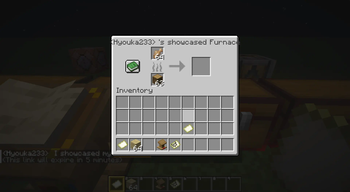
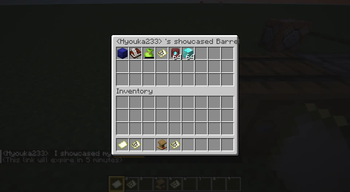
A server-side Minecraft mod that allows players to share links in chat to showcase items, inventories, containers, villager trades, and statistics through commands or chat keywords.
📖 (https://showcase-fabric.vercel.app)**
## ✨ Features
- Comprehensive Sharing: Items, inventories, containers, and villager trades
- Server-Side: No client installation required
- Interactive Previews: Auto-unpack containers, view books and maps
- Multi-Language: Support for 17+ languages
- Persistent Storage: Shares saved until expiration
- Permission System: LuckPerms integration
- Configurable Chat Keywords: Customizable trigger words for quick sharing
- Statistics Tracking: Player statistics with detailed categorization
- Developer Placeholders: PlaceholderAPI integration for other plugins
- Chat Item Icons: Customizable item icons in chat messages (Experimental)
About Chat Item Icons (Experimental)
Displays item icons in chat messages for shared items.
Why Resource Pack? As a server-side mod, we use Minecraft's custom font system to render icons.
Setup:
1. Generate resource pack at (https://iconifycraft.vercel.app/)
2. Host the pack on a web server
3. Enable in `config/showcase/config.yml`: `itemIcons.enabled = true`
4. Add to `server.properties`:
```properties
resource-pack=
Config Options: ```yaml itemIcons: enabled: false # Enable/disable icons fontNamespace: "iconifycraft" # Resource pack namespace includeInItemNames: true # Show icons in item names ```
## ⌨️ Commands
> 💡 (https://showcase-fabric.vercel.app/docs/commands/player-commands)** with examples and permissions
### Player Commands
```
/showcase
Duration formats: `30s`, `5m`, `1h`, `1h30m` or raw seconds (e.g. `300`)
Other Commands:
- `/showcase cancel
### Admin Commands
```
/admin-showcase
Actions: `reload`, `list `, `cancel `
### Chat Keywords
Players can type keywords in square brackets to quickly share content:
Default Keywords (configurable in `config.yml`): - `` or `` - Share held item - `` or `` - Share inventory - `` or `` - Share hotbar - `` or `` - Share ender chest - `` or `` - Share statistics
Example: `Check out my !` → automatically replaced with clickable share link
## 🔌 Developer API
> 🔗 (https://showcase-fabric.vercel.app/docs/developers/api-overview)** - Integration guides and examples
### PlaceholdersAPI Integration
Basic Sharing: ``` %showcase:item% - Share held item %showcase:inventory% - Share inventory %showcase:hotbar% - Share hotbar %showcase:ender_chest% - Share ender chest %showcase:stats% - Share statistics ```
Essential Statistics: ``` %showcase:shares_count% - Number of active shares %showcase:total_views% - Total views received %showcase:can_share_item% - Permission check (true/false) %showcase:has_admin_perms% - Admin check (true/false) ```
📚 (https://showcase-fabric.vercel.app/docs/developers/placeholderapi)**
## ⚙️ Configuration
> ⚙️ (https://showcase-fabric.vercel.app/docs/configuration/config-file)** - Complete settings guide
Main configuration file: `config/showcase/config.yml` (YAML format)
Key Settings: - Share cooldowns and permissions - Chat keywords and triggers - Statistics tracking options - Performance optimization - Multi-language support
📖 (https://showcase-fabric.vercel.app/docs/configuration/config-file)** | 🔐 (https://showcase-fabric.vercel.app/docs/configuration/permissions)**
## 📚 Documentation & Resources
- (https://showcase-fabric.vercel.app)** - Full feature documentation
- (https://showcase-fabric.vercel.app/docs/getting-started/installation)** - Installation and setup guide
- (https://showcase-fabric.vercel.app/docs/commands/player-commands)** - All commands with examples
- **(https://showcase-fabric.vercel.app/docs/configuration/config-file)** - Settings and
📊 Mod Details
- Game
- Minecraft Mods
- Author
- Hyouka
- Version
- v2.5.0+26.1.2
- Downloads
- 3,385
- Endorsements
- 21
- Category
- fabric
- Created
- 6/23/2025
- Updated
- 7/9/2026
- Game Versions
- 26.1, 26.1.1, 26.1.2
- Tags
- management, social, utility
🔧 How to Install Minecraft Mods Mods
Download from Modrinth. Use Prism Launcher or drop into your mods folder.
📖 Full step-by-step install guide for Minecraft Mods →
Visit the official mod page for specific installation instructions for this mod.
🎮 Need cheat codes or console commands? Check ur gaming wiki for Minecraft Mods commands, item IDs, and more.
❓ Frequently Asked Questions
Which Minecraft Mods versions does Showcase support?
The author lists 26.1, 26.1.1, 26.1.2. Other versions may work but are untested by the author.
What is the latest version of Showcase?
Version v2.5.0+26.1.2, published 2026-07-09 with 3,385 downloads recorded at the source.
Keep browsing — more Minecraft Mods mods await