Shoulder Surfing Reloaded
🟡 Updated this year⚠️ Install Order · 2 steps
Install in this order, then this mod last — most mods fail to load without their framework and dependencies in place.
🖼️ Gallery (5 images)
🔍 Analysis
- 👍 0.0% endorsement rate
- 🏆 #47 of 618 adventure mods in this game by downloads
📋 About This Mod
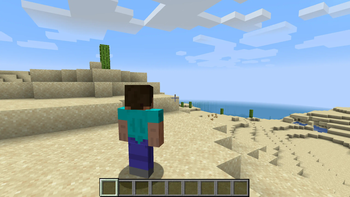
# Shoulder Surfing Reloaded # Shoulder Surfing Reloaded is a highly configurable third person camera mod for minecraft. # Features # * Over-the-shoulder camera - see what you are interacting with in 3rd person * Decoupled camera - walk left and right without turning your mouse * Free look (default: `left alt`) - keep walking in a direction while looking in a different one * Hotkeys to move the camera (default: `arrow keys`, `page up` and `page down`, `o` to switch shoulders) * Corrective cross-hair positioning when using adaptive or dynamic crosshair * Adaptive player transparency - fades the player model to transparent when view is obstructed * Highly configurable - customize your 3rd person experience with many configuration options * Client side only - no server mods required * Plugin API - implement custom camera behaviours and compatibility features with ease Please note that this mod modifies the camera position and player movement, which can be an issue for servers with strict anti-cheat. Use at your own risk! # Installation # <details> <summary>Forge</summary> ### Prerequisites ### 1. Make sure (http://files.minecraftforge.net/) is installed 2. Make sure Forge Config API Port ((https://www.curseforge.com/minecraft/mc-mods/forge-config-api-port-fabric), (https://modrinth.com/mod/forge-config-api-port)) is installed ### Manual ### 1. Navigate to `.minecraft/mods` 2. Move `ShoulderSurfing-Forge-.jar` into the folder 3. Follow the steps below ### Launcher Settings ### 1. Select Forge as your profile 2. Launch Minecraft 3. Join a world or server 4. Use `arrow keys`, `page up` and `page down` to adjust the perspective, `o` to switch shoulders </details> <details> <summary>Fabric</summary> ### Prerequisites ### 1. Make sure (https://fabricmc.net/) is installed 2. Make sure Fabric API ((https://www.curseforge.com/minecraft/mc-mods/fabric-api), (https://modrinth.com/mod/fabric-api)) is installed 3. Make sure Forge Config API Port ((https://www.curseforge.com/minecraft/mc-mods/forge-config-api-port-fabric), (https://modrinth.com/mod/forge-config-api-port)) is installed ### Manual ### 1. Navigate to `.minecraft/mods` 2. Move `ShoulderSurfing-Fabric-.jar` into the folder 3. Follow the steps below ### Launcher Settings ### 1. Select Fabric as your profile 2. Launch Minecraft 3. Join a world or server 4. Use `arrow keys`, `page up` and `page down` to adjust the perspective, `o` to switch shoulders </details> <details> <summary>NeoForge</summary> ### Prerequisites ### 1. Make sure (https://neoforged.net/) is installed ### Manual ### 1. Navigate to `.minecraft/mods` 2. Move `ShoulderSurfing-NeoForge-.jar` into the folder 3. Follow the steps below ### Launcher Settings ### 1. Select NeoForge as your profile 2. Launch Minecraft 3. Join a world or server 4. Use `arrow keys`, `page up` and `page down` to adjust the perspective, `o` to switch shoulders </details> # Configuration # ≥ 1.21: Ingame: Mods → ShoulderSurfing → Config (Manual: `.minecraft/config/shouldersurfing-client.cfg`) ≤ 1.20: Install Forge Config Screens ((https://www.curseforge.com/minecraft/mc-mods/config-menus-forge), (https://modrinth.com/mod/forge-config-screens)) (Manual: `.minecraft/config/shouldersurfing-client.cfg`) <details> <summary>Version 2.9.7 and older</summary> ≥ 1.13: Manual: `.minecraft/config/shouldersurfing.toml` ≤ 1.12: Ingame: Mods → ShoulderSurfing → Config (Manual: `.minecraft/config/shouldersurfing.cfg`) </details> # Plugin API # Shoulder Surfing Reloaded features a plugin API for third party mod developers. This allows for implementing custom camera behaviours and compatibility features without the use of invasive mixins. The documentation can be found in the (https://github.com/Exopandora/ShoulderSurfing/wiki) on GitHub. It explains step by step on how to create and register your own plugin, and how you can implement and register custom callbacks. # FAQ # **Q:** Why is the player not looking at the position of the crosshair when holding item x? **A:** This needs to be configured using the config options `adaptive_crosshair_hold_items` or `adaptive_crosshair_use_items`. **Q:** Why is the player not rendered correctly when using shader pack x? **A:** This is caused by player transparency effects of Shoulder Surfing Reloaded. Either disable them in the config (`adjust_player_transparency`) and restart your game or report this to the authors of the shader pack. **Q:** Can you port feature x to version y? **A:** No. **Q:** Can you port this to quilt, liteloader, rift, etc.? **A:** No. **Q:** Can I add this to my modpack? **A:** Yes. # License # MIT License, Original project by Sabar: (https://www.minecraftforum.net/forums/mapping-and-modding-java-edition/minecraft-mods/1287308-shoulder-surfing-modded-third-person-
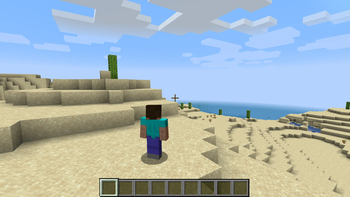
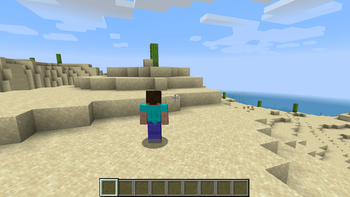
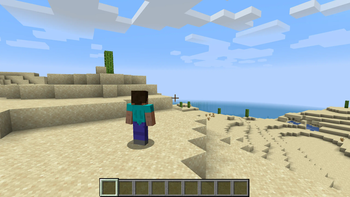
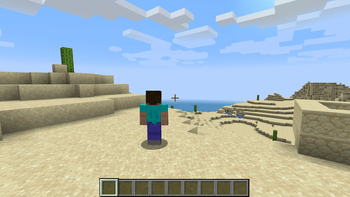
# Shoulder Surfing Reloaded # Shoulder Surfing Reloaded is a highly configurable third person camera mod for minecraft.
# Features # Over-the-shoulder camera - see what you are interacting with in 3rd person Decoupled camera - walk left and right without turning your mouse Free look (default: `left alt`) - keep walking in a direction while looking in a different one Hotkeys to move the camera (default: `arrow keys`, `page up` and `page down`, `o` to switch shoulders) Corrective cross-hair positioning when using adaptive or dynamic crosshair Adaptive player transparency - fades the player model to transparent when view is obstructed Highly configurable - customize your 3rd person experience with many configuration options Client side only - no server mods required * Plugin API - implement custom camera behaviours and compatibility features with ease
Please note that this mod modifies the camera position and player movement, which can be an issue for servers with strict anti-cheat. Use at your own risk!
# Installation #
Forge
### Prerequisites ### 1. Make sure (http://files.minecraftforge.net/) is installed 2. Make sure Forge Config API Port ((https://www.curseforge.com/minecraft/mc-mods/forge-config-api-port-fabric), (https://modrinth.com/mod/forge-config-api-port)) is installed
### Manual ### 1. Navigate to `.minecraft/mods` 2. Move `ShoulderSurfing-Forge-.jar` into the folder 3. Follow the steps below
### Launcher Settings ### 1. Select Forge as your profile 2. Launch Minecraft 3. Join a world or server 4. Use `arrow keys`, `page up` and `page down` to adjust the perspective, `o` to switch shoulders
Fabric
### Prerequisites ### 1. Make sure (https://fabricmc.net/) is installed 2. Make sure Fabric API ((https://www.curseforge.com/minecraft/mc-mods/fabric-api), (https://modrinth.com/mod/fabric-api)) is installed 3. Make sure Forge Config API Port ((https://www.curseforge.com/minecraft/mc-mods/forge-config-api-port-fabric), (https://modrinth.com/mod/forge-config-api-port)) is installed
### Manual ### 1. Navigate to `.minecraft/mods` 2. Move `ShoulderSurfing-Fabric-.jar` into the folder 3. Follow the steps below
### Launcher Settings ### 1. Select Fabric as your profile 2. Launch Minecraft 3. Join a world or server 4. Use `arrow keys`, `page up` and `page down` to adjust the perspective, `o` to switch shoulders
NeoForge
### Prerequisites ### 1. Make sure (https://neoforged.net/) is installed
### Manual ### 1. Navigate to `.minecraft/mods` 2. Move `ShoulderSurfing-NeoForge-.jar` into the folder 3. Follow the steps below
### Launcher Settings ### 1. Select NeoForge as your profile 2. Launch Minecraft 3. Join a world or server 4. Use `arrow keys`, `page up` and `page down` to adjust the perspective, `o` to switch shoulders
# Configuration # ≥ 1. 21: Ingame: Mods → ShoulderSurfing → Config (Manual: `.minecraft/config/shouldersurfing-client.cfg`) ≤ 1. 20: Install Forge Config Screens ((https://www.curseforge.com/minecraft/mc-mods/config-menus-forge), (https://modrinth.com/mod/forge-config-screens)) (Manual: `.minecraft/config/shouldersurfing-client.cfg`)
Version 2. 9. 7 and older
≥ 1. 13: Manual: `.minecraft/config/shouldersurfing.toml` ≤ 1. 12: Ingame: Mods → ShoulderSurfing → Config (Manual: `.minecraft/config/shouldersurfing.cfg`)
# Plugin API # Shoulder Surfing Reloaded features a plugin API for third party mod developers. This allows for implementing custom camera behaviours and compatibility features without the use of invasive mixins. The documentation can be found in the (https://github.com/Exopandora/ShoulderSurfing/wiki) on GitHub. It explains step by step on how to create and register your own plugin, and how you can implement and register custom callbacks.
# FAQ # Q: Why is the player not looking at the position of the crosshair when holding item x? A: This needs to be configured using the config options `adaptive_crosshair_hold_items` or `adaptive_crosshair_use_items`.
Q: Why is the player not rendered correctly when using shader pack x? A: This is caused by player transparency effects of Shoulder Surfing Reloaded. Either disable them in the config (`adjust_player_transparency`) and restart your game or report this to the authors of the shader pack.
Q: Can you port feature x to version y? A: No.
Q: Can you port this to quilt, liteloader, rift, etc.? A: No.
Q: Can I add this to my modpack? A: Yes.
# License # MIT License, Original project by Sabar: (https://www.minecraftforum.net/forums/mapping-and-modding-java-edition/minecraft-mods/1287308-shoulder-surfing-modded-third-person-
📊 Mod Details
- Game
- Minecraft Mods
- Author
- Exopandora
- Version
- 26.1.2-5.0.11+fabric
- Downloads
- 11,124,628
- Endorsements
- 1,664
- Category
- adventure
- Created
- 6/27/2023
- Updated
- 8/27/2026
- Game Versions
- 26.1, 26.1.1, 26.1.2
- Tags
- adventure, utility
🔧 How to Install Minecraft Mods Mods
Download from Modrinth. Use Prism Launcher or drop into your mods folder.
📖 Full step-by-step install guide for Minecraft Mods →
Visit the official mod page for specific installation instructions for this mod.
🎮 Need cheat codes or console commands? Check ur gaming wiki for Minecraft Mods commands, item IDs, and more.
❓ Frequently Asked Questions
Which Minecraft Mods versions does Shoulder Surfing Reloaded support?
The author lists 26.1, 26.1.1, 26.1.2. Other versions may work but are untested by the author.
What is the latest version of Shoulder Surfing Reloaded?
Version 26.1.2-5.0.11+fabric, published 2026-08-27 with 11.1M downloads recorded at the source.
Keep browsing — more Minecraft Mods mods await