ShadowKits
🟡 Updated this year⚠️ Install Order · 2 steps
Install in this order, then this mod last — most mods fail to load without their framework and dependencies in place.
🖼️ Gallery (3 images)
🔍 Analysis
- 👍 0.2% endorsement rate
- 🏆 #149 of 295 equipment mods in this game by downloads
📋 About This Mod
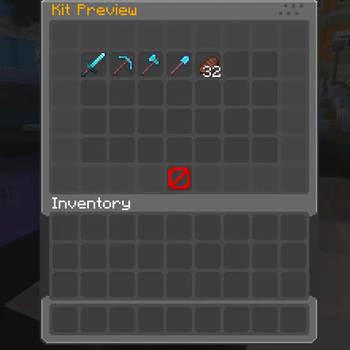
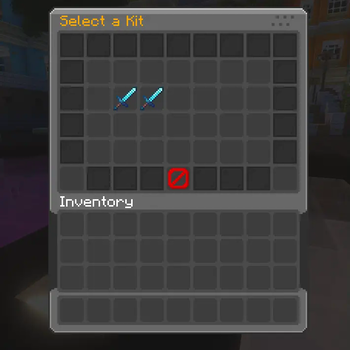
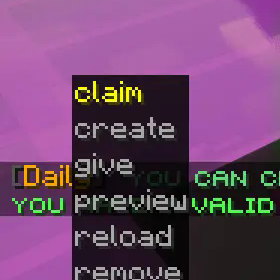
# **ShadowKits** **ShadowKits is a fully customizable kit system designed for Minecraft Fabric servers. It allows server administrators to create, manage, and configure kits that players can claim based on cooldowns, permissions, and other settings.** ### 📜 Features: - ✅ Fully Configurable Kits - Define kits in JSON format, including items, enchantments, names, lore, commands, cooldowns, and more. - ✅ Custom GUI Menus - Beautifully designed and configurable inventory GUIs for kit selection and previews. - ✅ Custom Enchantment & NBT Support - Kits retain all item properties, including enchantments, custom model data, and NBT tags. - ✅ Cooldown & Claim Limits - Set cooldowns and maximum claims per kit. - ✅ Permission-Based Access - Restrict specific kits using LuckPerms or any permission plugin. - ✅ Command Execution - Run custom commands when a player claims a kit. - ✅ Custom Sounds - Play unique sounds when a kit is claimed or when it's on cooldown. - ✅ Language & Message Customization - Edit all messages, GUI titles, and lore with full RGB color support. - ✅ Player Data Storage - Track kit usage, cooldowns, and claims in individual player JSON files. - ✅ Kits Privew on Blocks - Allow admins to set custom privew kits menu on custom blocks. ### ⚙️ Commands: <details> <summary>Spoiler</summary> - `/kits` - Opens the main kits GUI where players can browse and claim kits. - `/kit claim <kit>` - Claim a specific kit if available. - `/kit give <kit> <player>` - Admin command to give a kit to another player. - `/kit remove <kit>` - Deletes a kit from the configuration. - `/kit create <kit>` - Creates a new kit in kits folder. - `/kit preview <kit>` - Opens a GUI preview of a specific kit. - `/kit reload` - Reloads the kit configuration without restarting the server. - `/kit block set <kit_name> ` - This command will transform the block you are looking at into a kit preview block, which you can interact with to preview the kit or claim it. - `/kit block unset` - With this command you will be able to transform the preview kit block back into a normal block. </details> ### 🔒 Permissions: <details> <summary>Spoiler</summary> - `kit.claim` - Allows players to claim kits using **/kit claim <kit>** - `kits.view` - Allows players to open the kits menu with **/kits** - `kit.preview` - Allows players to preview a kit with **/kit preview <kit>** - `kit.create` - Allows admins to create new kits using **/kit create <kit>** - `kit.give` - Allows admins to give kits to players using **/kit give <kit> <player>** - `kit.remove` - Allows admins to remove kits using **/kit remove <kit>** - `kit.reload` - Allows admins to reload the kits configuration with **/kit reload** - `kit.<kit_name>` - Grants access to a specific kit by name - `kit.block.set` - Allow admins to set the privew blocks - `kit.block.unset` - Allow admins to remove the privew blocks </details> ### 📝 Configurable Menus: - Kit Selection Menu - A GUI for browsing kits, with customizable slots, fill items, and pagination. - Kit Preview Menu - A GUI that previews kit contents before claiming. - Fully Customizable - All GUI elements (buttons, titles, filler blocks, navigation buttons) are fully configurable via menu.json and menu_preview.json. ### 📂 Configuration Files: - 📁 `/config/shadowkits/config.json` - Stores general settings, cooldowns, and messages. - 📁 `/config/shadowkits/kits/` - Stores individual kit configurations in JSON format. - 📁 `/config/shadowkits/menu.json` - Configures the kit selection GUI. - 📁 `/config/shadowkits/menu_preview.json` - Configures the kit preview GUI. ### 📃 Config Ex: <details> <summary>Spoiler</summary> ```json { "name": "Starter", "onJoin": false, "firstTimeJoin": false, "cooldown": "1h", "claims": true, "maxClaims": 5, "permission": "kit.starter", "economyProvider": "auto", "currency": "money", "costMoney": false, "cost": 100, "claimSound": "minecraft:entity.player.levelup", "cooldownSound": "minecraft:entity.villager.no", "page": 1, "slotOnPage": 10, "displayItem": { "material": "minecraft:diamond_sword", "amount": 1, "displayname": "&bKit Starter", "lore": , "cooldownLore": true, "enchantEffect": true, "unbreakable": false }, "rewards": , "enchants": , "enchantEffect": true }, { "type": "command", "command": "give %player% minecraft:cooked_beef 16", "displayItem": { "material": "minecraft:cooked_beef", "amount": 16, "displayname": "&6Food Voucher", "lore": [ "&7Runs a give-food command"
# ShadowKits
ShadowKits is a fully customizable kit system designed for Minecraft Fabric servers. It allows server administrators to create, manage, and configure kits that players can claim based on cooldowns, permissions, and other settings.
### 📜 Features: - ✅ Fully Configurable Kits - Define kits in JSON format, including items, enchantments, names, lore, commands, cooldowns, and more. - ✅ Custom GUI Menus - Beautifully designed and configurable inventory GUIs for kit selection and previews. - ✅ Custom Enchantment & NBT Support - Kits retain all item properties, including enchantments, custom model data, and NBT tags. - ✅ Cooldown & Claim Limits - Set cooldowns and maximum claims per kit. - ✅ Permission-Based Access - Restrict specific kits using LuckPerms or any permission plugin. - ✅ Command Execution - Run custom commands when a player claims a kit. - ✅ Custom Sounds - Play unique sounds when a kit is claimed or when it's on cooldown. - ✅ Language & Message Customization - Edit all messages, GUI titles, and lore with full RGB color support. - ✅ Player Data Storage - Track kit usage, cooldowns, and claims in individual player JSON files. - ✅ Kits Privew on Blocks - Allow admins to set custom privew kits menu on custom blocks. ### ⚙️ Commands:
Spoiler
- `/kits` - Opens the main kits GUI where players can browse and claim kits.
- `/kit claim
` - Claim a specific kit if available. - `/kit give
` - Admin command to give a kit to another player. - `/kit remove
` - Deletes a kit from the configuration. - `/kit create
` - Creates a new kit in kits folder. - `/kit preview
` - Opens a GUI preview of a specific kit. - `/kit reload` - Reloads the kit configuration without restarting the server.
- `/kit block set
` - This command will transform the block you are looking at into a kit preview block, which you can interact with to preview the kit or claim it. - `/kit block unset` - With this command you will be able to transform the preview kit block back into a normal block.
### 🔒 Permissions:
Spoiler
- `kit.claim` - Allows players to claim kits using /kit claim
- `kits.view` - Allows players to open the kits menu with /kits
- `kit.preview` - Allows players to preview a kit with /kit preview
- `kit.create` - Allows admins to create new kits using /kit create
- `kit.give` - Allows admins to give kits to players using /kit give
- `kit.remove` - Allows admins to remove kits using /kit remove
- `kit.reload` - Allows admins to reload the kits configuration with /kit reload
- `kit.
` - Grants access to a specific kit by name - `kit.block.set` - Allow admins to set the privew blocks
- `kit.block.unset` - Allow admins to remove the privew blocks
### 📝 Configurable Menus: - Kit Selection Menu - A GUI for browsing kits, with customizable slots, fill items, and pagination. - Kit Preview Menu - A GUI that previews kit contents before claiming. - Fully Customizable - All GUI elements (buttons, titles, filler blocks, navigation buttons) are fully configurable via menu.json and menu_preview.json. ### 📂 Configuration Files: - 📁 `/config/shadowkits/config.json` - Stores general settings, cooldowns, and messages. - 📁 `/config/shadowkits/kits/` - Stores individual kit configurations in JSON format. - 📁 `/config/shadowkits/menu.json` - Configures the kit selection GUI. - 📁 `/config/shadowkits/menu_preview.json` - Configures the kit preview GUI.
### 📃 Config Ex:
Spoiler
```json { "name": "Starter", "onJoin": false, "firstTimeJoin": false, "cooldown": "1h", "claims": true, "maxClaims": 5, "permission": "kit.starter", "economyProvider": "auto", "currency": "money", "costMoney": false, "cost": 100, "claimSound": "minecraft:entity.player.levelup", "cooldownSound": "minecraft:entity.villager.no", "page": 1, "slotOnPage": 10, "displayItem": { "material": "minecraft:diamond_sword", "amount": 1, "displayname": "&bKit Starter", "lore": [ "&7A powerful kit to begin your journey!", "&aIncludes enchanted tools and a food!" ], "cooldownLore": true, "enchantEffect": true, "unbreakable": false }, "rewards": [ { "type": "item", "material": "minecraft:iron_pickaxe", "amount": 1, "displayname": "&bIron Pickaxe", "lore": [ "&7Handy starter tool" ], "enchants": [ { "name": "minecraft:unbreaking", "level": 2 } ], "enchantEffect": true }, { "type": "command", "command": "give %player% minecraft:cooked_beef 16", "displayItem": { "material": "minecraft:cooked_beef", "amount": 16, "displayname": "&6Food Voucher", "lore": [ "&7Runs a give-food command"
📊 Mod Details
- Game
- Minecraft Mods
- Author
- KrripeYT
- Version
- 2.0
- Downloads
- 3,448
- Endorsements
- 6
- Category
- equipment
- Created
- 2/12/2025
- Updated
- 1/8/2026
- Game Versions
- 1.21, 1.21.1, 1.21.2, 1.21.3
- Tags
- equipment, management, utility
🔧 How to Install Minecraft Mods Mods
Download from Modrinth. Use Prism Launcher or drop into your mods folder.
📖 Full step-by-step install guide for Minecraft Mods →
Visit the official mod page for specific installation instructions for this mod.
🎮 Need cheat codes or console commands? Check ur gaming wiki for Minecraft Mods commands, item IDs, and more.
❓ Frequently Asked Questions
Which Minecraft Mods versions does ShadowKits support?
The author lists 1.21, 1.21.1, 1.21.2, 1.21.3. Other versions may work but are untested by the author.
What is the latest version of ShadowKits?
Version 2.0, published 2026-01-08 with 3,448 downloads recorded at the source.
Keep browsing — more Minecraft Mods mods await