Server Tools
🟡 Updated this year⚠️ Install Order · 2 steps
Install in this order, then this mod last — most mods fail to load without their framework and dependencies in place.
🖼️ Gallery (1 images)
🔍 Analysis
- 👍 0.3% endorsement rate
- 🏆 #74 of 206 cursed mods in this game by downloads
📋 About This Mod
# Server Tools JS code: If (https://modrinth.com/mod/graaljs) is installed, prioritize using it over Nashorn. Players can use `/lang code` to set the language, for example, `/lang zh_cn`, `zh_cn.json` must be located in the language directory, otherwise it is invalid. ## functions ### **Login system:** Players will pop up a login interface when they enter the game, by clicking on the item to enter the password, click on the login to log in, the password must be 9-digit, initially no password, the first time you enter the password and successfully logged in that is the password for the future. Closing the login screen will get you kicked out. You will not be harmed during login and cannot interact. ### **Login message:** Definable first time join message, first time join message per day, every time join message ### **Entity cleanup:** multiple configurations, support for black and white lists, support for timed cleanup, support for cleanup after exceeding the cap, support for retaining items on creatures during cleanup, support for safe distances (no cleanup when there is a player within setting distance) ### **Item cleanup:** supports black and white lists, extra trash feature, cleaned items will be added to trash, can be turned on via /servers trash, this feature can be turned off. ### **Player blacklist:** support for normal ID, UUID, group, players located in the list can not join the server, rejection message can be customized, can be changed to allow mode, only allow players from the list to join. ### **Item blacklist:** items on the list are blocked from being acquired. ### **Attempt to fix abnormal entities:** try to remove entities that didn't die normally. ## Other Any ideas or suggestions you have can be commented on or made on Github! ## Note: Configuration files are located under `/your game directory/ServerTools`, not `config`. Most of the messages sent are localized, you can add your own language in the Lang folder. Please make sure that the player group files are located under PlayerGroup, where groups can be added. For additional information you can visit the WIKI. Any questions can be asked in github or contacted as below: - (https://url.anye.dev/tg) - (https://url.anye.dev/discord)
# Server Tools JS code: If (https://modrinth.com/mod/graaljs) is installed, prioritize using it over Nashorn.
Players can use `/lang code` to set the language, for example, `/lang zh_cn`, `zh_cn.json` must be located in the language directory, otherwise it is invalid.
## functions ### Login system: Players will pop up a login interface when they enter the game, by clicking on the item to enter the password, click on the login to log in, the password must be 9-digit, initially no password, the first time you enter the password and successfully logged in that is the password for the future. Closing the login screen will get you kicked out. You will not be harmed during login and cannot interact.
### Login message: Definable first time join message, first time join message per day, every time join message
### Entity cleanup: multiple configurations, support for black and white lists, support for timed cleanup, support for cleanup after exceeding the cap, support for retaining items on creatures during cleanup, support for safe distances (no cleanup when there is a player within setting distance)
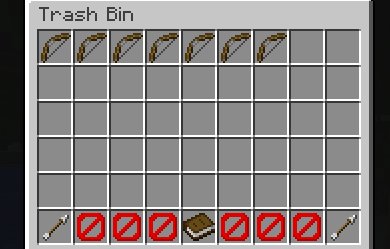
### Item cleanup: supports black and white lists, extra trash feature, cleaned items will be added to trash, can be turned on via /servers trash, this feature can be turned off.
### Player blacklist: support for normal ID, UUID, group, players located in the list can not join the server, rejection message can be customized, can be changed to allow mode, only allow players from the list to join.
### Item blacklist: items on the list are blocked from being acquired.
### Attempt to fix abnormal entities: try to remove entities that didn't die normally.
## Other Any ideas or suggestions you have can be commented on or made on Github!
## Note: Configuration files are located under `/your game directory/ServerTools`, not `config`. Most of the messages sent are localized, you can add your own language in the Lang folder. Please make sure that the player group files are located under PlayerGroup, where groups can be added.
For additional information you can visit the WIKI.
Any questions can be asked in github or contacted as below: - (https://url.anye.dev/tg) - (https://url.anye.dev/discord)
📊 Mod Details
- Game
- Minecraft Mods
- Author
- anmao
- Version
- 26.2-2.0.0-26072800-Neo
- Downloads
- 874
- Endorsements
- 3
- Category
- cursed
- Created
- 11/5/2024
- Updated
- 7/28/2026
- Game Versions
- 26.2
- Tags
- cursed, management, utility
🔧 How to Install Minecraft Mods Mods
Download from Modrinth. Use Prism Launcher or drop into your mods folder.
📖 Full step-by-step install guide for Minecraft Mods →
Visit the official mod page for specific installation instructions for this mod.
🎮 Need cheat codes or console commands? Check ur gaming wiki for Minecraft Mods commands, item IDs, and more.
❓ Frequently Asked Questions
Which Minecraft Mods versions does Server Tools support?
The author lists 26.2. Other versions may work but are untested by the author.
What is the latest version of Server Tools?
Version 26.2-2.0.0-26072800-Neo, published 2026-07-28 with 874 downloads recorded at the source.
Keep browsing — more Minecraft Mods mods await