Selection GUI Crafting - Continued
🟠 Updated over a year ago⚠️ Install Order · 2 steps
Install in this order, then this mod last — most mods fail to load without their framework and dependencies in place.
🖼️ Gallery (2 images)
🔍 Analysis
- 👍 0.2% endorsement rate
- 🏆 #77 of 391 forge mods in this game by downloads
📋 About This Mod
!(https://github.com/user-attachments/assets/a528c835-6fde-458e-8153-f265f77342ac)
This is a fork of (https://www.curseforge.com/minecraft/mc-mods/selection-gui-crafting) by (https://www.curseforge.com/members/gliese_832_c).
## Fork? Rewrite! (Version 2. 0. 0+)
What started as a fork of the original mod, quickly turned into a rewrite. The original crafting system felt way to clunky and not user-friendly. The new system is much more intuitive and user-friendly. It also allows much more customization and is more flexible to benefit the needs of modpack developers. An added bonus is the support for GroovyScript. The old CraftTweaker support was rewritten as well to reflect the new system.
## Re-Rewrite! (Version 3. 0. 0+)
Yep another rewrite. Now I finally took the time to transform the mod into something much more modular. So now GUIs can be opened either by items or blocks, each 'trigger' can tweaks the overall stats of the recipes. Additionally there are now ways to restrict recipes, for example you can now lock recipes behind Game Stages, Reskillable skill levels and even advancements. Furthermore I added the possibility to execute a set of commands if the general recipe builder wasn't powerful enough. This update also comes with an overhauled JEI integration and various other quality of life improvements!
## What even is this?
SelectionGUI Crafting gives modpack authors the ability to add crafting recipes into a selection GUI that is triggered by right-clicking while holding the right items. This could, for example, be used for clay recipes. Instead of manually arranging clay balls in a different way in a crafting table, it would be possible to make it so that you right-click with a spatula in one hand, clay in the other, and just select the clay item you want to make. Another use example would be forging. Right-click with a hammer in one hand, an ingot in the other, and select your desired toolhead.
## CraftTweaker & GroovyScript Integration (Version 3. 0. 0+)
I tried to make them as similar as possible. I'll publish additional documentation to the GroovyScript wiki as well as the CraftTweaker wiki. Below are a few examples, while I'll setup proper documentation.
### CraftTweaker
val test = mods.selectionguicrafting.category.categoryBuilder();
test.id("test");
test.trigger(<minecraft:apple>);
test.trigger(<minecraft:diamond_pickaxe>, 10. 0, 0. 1, 10. 0);
test.trigger(<minecraft:grass>.asBlock(), 2. 0, 2. 0, 2. 0);
test.register();val myRecipe = mods.selectionguicrafting.recipe.recipeBuilder();
myRecipe.category("test");
myRecipe.output(<minecraft:sand> 2);
myRecipe.input(<minecraft:snow> 3);
myRecipe.input(<ore:blockGlass>);
myRecipe.input(<minecraft:diamond_pickaxe>, 10);
myRecipe.register();
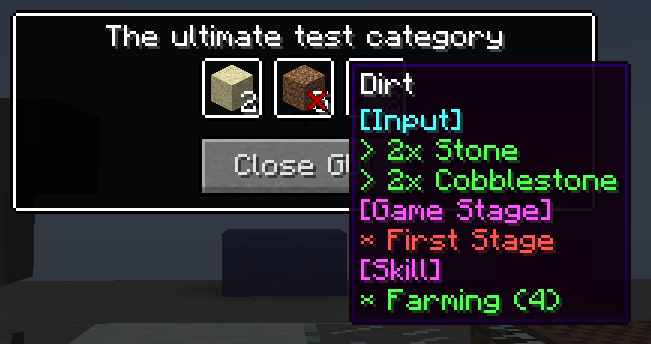
mods.selectionguicrafting.recipe.recipeBuilder().category("test").output(<minecraft:dirt> 5).input(<minecraft:stone> 2).input(<minecraft:cobblestone> 2).gamestage(["my_first_stage"]).skill("reskillable.farming", 4).register();
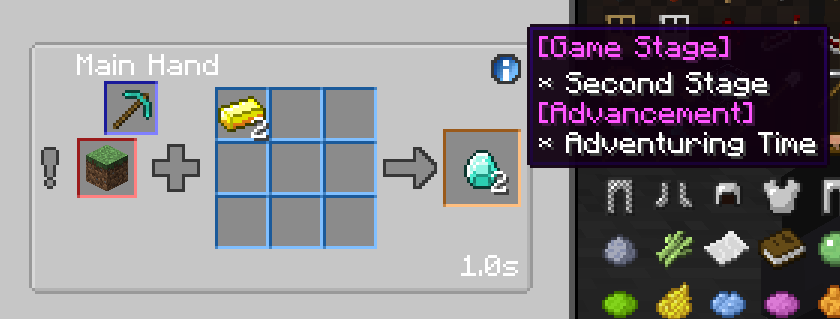
mods.selectionguicrafting.recipe.recipeBuilder().category("test").output(<minecraft:diamond> 2).input(<minecraft:gold_ingot> * 2).mainHand(<minecraft:diamond_pickaxe>, 5).gamestage(["my_second_stage"]).advancement(["minecraft:adventure/adventuring_time"]).register();
### GroovyScript
Crafting Category:
All recipes in the mod are divided into categories. Each category has its own set of recipes. Each category can have its own texture for the background, border, frame, decoration, and progress bar. The category can also have its own sounds, particles, can specify how the sounds are played, if recipes in the category can be added to the crafting queue, and how the output items are handed to the player.mods.selectionguicrafting.category.removeByName('dummy_category_1')
// mods.selectionguicrafting.category.removeAll()
mods.selectionguicrafting.category.categoryBuilder()
.id('dummy_category')
.trigger(item('minecraft:diamond'))
.background('selectionguicrafting:textures/gui/background/wood.png')
.register()
mods.selectionguicrafting.category.categoryBuilder()
.id('blub')
.trigger(item('minecraft:stone_shovel'))
.background('selectionguicrafting:textures/gui/background/lake.png')
.backgroundType('SINGLE_CUT')
.register()
mods.selectionguicrafting.category.categoryBuilder()
.id('dead')
.trigger(block('minecraft:snow'))
.background('selectionguicrafting:textures/gui/background/deadlands.png')
.decoration('selectionguicrafting:textures/gui/decor/gold.png')
.border('selectionguicrafting:textures/gui/background/wood.png')
.backgroundType('SINGLE_CUT')
.register()
Crafting Recipe:
Creates a recipe that is shown in the specified category. Each recipe requires at least an input and output. There can also b
📊 Mod Details
- Game
- Minecraft Mods
- Author
- MasterEnderman
- Version
- 3.0.0
- Downloads
- 1,161
- Endorsements
- 2
- Category
- forge
- Created
- 6/8/2025
- Updated
- 6/6/2025
- Game Versions
- 1.12.2
- Tags
- utility
🔧 How to Install Minecraft Mods Mods
Download from Modrinth. Use Prism Launcher or drop into your mods folder.
📖 Full step-by-step install guide for Minecraft Mods →
Visit the official mod page for specific installation instructions for this mod.
🎮 Need cheat codes or console commands? Check ur gaming wiki for Minecraft Mods commands, item IDs, and more.
❓ Frequently Asked Questions
Which Minecraft Mods versions does Selection GUI Crafting - Continued support?
The author lists 1.12.2. Other versions may work but are untested by the author.
What is the latest version of Selection GUI Crafting - Continued?
Version 3.0.0, published 2025-06-06 with 1,161 downloads recorded at the source.
Keep browsing — more Minecraft Mods mods await