Secure Trade
🟡 Updated this year⚠️ Install Order · 2 steps
Install in this order, then this mod last — most mods fail to load without their framework and dependencies in place.
🖼️ Gallery (5 images)
🔍 Analysis
- 👍 0.4% endorsement rate
- 🏆 #50 of 874 fabric mods in this game by downloads
📋 About This Mod
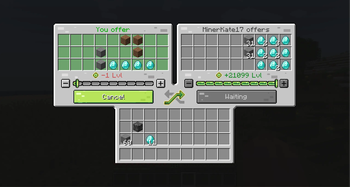
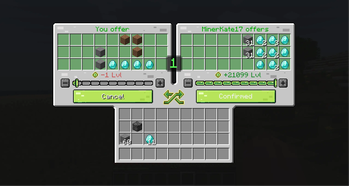
# Secure Trade Secure Trade is a player trade mod for multiplayer worlds, co-op servers, and modpacks. Trade items and experience with another player from anywhere: across a base, across the map, or even across dimensions. No more running back home just to hand over ores, tools, drops, or XP. ## Why Use It? Minecraft multiplayer often splits players across different jobs and locations. One player may be mining, another crafting at base, and someone else exploring the Nether or a modded dimension. Secure Trade keeps that flow intact: send a trade request, confirm the exchange, and keep playing. By default, trades are not limited by distance or dimension. Server owners can keep that freedom or configure stricter rules for local-only trading, dimension restrictions, item blacklists, cooldowns, logging, and trade history. ## How It Works 1. Run `/trade <player>`. 2. The other player accepts the request from chat. 3. Both players get a shared trade screen. 4. Each side adds items and/or XP. 5. Both players confirm. 6. A short countdown starts, then the exchange completes. If either player changes their offer after confirming, the ready state is reset so both sides can review the updated trade. ## Features - Player trading from anywhere by default - Cross-dimension trading between the Overworld, Nether, End, and modded dimensions - Item and XP exchange in the same trade session - Shared trade GUI with 27 offer slots per player - Clickable chat requests with accept and deny actions - Clear confirmation states and countdown before completion - Custom trade sounds for requests, countdown, blocked items, cancellation, and successful trades - Automatic readiness reset when items or XP change - Optional distance limit for servers that want local-only trading - Optional dimension allowlist or blocklist - Optional item blacklist, including protected items inside supported containers - In-GUI warning when an item is blocked by the server blacklist - One active trade or pending request per player - Request cooldowns to reduce spam - Trade history command with grouped items, XP, and item hover tooltips - Optional async transaction logging to `logs/securetrade.log` - Disconnect-safe item return or drop handling - Localization for 23 languages - Fabric, Forge, and NeoForge support across supported Minecraft versions ## Supported Versions | Minecraft | Loaders | | --- | --- | | 26.2 | Fabric, NeoForge | | 26.1.x | Fabric, NeoForge | | 1.21.1 | Fabric, NeoForge | | 1.20.1 | Fabric, Forge | | 1.19.2 | Fabric, Forge | | 1.18.2 | Fabric, Forge | | 1.16.5 | Fabric, Forge | Use the file that matches your Minecraft version and mod loader. ## Commands | Command | Description | | --- | --- | | `/trade <player>` | Sends a trade request. If both players request each other, the trade opens immediately. | | `/trade accept` | Accepts the current pending trade request. | | `/trade deny` | Denies the current pending trade request. | | `/trade history` | Shows recent trades for the player, including items and XP. | ## Configuration The server configuration file is created at: ```text config/securetrade-server.toml
# Secure Trade
Secure Trade is a player trade mod for multiplayer worlds, co-op servers, and modpacks.
Trade items and experience with another player from anywhere: across a base, across the map, or even across dimensions. No more running back home just to hand over ores, tools, drops, or XP.
## Why Use It?
Minecraft multiplayer often splits players across different jobs and locations. One player may be mining, another crafting at base, and someone else exploring the Nether or a modded dimension.
Secure Trade keeps that flow intact: send a trade request, confirm the exchange, and keep playing.
By default, trades are not limited by distance or dimension. Server owners can keep that freedom or configure stricter rules for local-only trading, dimension restrictions, item blacklists, cooldowns, logging, and trade history.
## How It Works
1. Run `/trade
If either player changes their offer after confirming, the ready state is reset so both sides can review the updated trade.
## Features
- Player trading from anywhere by default
- Cross-dimension trading between the Overworld, Nether, End, and modded dimensions
- Item and XP exchange in the same trade session
- Shared trade GUI with 27 offer slots per player
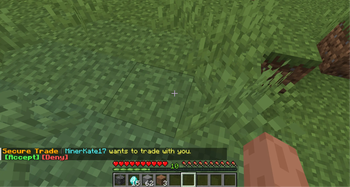
- Clickable chat requests with accept and deny actions
- Clear confirmation states and countdown before completion
- Custom trade sounds for requests, countdown, blocked items, cancellation, and successful trades
- Automatic readiness reset when items or XP change
- Optional distance limit for servers that want local-only trading
- Optional dimension allowlist or blocklist
- Optional item blacklist, including protected items inside supported containers
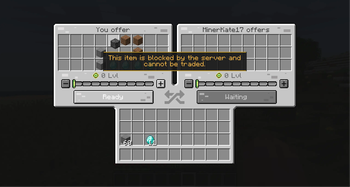
- In-GUI warning when an item is blocked by the server blacklist
- One active trade or pending request per player
- Request cooldowns to reduce spam
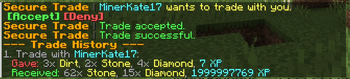
- Trade history command with grouped items, XP, and item hover tooltips
- Optional async transaction logging to `logs/securetrade.log`
- Disconnect-safe item return or drop handling
- Localization for 23 languages
- Fabric, Forge, and NeoForge support across supported Minecraft versions
## Supported Versions
| Minecraft | Loaders | | --- | --- | | 26. 2 | Fabric, NeoForge | | 26. 1.x | Fabric, NeoForge | | 1. 21. 1 | Fabric, NeoForge | | 1. 20. 1 | Fabric, Forge | | 1. 19. 2 | Fabric, Forge | | 1. 18. 2 | Fabric, Forge | | 1. 16. 5 | Fabric, Forge |
Use the file that matches your Minecraft version and mod loader.
## Commands
| Command | Description |
| --- | --- |
| `/trade
## Configuration
The server configuration file is created at:
```text config/securetrade-server.toml
📊 Mod Details
- Game
- Minecraft Mods
- Author
- Navielon
- Version
- 1.2.1-26.2
- Downloads
- 2,071
- Endorsements
- 8
- Category
- fabric
- Created
- 5/30/2026
- Updated
- 6/20/2026
- Game Versions
- 26.2
- Tags
- game-mechanics, social, utility
🔧 How to Install Minecraft Mods Mods
Download from Modrinth. Use Prism Launcher or drop into your mods folder.
📖 Full step-by-step install guide for Minecraft Mods →
Visit the official mod page for specific installation instructions for this mod.
🎮 Need cheat codes or console commands? Check ur gaming wiki for Minecraft Mods commands, item IDs, and more.
❓ Frequently Asked Questions
Which Minecraft Mods versions does Secure Trade support?
The author lists 26.2. Other versions may work but are untested by the author.
What is the latest version of Secure Trade?
Version 1.2.1-26.2, published 2026-06-20 with 2,071 downloads recorded at the source.
Keep browsing — more Minecraft Mods mods await