Screenshot Gallery
🟡 Updated this year⚠️ Install Order · 2 steps
Install in this order, then this mod last — most mods fail to load without their framework and dependencies in place.
🖼️ Gallery (5 images)



🔍 Analysis
- 👍 0.3% endorsement rate
- 🏆 #38 of 940 fabric mods in this game by downloads
📋 About This Mod
<div align="center"> # Screenshot Gallery (https://img.shields.io/modrinth/dt/screenshot-gallery?style=for-the-badge&color=00AF5C&label=Downloads)](https://modrinth.com/mod/screenshot-gallery) (https://img.shields.io/modrinth/v/screenshot-gallery?style=for-the-badge&color=orange&label=Latest%20Ver)](https://modrinth.com/mod/screenshot-gallery/versions) (https://img.shields.io/badge/Loader-Fabric-blue?style=for-the-badge&logo=fabric)](https://modrinth.com/mod/screenshot-gallery) (https://img.shields.io/badge/Loader-NeoForge-orange?style=for-the-badge)](https://modrinth.com/mod/screenshot-gallery) (https://img.shields.io/badge/Loader-Forge-red?style=for-the-badge)](https://modrinth.com/mod/screenshot-gallery) <iframe width="560" height="315" src="https://www.youtube-nocookie.com/embed/zf42ySMjPHU" title="YouTube video player" frameborder="0" allow="accelerometer; autoplay; clipboard-write; encrypted-media; gyroscope; picture-in-picture; web-share" allowfullscreen></iframe> (https://cdn.modrinth.com/data/cached_images/0eacbd0118b26e15ff2060506f7203b66b49baae_0.webp)](https://url-shortener.curseforge.com/mEw6x) </div> --- Adds a gallery screen to your pause menu so you can browse, delete, and locate screenshots without ever alt-tabbing out. Hit Escape, click Gallery, and you're in. From there you can view shots fullscreen, delete the ones you don't want, or hit "Go To" to open File Explorer with the exact file already highlighted useful when you want to drag it into Discord or post it somewhere. --- ## Features - Gallery button in the pause menu (Esc) - Fullscreen viewer !(https://cdn.modrinth.com/data/cached_images/9e185168048a1a4ba8861ee1aec340dd2f4a60e6.png) - Delete screenshots directly from the UI without touching your folders - "Open Folder" opens File Explorer with the screenshot selected and ready to grab - Lazy-loads images holds up fine even with large screenshot folders --- ## Installation Supports **Fabric**, **Forge**, and **NeoForge**. **Fabric:** Grab the mod and Fabric API, then drop both into `.minecraft/mods`. **Forge / NeoForge:** Download the version that matches your loader and drop it into `.minecraft/mods`. No extra mods needed.
# Screenshot Gallery
[!(https://img.shields.io/modrinth/dt/screenshot-gallery?style=for-the-badge&color=00AF5C&label=Downloads)](https://modrinth.com/mod/screenshot-gallery) [!(https://img.shields.io/modrinth/v/screenshot-gallery?style=for-the-badge&color=orange&label=Latest%20Ver)](https://modrinth.com/mod/screenshot-gallery/versions) [!(https://img.shields.io/badge/Loader-Fabric-blue?style=for-the-badge&logo=fabric)](https://modrinth.com/mod/screenshot-gallery) [!(https://img.shields.io/badge/Loader-NeoForge-orange?style=for-the-badge)](https://modrinth.com/mod/screenshot-gallery) [!(https://img.shields.io/badge/Loader-Forge-red?style=for-the-badge)](https://modrinth.com/mod/screenshot-gallery)
[!(https://cdn.modrinth.com/data/cached_images/0eacbd0118b26e15ff2060506f7203b66b49baae_0.webp)](https://url-shortener.curseforge.com/mEw6x)
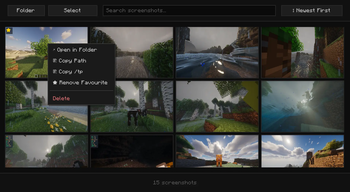
Adds a gallery screen to your pause menu so you can browse, delete, and locate screenshots without ever alt-tabbing out.
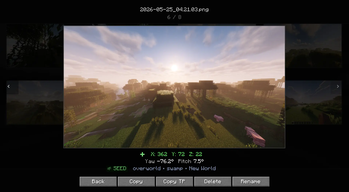
Hit Escape, click Gallery, and you're in. From there you can view shots fullscreen, delete the ones you don't want, or hit "Go To" to open File Explorer with the exact file already highlighted useful when you want to drag it into Discord or post it somewhere.
## Features
- Gallery button in the pause menu (Esc)
- Fullscreen viewer
!(https://cdn.modrinth.com/data/cached_images/9e185168048a1a4ba8861ee1aec340dd2f4a60e6.png)
- Delete screenshots directly from the UI without touching your folders
- "Open Folder" opens File Explorer with the screenshot selected and ready to grab
- Lazy-loads images holds up fine even with large screenshot folders
## Installation
Supports Fabric, Forge, and NeoForge.
Fabric: Grab the mod and Fabric API, then drop both into `.minecraft/mods`.
Forge / NeoForge: Download the version that matches your loader and drop it into `.minecraft/mods`. No extra mods needed.
📊 Mod Details
- Game
- Minecraft Mods
- Author
- Hicham
- Version
- 2.0+neoforge
- Downloads
- 33,788
- Endorsements
- 99
- Category
- fabric
- Created
- 1/13/2026
- Updated
- 7/21/2026
- Game Versions
- 1.21.1
- Tags
- management, utility
🔧 How to Install Minecraft Mods Mods
Download from Modrinth. Use Prism Launcher or drop into your mods folder.
📖 Full step-by-step install guide for Minecraft Mods →
Visit the official mod page for specific installation instructions for this mod.
🎮 Need cheat codes or console commands? Check ur gaming wiki for Minecraft Mods commands, item IDs, and more.
❓ Frequently Asked Questions
Which Minecraft Mods versions does Screenshot Gallery support?
The author lists 1.21.1. Other versions may work but are untested by the author.
What is the latest version of Screenshot Gallery?
Version 2.0+neoforge, published 2026-07-21 with 33,788 downloads recorded at the source.
Keep browsing — more Minecraft Mods mods await