Screenie
🟡 Updated this year⚠️ Install Order · 2 steps
Install in this order, then this mod last — most mods fail to load without their framework and dependencies in place.
🖼️ Gallery (2 images)
🔍 Analysis
- 🏆 #368 of 909 fabric mods in this game by downloads
📋 About This Mod
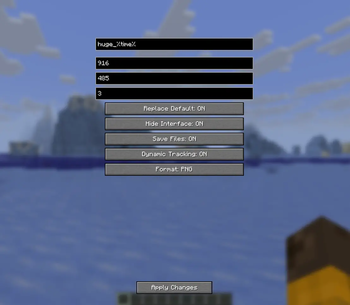
# Screenie A Minecraft mod for taking high-resolution screenshots with custom dimensions and settings. ## Features - Take screenshots at custom resolutions - Dynamic window size tracking - GUI configuration screen - Multiple file formats (PNG, JPG, TGA, BMP) - HUD hiding option - Configurable capture delay - Custom filename templates ## Usage Press J (default key) to open the configuration screen. Configure your settings and press Apply Changes to save. !(https://cdn.modrinth.com/data/cached_images/c3240e47ccbb33a222e59ba30912167ac59d68f2_0.webp) ### Taking Screenshots With the mod configured, use the screenshot key to capture images at your specified resolution. !(https://cdn.modrinth.com/data/cached_images/b19de18318392b320a567a1fb888ed1b33c77181.png) ## Configuration The mod creates a configuration file at `.minecraft/config/screenie.properties` with the following options: - `screenshot_name` - Filename template (supports %time% and %world% variables) - `replace_default` - Replace default screenshot functionality - `hide_ui` - Hide HUD during capture - `save_enabled` - Enable file saving - `dynamic_sizing` - Automatically track window size changes - `img_width` - Screenshot width - `img_height` - Screenshot height - `countdown` - Frames to wait before capture - `format` - Output format (PNG, JPG, TGA, BMP)
A Minecraft mod for taking high-resolution screenshots with custom dimensions and settings.
## Features
- Take screenshots at custom resolutions
- Dynamic window size tracking
- GUI configuration screen
- Multiple file formats (PNG, JPG, TGA, BMP)
- HUD hiding option
- Configurable capture delay
- Custom filename templates
Press J (default key) to open the configuration screen. Configure your settings and press Apply Changes to save.
!(https://cdn.modrinth.com/data/cached_images/c3240e47ccbb33a222e59ba30912167ac59d68f2_0.webp)
### Taking Screenshots
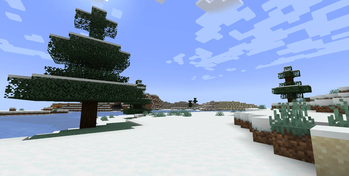
With the mod configured, use the screenshot key to capture images at your specified resolution.
!(https://cdn.modrinth.com/data/cached_images/b19de18318392b320a567a1fb888ed1b33c77181.png)
## Configuration
The mod creates a configuration file at `.minecraft/config/screenie.properties` with the following options:
- `screenshot_name` - Filename template (supports %time% and %world% variables)
- `replace_default` - Replace default screenshot functionality
- `hide_ui` - Hide HUD during capture
- `save_enabled` - Enable file saving
- `dynamic_sizing` - Automatically track window size changes
- `img_width` - Screenshot width
- `img_height` - Screenshot height
- `countdown` - Frames to wait before capture
- `format` - Output format (PNG, JPG, TGA, BMP)
📊 Mod Details
- Game
- Minecraft Mods
- Author
- ThnksCJ
- Version
- 0.1.0
- Downloads
- 274
- Endorsements
- 2
- Category
- fabric
- Created
- 10/20/2025
- Updated
- 10/19/2025
- Game Versions
- 1.21.8
- Tags
- game-mechanics, utility
🔧 How to Install Minecraft Mods Mods
Download from Modrinth. Use Prism Launcher or drop into your mods folder.
📖 Full step-by-step install guide for Minecraft Mods →
Visit the official mod page for specific installation instructions for this mod.
🎮 Need cheat codes or console commands? Check ur gaming wiki for Minecraft Mods commands, item IDs, and more.
❓ Frequently Asked Questions
Which Minecraft Mods versions does Screenie support?
The author lists 1.21.8. Other versions may work but are untested by the author.
What is the latest version of Screenie?
Version 0.1.0, published 2025-10-19 with 274 downloads recorded at the source.
Keep browsing — more Minecraft Mods mods await