Schematic Market
🟡 Updated this year⚠️ Install Order · 2 steps
Install in this order, then this mod last — most mods fail to load without their framework and dependencies in place.
🖼️ Gallery (5 images)

🔍 Analysis
- 👍 1.2% endorsement rate — high engagement, a strong quality signal
- 🏆 #95 of 257 decoration mods in this game by downloads
📋 About This Mod
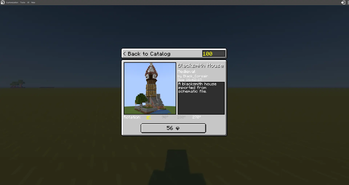
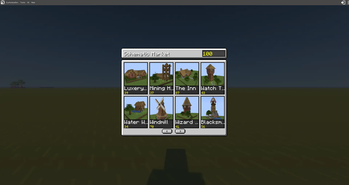
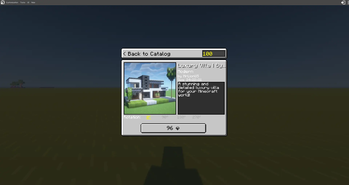
# Schematic Market Transform your Minecraft server with an integrated construction marketplace! Players can browse, purchase, and instantly place beautiful pre-made structures. ## ✨ Features - **📚 Construction Catalog**: Browse available constructions with thumbnails and details - **💎 Economy Integration**: Purchase constructions using emeralds (customizable currency) - **🔄 Rotation Support**: Place structures in any of 4 directions (0°, 90°, 180°, 270°) - **🏗️ Instant Placement**: Right-click to place your purchased construction - **📦 Multiple Formats**: Supports both .schem and .schematic files - **⚙️ Server-Friendly**: Add custom constructions without updating the mod ## 🎮 How to Use 1. Press **C** to open the Construction Catalog 2. Browse available constructions 3. Click on a construction to view details 4. Select rotation and click **BUY** 5. Right-click on a block to place the construction ## 🎯 Economy Commands ``` /balance - Check your balance /balance add <player> <amount> - Add currency /balance remove <player> <amount> - Remove currency /balance set <player> <amount> - Set balance ``` ## 📋 Requirements - Minecraft 1.20.1 - Fabric API - Fabric Loader ## 🐛 Known Issues - Some complex block states might not preserve perfectly - Large constructions (1000+ blocks) may cause brief lag on placement ## 📝 License MIT License - Feel free to use in your modpacks! ## 💬 Support Found a bug? Have a suggestion? Open an issue on GitHub!
# Schematic Market
Transform your Minecraft server with an integrated construction marketplace! Players can browse, purchase, and instantly place beautiful pre-made structures.
## ✨ Features
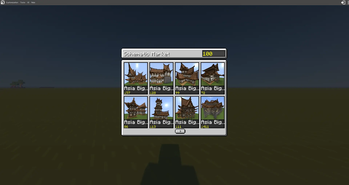
- 📚 Construction Catalog: Browse available constructions with thumbnails and details
- 💎 Economy Integration: Purchase constructions using emeralds (customizable currency)
- 🔄 Rotation Support: Place structures in any of 4 directions (0°, 90°, 180°, 270°)
- 🏗️ Instant Placement: Right-click to place your purchased construction
- 📦 Multiple Formats: Supports both .schem and .schematic files
- ⚙️ Server-Friendly: Add custom constructions without updating the mod
## 🎮 How to Use
1. Press C to open the Construction Catalog 2. Browse available constructions 3. Click on a construction to view details 4. Select rotation and click BUY 5. Right-click on a block to place the construction
## 🎯 Economy Commands
```
/balance - Check your balance
/balance add
## 📋 Requirements
- Minecraft 1. 20. 1
- Fabric API
- Fabric Loader
## 🐛 Known Issues
- Some complex block states might not preserve perfectly
- Large constructions (1000+ blocks) may cause brief lag on placement
## 📝 License
MIT License - Feel free to use in your modpacks!
## 💬 Support
Found a bug? Have a suggestion? Open an issue on GitHub!
📊 Mod Details
- Game
- Minecraft Mods
- Author
- abfann001
- Version
- 1.2.0
- Downloads
- 1,106
- Endorsements
- 13
- Category
- decoration
- Created
- 10/30/2025
- Updated
- 12/26/2025
- Game Versions
- 1.20.1, 1.20.2, 1.20.3, 1.20.4, 1.20.5
- Tags
- decoration, economy, utility
🔧 How to Install Minecraft Mods Mods
Download from Modrinth. Use Prism Launcher or drop into your mods folder.
📖 Full step-by-step install guide for Minecraft Mods →
Visit the official mod page for specific installation instructions for this mod.
🎮 Need cheat codes or console commands? Check ur gaming wiki for Minecraft Mods commands, item IDs, and more.
❓ Frequently Asked Questions
Which Minecraft Mods versions does Schematic Market support?
The author lists 1.20.1, 1.20.2, 1.20.3, 1.20.4, 1.20.5, 1.20.6. Other versions may work but are untested by the author.
What is the latest version of Schematic Market?
Version 1.2.0, published 2025-12-26 with 1,106 downloads recorded at the source.
Keep browsing — more Minecraft Mods mods await