scarpet-graphics
🟡 Updated this year⚠️ Install Order · 2 steps
Install in this order, then this mod last — most mods fail to load without their framework and dependencies in place.
🖼️ Gallery (1 images)
🔍 Analysis
- 👍 0.1% endorsement rate
- 🏆 #445 of 920 fabric mods in this game by downloads
📋 About This Mod
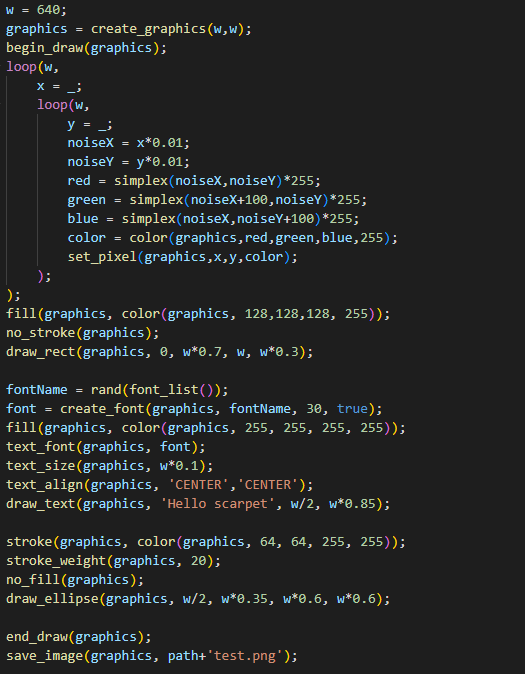
# scarpet-graphics (https://img.shields.io/badge/Discord-7289DA?logo=discord&logoColor=white)](https://discord.gg/etTDQAVSgt) A wrapper of (https://processing.org) for (https://github.com/gnembon/fabric-carpet/wiki/Scarpet) This can also be used with (https://modrinth.com/mod/discarpet) to send the created images via Discord. ## Values This extension adds these new scarpet values: * `image`: Wrapper for (https://processing.org/reference/PImage.html) * `graphics`: Wrapper for (https://processing.org/reference/PGraphics.html), extends `image` value (meaning it can be used in the same way `image` can) * `font`: Wrapper for (https://processing.org/reference/PFont.html) Colors are handled using numbers (0xRRGGBBAA in hex), but can be constructed from RGB and HSB using the `color` function. ## Functions **For a more detailed documentation for these functions, see the (https://processing.org/reference)** Most functions are just a wrapper function for the internal processing function. Sometimes they may have slightly different names than the original Processing functions, due to the name being already used by scarpet (e.g. `copy()`) or to group them (all `draw_?()` functions). ### Graphics and Image functions #### `load_image(location, shared?)` Loads an image from the specified `location` (string). Can be a URL, or file name (path that works just like `read_file`). If `shared` is true, uses shared app storage. Returns an `image` value. #### `save_image(image, location, shared?)` Saves the `image` in the specified `location` (works like `load_image`) #### `create_graphics(width, height)` Creates a new `graphics` object with the specified dimensions. #### `copy_image(source, desination, sourceX, sourceY, sourceW, sourceH, destinationX, destinationY, destinationW, destinationH)` Copies pixels from one image/graphics to another. #### `get_pixel(image, x, y)` Returns the color of a certain pixel. #### `set_pixel(image, x, y, color)` Sets the pixel on the image to the color. #### `begin_draw(graphics)` Prepares the graphics object for doing drawing operations on it. #### `end_draw(graphics)` To be called when done drawing. ### Drawing functions See the (https://processing.org/reference/#shape) section in the processing reference. (The scarpet functions have `draw_` prefixed with the processing function names) #### `draw_background(graphics, color)` #### `draw_rect(graphics, a, b, c, d)` #### `draw_ellipse(graphics, a, b, c, d)` #### `draw_line(graphics, x1, y1, x2, y2)` #### `draw_image(graphics, image, a, b, c, d)` #### `draw_text(graphics, text, x, y)` ### Mode functions #### `color_mode(graphics, mode)` `mode`s: `'RGB'`, `'HSB'` #### `image_mode(graphics, mode)` `mode`s: `'CORNER'`, `'CORNERS'`, `'CENTER'` #### `ellipse_mode(graphics, mode)` `mode`s: `'CORNER'`, `'CORNERS'`, `'CENTER'`, `'RADIUS'` #### `rect_mode(graphics, mode)` `mode`s: `'CORNER'`, `'CORNERS'`, `'CENTER'`, `'RADIUS'` ### Utility functions #### `color(graphics, v1, v2, v3, alpha)` Depending on the `color_mode()` set, v1,v2,v3 are either r,g,b or h,s,b values #### `fill(graphics, color)` #### `no_fill(graphics)` #### `stroken(graphics, color)` #### `no_stroke(graphics)` #### `stroke_weight(graphics, weight)` #### `smooth(graphics)` #### `no_smooth(graphics)` #### `font_list()` (Equivalent to PFont.list() in processing) #### `text_font(graphics, font)` #### `text_size(graphics, size)` #### `create_font(graphics, name, size, smooth?)` #### `text_align(graphics, alignX, alignY)`
# scarpet-graphics
[!(https://img.shields.io/badge/Discord-7289DA?logo=discord&logoColor=white)](https://discord.gg/etTDQAVSgt)
A wrapper of (https://processing.org) for (https://github.com/gnembon/fabric-carpet/wiki/Scarpet)
This can also be used with (https://modrinth.com/mod/discarpet) to send the created images via Discord.
This extension adds these new scarpet values:
`image`: Wrapper for (https://processing.org/reference/PImage.html) `graphics`: Wrapper for (https://processing.org/reference/PGraphics.html), extends `image` value (meaning it can be used in the same way `image` can) `font`: Wrapper for (https://processing.org/reference/PFont.html)
Colors are handled using numbers (0xRRGGBBAA in hex), but can be constructed from RGB and HSB using the `color` function.
## Functions
- *For a more detailed documentation for these functions, see the (https://processing.org/reference)**
- Most functions are just a wrapper function for the internal processing function.
- Sometimes they may have slightly different names than the original Processing functions, due to the name being already used by scarpet (e.g. `copy()`) or to group them (all `draw_?()` functions).
### Graphics and Image functions
#### `load_image(location, shared?)`
Loads an image from the specified `location` (string). Can be a URL, or file name (path that works just like `read_file`). If `shared` is true, uses shared app storage. Returns an `image` value.
#### `save_image(image, location, shared?)`
Saves the `image` in the specified `location` (works like `load_image`)
#### `create_graphics(width, height)`
Creates a new `graphics` object with the specified dimensions.
#### `copy_image(source, desination, sourceX, sourceY, sourceW, sourceH, destinationX, destinationY, destinationW, destinationH)`
Copies pixels from one image/graphics to another.
#### `get_pixel(image, x, y)`
Returns the color of a certain pixel.
#### `set_pixel(image, x, y, color)`
Sets the pixel on the image to the color.
#### `begin_draw(graphics)`
Prepares the graphics object for doing drawing operations on it.
#### `end_draw(graphics)`
To be called when done drawing.
### Drawing functions
See the (https://processing.org/reference/#shape) section in the processing reference. (The scarpet functions have `draw_` prefixed with the processing function names)
#### `draw_background(graphics, color)` #### `draw_rect(graphics, a, b, c, d)` #### `draw_ellipse(graphics, a, b, c, d)` #### `draw_line(graphics, x1, y1, x2, y2)` #### `draw_image(graphics, image, a, b, c, d)` #### `draw_text(graphics, text, x, y)`
### Mode functions
#### `color_mode(graphics, mode)`
`mode`s: `'RGB'`, `'HSB'`
#### `image_mode(graphics, mode)`
`mode`s: `'CORNER'`, `'CORNERS'`, `'CENTER'`
#### `ellipse_mode(graphics, mode)`
`mode`s: `'CORNER'`, `'CORNERS'`, `'CENTER'`, `'RADIUS'`
#### `rect_mode(graphics, mode)`
`mode`s: `'CORNER'`, `'CORNERS'`, `'CENTER'`, `'RADIUS'`
### Utility functions
#### `color(graphics, v1, v2, v3, alpha)`
Depending on the `color_mode()` set, v1,v2,v3 are either r,g,b or h,s,b values
#### `fill(graphics, color)` #### `no_fill(graphics)` #### `stroken(graphics, color)` #### `no_stroke(graphics)` #### `stroke_weight(graphics, weight)` #### `smooth(graphics)` #### `no_smooth(graphics)` #### `font_list()` (Equivalent to PFont.list() in processing) #### `text_font(graphics, font)` #### `text_size(graphics, size)` #### `create_font(graphics, name, size, smooth?)` #### `text_align(graphics, alignX, alignY)`
📊 Mod Details
- Game
- Minecraft Mods
- Author
- replaceitem
- Version
- 0.1.7
- Downloads
- 5,003
- Endorsements
- 6
- Category
- fabric
- Created
- 7/31/2022
- Updated
- 4/8/2026
- Game Versions
- 26.1, 26.1.1, 26.1.2, 26.2
- Tags
- library, utility
🔧 How to Install Minecraft Mods Mods
Download from Modrinth. Use Prism Launcher or drop into your mods folder.
📖 Full step-by-step install guide for Minecraft Mods →
Visit the official mod page for specific installation instructions for this mod.
🎮 Need cheat codes or console commands? Check ur gaming wiki for Minecraft Mods commands, item IDs, and more.
❓ Frequently Asked Questions
Which Minecraft Mods versions does scarpet-graphics support?
The author lists 26.1, 26.1.1, 26.1.2, 26.2. Other versions may work but are untested by the author.
What is the latest version of scarpet-graphics?
Version 0.1.7, published 2026-04-08 with 5,003 downloads recorded at the source.
Keep browsing — more Minecraft Mods mods await