Saved Commands
🟡 Updated this year⚠️ Install Order · 2 steps
Install in this order, then this mod last — most mods fail to load without their framework and dependencies in place.
🖼️ Gallery (8 images)
🔍 Analysis
- 👍 0.5% endorsement rate
- 🏆 #635 of 892 fabric mods in this game by downloads
📋 About This Mod
# Saved Commands Saved Commands is a client Minecraft mod for Fabric that lets you save commands and chat messages for easier access later using keyboard shortcuts and the saved commands menu. ## Installation This mod is only supported by the Fabric mod loader. For installation guides regarding please use the official (https://docs.fabricmc.net/players/). You can download the mod on either (https://modrinth.com/mod/savedcommands) or on (https://github.com/Pr77Pr77/savedcommands) under (https://github.com/Pr77Pr77/savedcommands/releases). This mod has the following dependencies: - Required: (https://modrinth.com/mod/fabric-api) - Optional: (https://modrinth.com/mod/modmenu) ## Using the mod To use the mod, open the Saved Commands screen by pressing the keybind (defaults to Y on QWERTY and Z on QWERTZ keyboards). On the Saved Commands screen, you can: * Add a new command by clicking the "+"-button * Edit saved commands by clicking on the pen icon on the right. In the appearing popup, you can edit the command, insert variables, add or edit a name and add or edit the keybind combination (shortcut). * Delete saved commands by clicking on the trash can icon on the right. * Send and run commands by clicking on them * Search for commands by entering the query into the top bar. * Share saved commands with other players on the server using this mod. * Change global and world settings by clicking on the sliders icon in the top right corner. Variables can be used to insert player data, like the position and item id of the held item. You can also select a data type like string, integer and float, for you to input before sending. If you don't know these types, use string because it is the least "strict" one. Custom categories can be enabled in the settings. Turning the related setting on, makes it possible to create and select categories with custom names from within the edit popup. Commands can be shared with players on the same server using the mod, which also shares all command properties like the name, keybind combination and variables, but not custom categories. When you receive one or more commands, you will get a notification within the game in the top right corner, saying to press your keybind for opening the saved commands screen to view or save the commands. There you can pick commands to save separately or bulk save them. Please note, that commands are being sent unencrypted! This means, that server admins, your ISP or other involved parties could see the commands you sent or received. The ability to receive commands can be disabled in the settings. > We accept no liability for any damages caused by using this mod. Use at your own risk! ## Screenshots !(https://raw.githubusercontent.com/Pr77Pr77/savedcommands/refs/heads/26.2/resources/saved-commands-screen-screenshot.png) *The Saved Commands screen with some example commands.* !(https://raw.githubusercontent.com/Pr77Pr77/savedcommands/refs/heads/26.2/resources/search-suggestion-screenshot.png) *In the top bar you can get command recommendations like in the chat. In this screenshot, custom categories are enabled.* !(https://raw.githubusercontent.com/Pr77Pr77/savedcommands/refs/heads/26.2/resources/edit-command-screen-screenshot.png) *In the edit command screen you can edit the name, command and keybind combination.* !(https://raw.githubusercontent.com/Pr77Pr77/savedcommands/refs/heads/26.2/resources/edit-variable-screen-screenshot.png) *In the edit variable screen you can edit the name, abbreviation, variable type and defult value.* !(https://raw.githubusercontent.com/Pr77Pr77/savedcommands/refs/heads/26.2/resources/input-variable-screen-screenshot.png) *Before sending a command or text containing a custom variable, you are prompted to input the values.* !(https://raw.githubusercontent.com/Pr77Pr77/savedcommands/refs/heads/26.2/resources/share-select-recipients.png) *After clicking share, this screen to select the recipients opens.* !(https://raw.githubusercontent.com/Pr77Pr77/savedcommands/refs/heads/26.2/resources/share-view-save.png) *This screen lets you view, save and edit received commands. The circle shows, if you already have the command saved.* !(https://raw.githubusercontent.com/Pr77Pr77/savedcommands/refs/heads/26.2/resources/settings-world.png) *There are settings which can be changed per world, as seen in the screenshot, or changed for the whole installation.* ## Working principles The following things regarding the mod might be counterintuitive: * The mod separates every world and server from each other. This means, that you might have to set the same command up multiple times. * If you set a keybind to one that already exists in the Minecraft keybinds, it will block
# Saved Commands
Saved Commands is a client Minecraft mod for Fabric that lets you save commands and chat messages for easier access later using keyboard shortcuts and the saved commands menu.
## Installation
This mod is only supported by the Fabric mod loader. For installation guides regarding please use the official (https://docs.fabricmc.net/players/).
You can download the mod on either (https://modrinth.com/mod/savedcommands) or on (https://github.com/Pr77Pr77/savedcommands) under (https://github.com/Pr77Pr77/savedcommands/releases). This mod has the following dependencies:
- Required: (https://modrinth.com/mod/fabric-api)
- Optional: (https://modrinth.com/mod/modmenu)
## Using the mod
To use the mod, open the Saved Commands screen by pressing the keybind (defaults to Y on QWERTY and Z on QWERTZ keyboards).
On the Saved Commands screen, you can:
Add a new command by clicking the "+"-button Edit saved commands by clicking on the pen icon on the right. In the appearing popup, you can edit the command, insert variables, add or edit a name and add or edit the keybind combination (shortcut). Delete saved commands by clicking on the trash can icon on the right. Send and run commands by clicking on them Search for commands by entering the query into the top bar. Share saved commands with other players on the server using this mod. Change global and world settings by clicking on the sliders icon in the top right corner.
Variables can be used to insert player data, like the position and item id of the held item. You can also select a data type like string, integer and float, for you to input before sending. If you don't know these types, use string because it is the least "strict" one.
Custom categories can be enabled in the settings. Turning the related setting on, makes it possible to create and select categories with custom names from within the edit popup.
Commands can be shared with players on the same server using the mod, which also shares all command properties like the name, keybind combination and variables, but not custom categories. When you receive one or more commands, you will get a notification within the game in the top right corner, saying to press your keybind for opening the saved commands screen to view or save the commands. There you can pick commands to save separately or bulk save them. Please note, that commands are being sent unencrypted! This means, that server admins, your ISP or other involved parties could see the commands you sent or received. The ability to receive commands can be disabled in the settings.
> We accept no liability for any damages caused by using this mod. Use at your own risk!
## Screenshots
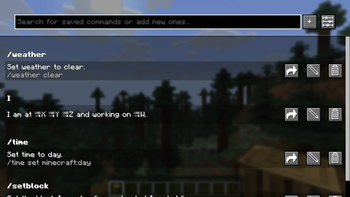
!(https://raw.githubusercontent.com/Pr77Pr77/savedcommands/refs/heads/26. 2/resources/saved-commands-screen-screenshot.png) The Saved Commands screen with some example commands.
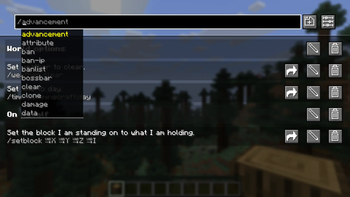
!(https://raw.githubusercontent.com/Pr77Pr77/savedcommands/refs/heads/26. 2/resources/search-suggestion-screenshot.png) In the top bar you can get command recommendations like in the chat. In this screenshot, custom categories are enabled.
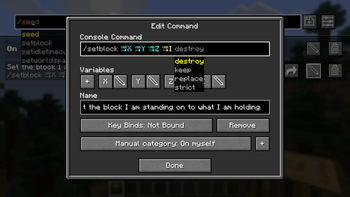
!(https://raw.githubusercontent.com/Pr77Pr77/savedcommands/refs/heads/26. 2/resources/edit-command-screen-screenshot.png) In the edit command screen you can edit the name, command and keybind combination.
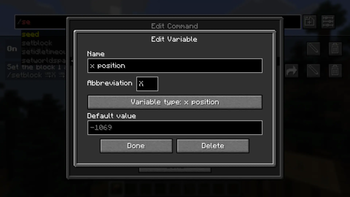
!(https://raw.githubusercontent.com/Pr77Pr77/savedcommands/refs/heads/26. 2/resources/edit-variable-screen-screenshot.png) In the edit variable screen you can edit the name, abbreviation, variable type and defult value.
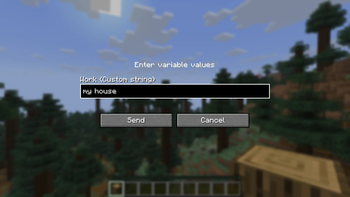
!(https://raw.githubusercontent.com/Pr77Pr77/savedcommands/refs/heads/26. 2/resources/input-variable-screen-screenshot.png) Before sending a command or text containing a custom variable, you are prompted to input the values.
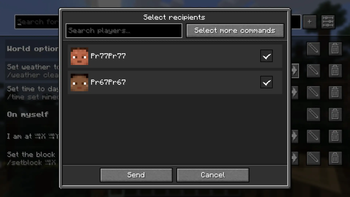
!(https://raw.githubusercontent.com/Pr77Pr77/savedcommands/refs/heads/26. 2/resources/share-select-recipients.png) After clicking share, this screen to select the recipients opens.
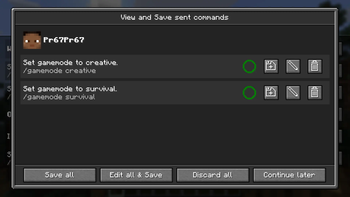
!(https://raw.githubusercontent.com/Pr77Pr77/savedcommands/refs/heads/26. 2/resources/share-view-save.png) This screen lets you view, save and edit received commands. The circle shows, if you already have the command saved.
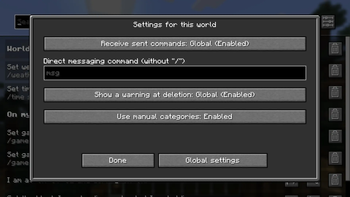
!(https://raw.githubusercontent.com/Pr77Pr77/savedcommands/refs/heads/26. 2/resources/settings-world.png) There are settings which can be changed per world, as seen in the screenshot, or changed for the whole installation.
## Working principles
The following things regarding the mod might be counterintuitive:
The mod separates every world and server from each other. This means, that you might have to set the same command up multiple times. * If you set a keybind to one that already exists in the Minecraft keybinds, it will block
📊 Mod Details
- Game
- Minecraft Mods
- Author
- Pr77Pr77
- Version
- 1.3.2-beta+1.21.9-10
- Downloads
- 1,331
- Endorsements
- 7
- Category
- fabric
- Created
- 10/30/2025
- Updated
- 7/12/2026
- Game Versions
- 1.21.9, 1.21.10
- Tags
- utility
🔧 How to Install Minecraft Mods Mods
Download from Modrinth. Use Prism Launcher or drop into your mods folder.
📖 Full step-by-step install guide for Minecraft Mods →
Visit the official mod page for specific installation instructions for this mod.
🎮 Need cheat codes or console commands? Check ur gaming wiki for Minecraft Mods commands, item IDs, and more.
❓ Frequently Asked Questions
Which Minecraft Mods versions does Saved Commands support?
The author lists 1.21.9, 1.21.10. Other versions may work but are untested by the author.
What is the latest version of Saved Commands?
Version 1.3.2-beta+1.21.9-10, published 2026-07-12 with 1,331 downloads recorded at the source.
Keep browsing — more Minecraft Mods mods await