Saros Worldborder Customizer
🟡 Updated this year⚠️ Install Order · 2 steps
Install in this order, then this mod last — most mods fail to load without their framework and dependencies in place.
🖼️ Gallery (1 images)
🔍 Analysis
- 👍 0.4% endorsement rate
- 🏆 #87 of 254 decoration mods in this game by downloads
📋 About This Mod
!(https://www.bisecthosting.com/images/CF/Saros_Worldborder_Customizer/BH_Saros_Worldborder_Customizer_header.webp)
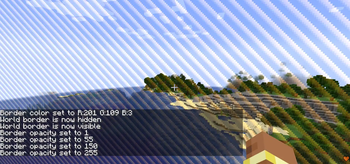
Saros Worldborder Customizer gives server admins and singleplayer users full control over the look of the Minecraft world border. Change its color, make it invisible, adjust transparency, set a custom warning color, or let it pulse with animated flair — all in real time, synced instantly to every connected player, and saved across server restarts.
!(https://www.bisecthosting.com/images/CF/Saros_Worldborder_Customizer/BH_Saros_Worldborder_Customizer_features.webp)
- Custom Border Color 🎨
- - Set any color using RGB values (0–255 per channel).
- - `/saros_worldborder color
` - - Example: `/saros_worldborder color 255 128 0` → orange border.
- Hide / Show 👻
- - Make the world border completely invisible with a single command.
- - `/saros_worldborder hide` — border disappears entirely.
- - `/saros_worldborder show` — border becomes visible again.
- Opacity Control 🔆
- - Adjust the transparency of the border independently of its color.
- - `/saros_worldborder opacity <0-255>` — 0 = fully transparent, 255 = fully opaque.
- Warning Color ⚠️
- - Define a separate color that activates automatically when a player steps inside the border's warning distance.
- - `/saros_worldborder warningcolor
` - - Works alongside Minecraft's built-in warning distance setting.
- Pulse Animation 💫
- - Animate the border so it smoothly pulses between the main color and a secondary color.
- - `/saros_worldborder pulse
` — speed 1 is slow, 10 is fast. - - `/saros_worldborder pulse off` — disables the animation.
- Instant Multiplayer Sync 🌐
- - Every change is broadcast to all online players the moment the command is executed.
- - Newly joining players automatically receive the current state.
- Persistent Storage 🔄
- - All settings are saved to the world folder (`wbcustomizer_state.json`) and restored after every server restart.
- - Per-world: different worlds can have different border configurations.
- Permission System 🔒
- - On multiplayer servers: OP level 2 required.
- - In singleplayer: all commands are available by default.
!(https://www.bisecthosting.com/images/CF/Saros_Worldborder_Customizer/BH_Saros_Worldborder_Customizer_commands.webp)
| Command | Description |
|---|---|
| `/saros_worldborder` | Show all available commands (EN + DE) |
| `/saros_worldborder color
!(https://www.bisecthosting.com/images/CF/Saros_Worldborder_Customizer/BH_Saros_Worldborder_Customizer_versions.webp)
### Currently Supported ✅ - Forge 1. 20. 1 - Fabric 1. 20. 1 - Forge 1. 21. 1 - NeoForge 1. 21. 1 - Fabric 1. 21. 1 - Forge 26. 1 - NeoForge 26. 1 - Fabric 26. 1 - Forge 26. 1. 2 - NeoForge 26. 1. 2 - Fabric 26. 1. 2
!(https://www.bisecthosting.com/images/CF/Saros_Worldborder_Customizer/BH_Saros_Worldborder_Customizer_discord.webp)
For requests, suggestions, or bug reports, join the (https://discord.gg/H8a8CJe) and become part of the Saro's Mod community!
[!(https://www.bisecthosting.com/images/CF/Saros_Worldborder_Customizer/BH_Saros_Worldborder_Customizer_promo2.webp)](https://server.sarocesch.de/refersaro.php "Bisect Hosting")
📊 Mod Details
- Game
- Minecraft Mods
- Author
- Sarocesch
- Version
- 1.0.1
- Downloads
- 542
- Endorsements
- 2
- Category
- decoration
- Created
- 5/16/2026
- Updated
- 6/22/2026
- Game Versions
- 26.2
- Tags
- decoration, game-mechanics, social
🔧 How to Install Minecraft Mods Mods
Download from Modrinth. Use Prism Launcher or drop into your mods folder.
📖 Full step-by-step install guide for Minecraft Mods →
Visit the official mod page for specific installation instructions for this mod.
🎮 Need cheat codes or console commands? Check ur gaming wiki for Minecraft Mods commands, item IDs, and more.
❓ Frequently Asked Questions
Which Minecraft Mods versions does Saros Worldborder Customizer support?
The author lists 26.2. Other versions may work but are untested by the author.
What is the latest version of Saros Worldborder Customizer?
Version 1.0.1, published 2026-06-22 with 542 downloads recorded at the source.
Keep browsing — more Minecraft Mods mods await