Rype's Profiles
🟡 Updated this year⚠️ Install Order · 2 steps
Install in this order, then this mod last — most mods fail to load without their framework and dependencies in place.
🖼️ Gallery (1 images)
🔍 Analysis
- 🏆 #757 of 874 fabric mods in this game by downloads
📋 About This Mod
# Rype's Profiles Save, organize, and instantly recreate your favorite inventory layouts for Shulker Boxes, Single Chests, and Double Chests. Stop manually sorting containers every time. Rype's Profiles lets you save the exact arrangement of items inside supported containers and reapply that layout whenever you need it. Whether you're organizing PvP kits, building materials, farming supplies, or general storage, your favorite layouts are always one click away. --- # Features ## Save Inventory Layouts Create named profiles from the current contents of a supported container. Perfect for: * PvP kits * Building blocks * Redstone supplies * Food storage * Potion setups * Tool collections * Any custom organization system --- ## Apply Profiles Instantly Open a compatible container and select one of your saved profiles to automatically arrange the items into the saved layout. No commands. No complicated setup. Just click and organize. --- ## Supported Containers ✔ Shulker Boxes ✔ Single Chests ✔ Double Chests Each container type has its own independent profile list, keeping everything organized. --- ## Integrated GUI The mod adds a clean set of buttons beside supported container GUIs. Features include: * Save Profile button * List of saved profiles * One-click profile loading * Automatic container detection * Clean, lightweight interface The buttons only appear when opening supported containers. --- # Highly Customizable Everything can be configured through Mod Menu. ### Enable or Disable * Shulker Box Profiles * Single Chest Profiles * Double Chest Profiles ### Customize Button Layout Adjust the interface exactly how you like it. Options include: * Button Width * Button Height * Button Spacing * X Offset * Y Offset A live preview lets you see changes before closing the config screen. You can also restore the default layout with a single click. --- # Configuration Profiles and settings are automatically saved. Configuration location: `config/rypesprofiles/` Profiles are stored separately from settings, making management simple. --- # Why Use Rype's Profiles? * Save time organizing storage * Keep every container consistent * Build reusable inventory layouts * Great for large storage systems * Perfect for PvP kits * Lightweight and client-side * Simple interface * No commands required --- # Performance Rype's Profiles is designed to be lightweight. * Minimal performance impact * Loads only when supported containers are opened * Client-side only --- # Requirements * Minecraft **1.21.11** * Fabric Loader * Fabric API ### Optional * Mod Menu (recommended for configuration) --- # Planned Features Future updates may include: * Additional container support (Barrels, Hoppers, etc.) * Profile import/export * Profile sharing * Categories and folders * Search functionality * More customization options --- # Need Help? If you encounter a bug or have a feature request, feel free to open an issue or leave feedback. Suggestions are always welcome! --- Made with ❤️ by **ItzNotRype**
# Rype's Profiles
Save, organize, and instantly recreate your favorite inventory layouts for Shulker Boxes, Single Chests, and Double Chests.
Stop manually sorting containers every time. Rype's Profiles lets you save the exact arrangement of items inside supported containers and reapply that layout whenever you need it.
Whether you're organizing PvP kits, building materials, farming supplies, or general storage, your favorite layouts are always one click away.
## Save Inventory Layouts
Create named profiles from the current contents of a supported container.
Perfect for:
PvP kits Building blocks Redstone supplies Food storage Potion setups Tool collections Any custom organization system
## Apply Profiles Instantly
Open a compatible container and select one of your saved profiles to automatically arrange the items into the saved layout.
No commands. No complicated setup. Just click and organize.
## Supported Containers
✔ Shulker Boxes
✔ Single Chests
✔ Double Chests
Each container type has its own independent profile list, keeping everything organized.
## Integrated GUI
The mod adds a clean set of buttons beside supported container GUIs.
Features include:
Save Profile button List of saved profiles One-click profile loading Automatic container detection Clean, lightweight interface
The buttons only appear when opening supported containers.
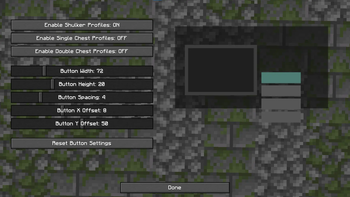
# Highly Customizable
Everything can be configured through Mod Menu.
### Enable or Disable
Shulker Box Profiles Single Chest Profiles Double Chest Profiles
### Customize Button Layout
Adjust the interface exactly how you like it.
Options include:
Button Width Button Height Button Spacing X Offset Y Offset
A live preview lets you see changes before closing the config screen.
You can also restore the default layout with a single click.
# Configuration
Profiles and settings are automatically saved.
Configuration location:
`config/rypesprofiles/`
Profiles are stored separately from settings, making management simple.
# Why Use Rype's Profiles?
Save time organizing storage Keep every container consistent Build reusable inventory layouts Great for large storage systems Perfect for PvP kits Lightweight and client-side Simple interface No commands required
# Performance
Rype's Profiles is designed to be lightweight.
Minimal performance impact Loads only when supported containers are opened Client-side only
# Requirements
Minecraft 1. 21. 11 Fabric Loader Fabric API
### Optional
Mod Menu (recommended for configuration)
# Planned Features
Future updates may include:
Additional container support (Barrels, Hoppers, etc.) Profile import/export Profile sharing Categories and folders Search functionality * More customization options
# Need Help?
If you encounter a bug or have a feature request, feel free to open an issue or leave feedback.
Suggestions are always welcome!
Made with ❤️ by ItzNotRype
📊 Mod Details
- Game
- Minecraft Mods
- Author
- ItzNotRype
- Version
- 5HIQObN7
- Downloads
- 40
- Endorsements
- 0
- Category
- fabric
- Created
- 7/16/2026
- Updated
- 7/13/2026
- Game Versions
- 5HIQObN7
- Tags
- management, storage, utility
🔧 How to Install Minecraft Mods Mods
Download from Modrinth. Use Prism Launcher or drop into your mods folder.
📖 Full step-by-step install guide for Minecraft Mods →
Visit the official mod page for specific installation instructions for this mod.
🎮 Need cheat codes or console commands? Check ur gaming wiki for Minecraft Mods commands, item IDs, and more.
❓ Frequently Asked Questions
Which Minecraft Mods versions does Rype's Profiles support?
The author lists 5HIQObN7. Other versions may work but are untested by the author.
What is the latest version of Rype's Profiles?
Version 5HIQObN7, published 2026-07-13 with 40 downloads recorded at the source.
Keep browsing — more Minecraft Mods mods await