RulerMod
🟡 Updated this year⚠️ Install Order · 2 steps
Install in this order, then this mod last — most mods fail to load without their framework and dependencies in place.
🖼️ Gallery (3 images)
🔍 Analysis
- 🏆 #53 of 909 fabric mods in this game by downloads
📋 About This Mod
# Ruler **Ruler** is a lightweight, client-side selection and measurement tool for Minecraft 1.21.1 (Fabric). It lets you mark two positions in the world and instantly see a clean holographic 3D visualization of the selected area — along with all relevant measurements in a HUD overlay. Inspired by WorldEdit CUI, but completely standalone. No server plugin or WorldEdit installation required. --- ## How it works Press **R** to activate the ruler (rebindable under Controls → Ruler). - **Left-click** a block to set **Pos1** - **Right-click** a block to set **Pos2** That's it. The selection renders immediately. Press **R** again to deactivate and clear the selection. --- ## 3D Visualization The selection is rendered as a holographic wireframe box directly in the world: - **XYZ color-coded edges** — X red, Y green, Z blue - **Subtle inner grid** for spatial orientation - **Transparent block highlights** at Pos1 (green) and Pos2 (red) - Single positions are shown before the second is placed - Clean, modern look — no chunky vanilla-style boxes --- ## HUD Overlay A small panel in the top-left corner shows: | Field | Description | |-------|-------------| | Pos1 / Pos2 | Block coordinates | | Distance | Direct 3D diagonal (air-line) | | X / Y / Z | Dimensions of the selection | | Area | Footprint (X × Z) | | Volume | Total blocks (X × Y × Z) | --- ## Languages Ruler ships with **37 languages** out of the box: **Standard:** English, Deutsch, Français, Español, Italiano, Português, Русский, Українська, Polski, Nederlands, Svenska, Dansk, Norsk, Suomi, Čeština, Slovenčina, Magyar, Română, Türkçe, Ελληνικά, 简体中文, 繁體中文, 日本語, 한국어, العربية, עברית, Tiếng Việt, ภาษาไทย --- ## Compatibility - ✅ **Client-side only** — works on any server, no server mod needed - ✅ **ModMenu** — appears correctly in the mod list - ✅ Fabric API required --- ## Requirements - Minecraft **1.21.1** - Fabric Loader **≥ 0.17.3** - (https://modrinth.com/mod/fabric-api)
Ruler is a lightweight, client-side selection and measurement tool for Minecraft 1. 21. 1 (Fabric). It lets you mark two positions in the world and instantly see a clean holographic 3D visualization of the selected area — along with all relevant measurements in a HUD overlay.
Inspired by WorldEdit CUI, but completely standalone. No server plugin or WorldEdit installation required.
## How it works
Press R to activate the ruler (rebindable under Controls → Ruler).
- Left-click a block to set Pos1
- Right-click a block to set Pos2
That's it. The selection renders immediately.
Press R again to deactivate and clear the selection.
## 3D Visualization
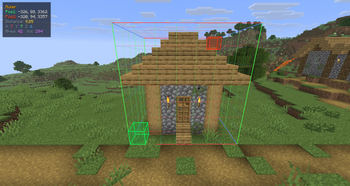
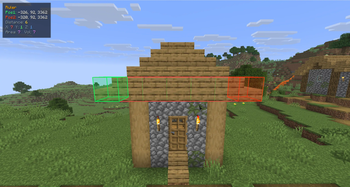
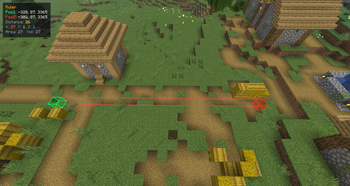
The selection is rendered as a holographic wireframe box directly in the world:
- XYZ color-coded edges — X red, Y green, Z blue
- Subtle inner grid for spatial orientation
- Transparent block highlights at Pos1 (green) and Pos2 (red)
- Single positions are shown before the second is placed
- Clean, modern look — no chunky vanilla-style boxes
## HUD Overlay
A small panel in the top-left corner shows:
| Field | Description | |-------|-------------| | Pos1 / Pos2 | Block coordinates | | Distance | Direct 3D diagonal (air-line) | | X / Y / Z | Dimensions of the selection | | Area | Footprint (X × Z) | | Volume | Total blocks (X × Y × Z) |
## Languages
Ruler ships with 37 languages out of the box:
Standard: English, Deutsch, Français, Español, Italiano, Português, Русский, Українська, Polski, Nederlands, Svenska, Dansk, Norsk, Suomi, Čeština, Slovenčina, Magyar, Română, Türkçe, Ελληνικά, 简体中文, 繁體中文, 日本語, 한국어, العربية, עברית, Tiếng Việt, ภาษาไทย
## Compatibility
- ✅ Client-side only — works on any server, no server mod needed
- ✅ ModMenu — appears correctly in the mod list
- ✅ Fabric API required
## Requirements
- Minecraft 1. 21. 1
- Fabric Loader ≥ 0. 17. 3
- (https://modrinth.com/mod/fabric-api)
📊 Mod Details
- Game
- Minecraft Mods
- Author
- Beo2011_
- Version
- 1.0.0
- Downloads
- 297
- Endorsements
- 2
- Category
- fabric
- Created
- 5/26/2026
- Updated
- 5/23/2026
- Game Versions
- 1.21.11
- Tags
- utility
🔧 How to Install Minecraft Mods Mods
Download from Modrinth. Use Prism Launcher or drop into your mods folder.
📖 Full step-by-step install guide for Minecraft Mods →
Visit the official mod page for specific installation instructions for this mod.
🎮 Need cheat codes or console commands? Check ur gaming wiki for Minecraft Mods commands, item IDs, and more.
❓ Frequently Asked Questions
Which Minecraft Mods versions does RulerMod support?
The author lists 1.21.11. Other versions may work but are untested by the author.
What is the latest version of RulerMod?
Version 1.0.0, published 2026-05-23 with 297 downloads recorded at the source.
Keep browsing — more Minecraft Mods mods await