RPG Enchanting
🟡 Updated this year⚠️ Install Order · 2 steps
Install in this order, then this mod last — most mods fail to load without their framework and dependencies in place.
🖼️ Gallery (1 images)
🔍 Analysis
- 👍 0.9% endorsement rate
- 🏆 #331 of 538 adventure mods in this game by downloads
📋 About This Mod
# RPG Enchanting Introduces an alternative/replacement/addition to the traditional enchanting system. It is heavily inspired by the game "Heroes of Hammerwatch 2". ## Enchantment limit Each item can be enchanted with a maximum of 2 enchantments, one "prefix" and one "suffix" enchantment. Every enchantment is either a prefix or a suffix enchantment. ## Tooltip changes Enchantments are no longer displayed in a list below the item name. Instead, the item name is modified. E.g. an Iron Pickaxe enchanted with Efficiency and Fortune is called "Efficient Iron Pickaxe of Fortune". (Items can still be renamed, these changes only affect the default name) The RPG Enchanting Table adds a "Enchanted by player_name" line to items it enchants. This is purely cosmetic and it can be disabled in the config (both in the client config and in the server config). ## RPG Enchanting Table This new block allows the player to enchant items in a more controlled way. The table will replace existing enchantments of the same group (prefix or suffix). Only unlocked enchantments are available for the player to choose from. The RPG Enchanting Table can be crafted with the same recipe as the vanilla Enchanting Table (replacing it). It has the same properties when interacting with the world (emits light, mineable faster with a pickaxe, etc) ### Unlocking enchantments Enchantments can be unlocked by three different methods. 1. Advancements The server config allows pairing advancements to specific enchantments. When the player has the advancement when interacting with the RPG Enchanting Table, the corresponding enchantments of the specified level are unlocked. 2. Surrounding blocks The server config allows pairing blocks to specific enchantments. When a player interacts with the RPG Enchanting Table, the table searches for these in a configurable radius. When a block from the list is found, the corresponding enchantments of the specified level are unlocked. 3. Enchanted books in Chiseled Bookshelves When enabled in the server config, the RPG Enchanting Table looks for Chiseled Bookshelves, similar to the second option. When a Chiseled Bookshelf that stores Enchanted Books is found, each of those enchantments is unlocked. ### Settings Several settings define how exactly the RPG Enchanting Table works. These settings can be defined for each individual RPG Enchanting Table (via block entity data), with a default defined in the server config. - Block Reach Radius, defines the area around the RPG Enchanting Table where blocks are checked to unlock enchantments. - Enchanted Book Consumption Mode, defines what happens with enchanted books in surrounding bookshelves, when their enchantment is applied to an item. These include: - KEEP (nothing happens) - CONSUME (enchanted books are replaced with a configurable item when one of their enchantments is used) - PARTIAL_CONSUME (same as consume, but books with multiple enchants are not replaced, only the relevant enchantment is removed) - Enchantment Unlock Mode, defines how exactly enchantments are unlocked (also see above) - ADDITION (all three methods are working like normal) - BLOCK_REQUIRED_FOR_ADVANCEMENT (enchantments unlocked by advancements are only added, when they are also unlocked by blocks, book enchantments are added like normal) ### Enchanting cost Enchanting costs experience and items. These items are defined in the server config. Both item and experience cost are higher when an existing enchantment is replaced. ## Compatibility with custom enchantments RPG Enchanting uses the existing enchantment technology, but expects enchantments to be configured a certain way. Namely, enchantments must be present in one of these enchantment tags: "rpgenchanting:prefix_enchantments" or "rpgenchanting:suffix_enchantments". RPG Enchanting uses these two enchantment tags for all its logic. > Note that putting an enchantment into both tags at the same time can lead to unexpected behaviour. The item name additions are controlled by localization keys of these formats: "rpgenchanting.\<namespace\>.\<id\>.<level>.prefix" "rpgenchanting.\<namespace\>.\<id\>.<level>.suffix" E.g. if the "minecraft:efficiency" enchantment is in the "prefix" tag, the localization keys would look like this: - "rpgenchanting.minecraft.efficiency.1.prefix" - "rpgenchanting.minecraft.efficiency.2.prefix" - "rpgenchanting.minecraft.efficiency.3.prefix" - "rpgenchanting.minecraft.efficiency.4.prefix" - "rpgenchanting.minecraft.efficiency.5.prefix" ### Display Order The pre- and suffix enchantment names are "wrapped" around the item name, the suffix is processed first. **What does this mean?** The final item name is a combination of the "item name additions" of both enchantment and the original item name. E.g. "Efficient Iron Pickaxe of Fortune" However, instead of "prefix_name + item_name + suffix_name", the order is much more customizable. The translations for the "item name
# RPG Enchanting
Introduces an alternative/replacement/addition to the traditional enchanting system. It is heavily inspired by the game "Heroes of Hammerwatch 2".
## Enchantment limit
Each item can be enchanted with a maximum of 2 enchantments, one "prefix" and one "suffix" enchantment.
Every enchantment is either a prefix or a suffix enchantment.
## Tooltip changes
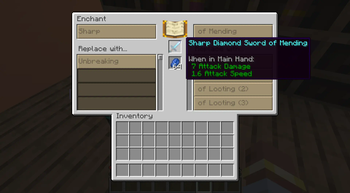
Enchantments are no longer displayed in a list below the item name. Instead, the item name is modified.
E.g. an Iron Pickaxe enchanted with Efficiency and Fortune is called "Efficient Iron Pickaxe of Fortune".
(Items can still be renamed, these changes only affect the default name)
The RPG Enchanting Table adds a "Enchanted by player_name" line to items it enchants. This is purely cosmetic and it can be disabled in the config (both in the client config and in the server config).
## RPG Enchanting Table
This new block allows the player to enchant items in a more controlled way. The table will replace existing enchantments of the same group (prefix or suffix). Only unlocked enchantments are available for the player to choose from.
The RPG Enchanting Table can be crafted with the same recipe as the vanilla Enchanting Table (replacing it). It has the same properties when interacting with the world (emits light, mineable faster with a pickaxe, etc)
### Unlocking enchantments
Enchantments can be unlocked by three different methods.
1. Advancements
The server config allows pairing advancements to specific enchantments. When the player has the advancement when interacting with the RPG Enchanting Table, the corresponding enchantments of the specified level are unlocked.
2. Surrounding blocks
The server config allows pairing blocks to specific enchantments. When a player interacts with the RPG Enchanting Table, the table searches for these in a configurable radius. When a block from the list is found, the corresponding enchantments of the specified level are unlocked.
3. Enchanted books in Chiseled Bookshelves
When enabled in the server config, the RPG Enchanting Table looks for Chiseled Bookshelves, similar to the second option. When a Chiseled Bookshelf that stores Enchanted Books is found, each of those enchantments is unlocked.
### Settings
Several settings define how exactly the RPG Enchanting Table works. These settings can be defined for each individual RPG Enchanting Table (via block entity data), with a default defined in the server config.
- Block Reach Radius, defines the area around the RPG Enchanting Table where blocks are checked to unlock enchantments.
- Enchanted Book Consumption Mode, defines what happens with enchanted books in surrounding bookshelves, when their enchantment is applied to an item. These include:
- - KEEP (nothing happens)
- - CONSUME (enchanted books are replaced with a configurable item when one of their enchantments is used)
- - PARTIAL_CONSUME (same as consume, but books with multiple enchants are not replaced, only the relevant enchantment is removed)
- Enchantment Unlock Mode, defines how exactly enchantments are unlocked (also see above)
- - ADDITION (all three methods are working like normal)
- - BLOCK_REQUIRED_FOR_ADVANCEMENT (enchantments unlocked by advancements are only added, when they are also unlocked by blocks, book enchantments are added like normal)
### Enchanting cost
Enchanting costs experience and items.
These items are defined in the server config.
Both item and experience cost are higher when an existing enchantment is replaced.
## Compatibility with custom enchantments
RPG Enchanting uses the existing enchantment technology, but expects enchantments to be configured a certain way.
Namely, enchantments must be present in one of these enchantment tags: "rpgenchanting:prefix_enchantments" or "rpgenchanting:suffix_enchantments".
RPG Enchanting uses these two enchantment tags for all its logic.
> Note that putting an enchantment into both tags at the same time can lead to unexpected behaviour.
The item name additions are controlled by localization keys of these formats:
"rpgenchanting.\
"rpgenchanting.\
E.g. if the "minecraft:efficiency" enchantment is in the "prefix" tag, the localization keys would look like this:
- "rpgenchanting.minecraft.efficiency. 1.prefix"
- "rpgenchanting.minecraft.efficiency. 2.prefix"
- "rpgenchanting.minecraft.efficiency. 3.prefix"
- "rpgenchanting.minecraft.efficiency. 4.prefix"
- "rpgenchanting.minecraft.efficiency. 5.prefix"
### Display Order
The pre- and suffix enchantment names are "wrapped" around the item name, the suffix is processed first.
What does this mean?
The final item name is a combination of the "item name additions" of both enchantment and the original item name.
E.g. "Efficient Iron Pickaxe of Fortune"
However, instead of "prefix_name + item_name + suffix_name", the order is much more customizable.
The translations for the "item name
📊 Mod Details
- Game
- Minecraft Mods
- Author
- TheRedBrain
- Version
- 2.1.0
- Downloads
- 1,768
- Endorsements
- 16
- Category
- adventure
- Created
- 3/24/2025
- Updated
- 7/13/2026
- Game Versions
- 26.1, 26.1.1, 26.1.2
- Tags
- adventure, game-mechanics, magic
🔧 How to Install Minecraft Mods Mods
Download from Modrinth. Use Prism Launcher or drop into your mods folder.
📖 Full step-by-step install guide for Minecraft Mods →
Visit the official mod page for specific installation instructions for this mod.
🎮 Need cheat codes or console commands? Check ur gaming wiki for Minecraft Mods commands, item IDs, and more.
❓ Frequently Asked Questions
Which Minecraft Mods versions does RPG Enchanting support?
The author lists 26.1, 26.1.1, 26.1.2. Other versions may work but are untested by the author.
What is the latest version of RPG Enchanting?
Version 2.1.0, published 2026-07-13 with 1,768 downloads recorded at the source.
Keep browsing — more Minecraft Mods mods await