Riftbone
🟡 Updated this year⚠️ Install Order · 2 steps
Install in this order, then this mod last — most mods fail to load without their framework and dependencies in place.
🖼️ Gallery (2 images)
🔍 Analysis
- 👍 0.3% endorsement rate
- 🏆 #821 of 892 fabric mods in this game by downloads
📋 About This Mod
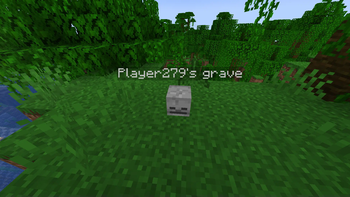
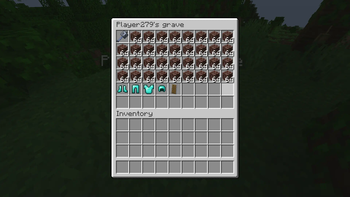
# Riftbone WARNING! Upgrading the mod between certain versions might be unsafe! Read changelog before updating! A simple grave / remains mod to keep your items safe and ready for recovery A partial rewrite of (https://modrinth.com/mod/riftrealmsutility) for 1.21.1 ## Graves - Spawned on death. - Disappear after a few seconds if emptied. - Right-click to open their inventory and take the items out. - Shift-right-click to take all the items from the grave into the slots they were previously in. (Quick looting) - If the slot is filled, the item is placed in an empty one. - If the inventory is full, the item is dropped on the ground. - Float in water and lava, and stay at -64 when falling into the void. ## Migration - ONLY WORKS ON v1.0.0 - Graves from (https://modrinth.com/mod/riftrealmsutility) automatically change themselves into Riftbone graves when they are loaded. - Rift Realm Utility should not be installed alongside Riftbone, if it ever becomes avaible on 1.21.1 ## Gamerules - `ownerOnlyLooting` : Allows only the owner of the grave to open the grave, by either method. Defaults to false. - `ownerOnlyQuickLooting` : Allows only the owner of the grave to instantly loot the grave, by Shift-right-clicking. Defaults to true. - `quickLootingAllowed` : Allows quick looting to happen. Defaults to true.
# Riftbone WARNING! Upgrading the mod between certain versions might be unsafe! Read changelog before updating! A simple grave / remains mod to keep your items safe and ready for recovery
A partial rewrite of (https://modrinth.com/mod/riftrealmsutility) for 1. 21. 1 ## Graves - Spawned on death. - Disappear after a few seconds if emptied. - Right-click to open their inventory and take the items out. - Shift-right-click to take all the items from the grave into the slots they were previously in. (Quick looting) - If the slot is filled, the item is placed in an empty one. - If the inventory is full, the item is dropped on the ground. - Float in water and lava, and stay at -64 when falling into the void. ## Migration - ONLY WORKS ON v1. 0. 0 - Graves from (https://modrinth.com/mod/riftrealmsutility) automatically change themselves into Riftbone graves when they are loaded. - Rift Realm Utility should not be installed alongside Riftbone, if it ever becomes avaible on 1. 21. 1 ## Gamerules - `ownerOnlyLooting` : Allows only the owner of the grave to open the grave, by either method. Defaults to false. - `ownerOnlyQuickLooting` : Allows only the owner of the grave to instantly loot the grave, by Shift-right-clicking. Defaults to true. - `quickLootingAllowed` : Allows quick looting to happen. Defaults to true.
📊 Mod Details
- Game
- Minecraft Mods
- Author
- flexhd
- Version
- 1.2.1+26.1-beta
- Downloads
- 1,243
- Endorsements
- 4
- Category
- fabric
- Created
- 4/14/2025
- Updated
- 4/26/2026
- Game Versions
- 26.1, 26.1.1, 26.1.2
- Tags
- game-mechanics
🔧 How to Install Minecraft Mods Mods
Download from Modrinth. Use Prism Launcher or drop into your mods folder.
📖 Full step-by-step install guide for Minecraft Mods →
Visit the official mod page for specific installation instructions for this mod.
🎮 Need cheat codes or console commands? Check ur gaming wiki for Minecraft Mods commands, item IDs, and more.
❓ Frequently Asked Questions
Which Minecraft Mods versions does Riftbone support?
The author lists 26.1, 26.1.1, 26.1.2. Other versions may work but are untested by the author.
What is the latest version of Riftbone?
Version 1.2.1+26.1-beta, published 2026-04-26 with 1,243 downloads recorded at the source.
Keep browsing — more Minecraft Mods mods await