RGB Redstone Lamps (Color Blocks)
🟠 Updated over a year ago⚠️ Install Order · 2 steps
Install in this order, then this mod last — most mods fail to load without their framework and dependencies in place.
🖼️ Gallery (3 images)
🔍 Analysis
- 🏆 #113 of 211 decoration mods in this game by downloads
📋 About This Mod
# Color Blocks Color Blocks is a mod for Minecraft Java Edition. It runs on the version 1.20.4 using the (https://fabricmc.net) Loader. This guide will cover how to install, and use this mod. ## Installation This mod will run without any dependencies. Just install fabric and drop the jar file in the `mods` folder located in `%appdata%/.minecraft/` to install the mod. ## Usage Once installed, you will be able to obtain the added, "RGB Lamp" in the Redstone tab of the creative section or by using this crafting recipe: !(https://raw.githubusercontent.com/wet-noodles90/ColorBlocks/refs/heads/master/recipe.png) When giving the block a redstone signal, the block will change color depending on the strength of the signal. Here are all of the colors and their corresponding signal strenghts: - 0 - black - 1 - red - 2 - orange - 3 - yellow - 4 - lime - 5 - green - 6 - cyan - 7 - light blue - 8 - blue - 9 - purple - 10 - magenta - 11 - pink - 12 - brown - 13 - gray - 14 - light gray - 15 - white This block also can only be collected by a pickaxe with silk touch. This mod is intended for redstone but can be used in building as well. ## Bugs, Glitches and Issues If there are any problems with this mod, report it (https://github.com/wet-noodles90/ColorBlocks/issues).
# Color Blocks
Color Blocks is a mod for Minecraft Java Edition. It runs on the version 1. 20. 4 using the (https://fabricmc.net) Loader. This guide will cover how to install, and use this mod.
## Installation This mod will run without any dependencies. Just install fabric and drop the jar file in the `mods` folder located in `%appdata%/.minecraft/` to install the mod.
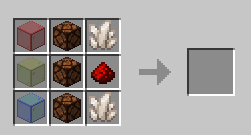
## Usage Once installed, you will be able to obtain the added, "RGB Lamp" in the Redstone tab of the creative section or by using this crafting recipe:
!(https://raw.githubusercontent.com/wet-noodles90/ColorBlocks/refs/heads/master/recipe.png)
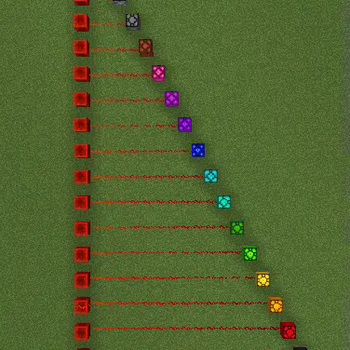
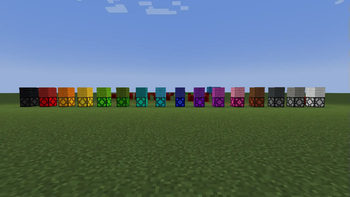
When giving the block a redstone signal, the block will change color depending on the strength of the signal. Here are all of the colors and their corresponding signal strenghts:
- 0 - black
- - 1 - red
- - 2 - orange
- - 3 - yellow
- - 4 - lime
- - 5 - green
- - 6 - cyan
- - 7 - light blue
- - 8 - blue
- - 9 - purple
- - 10 - magenta
- - 11 - pink
- - 12 - brown
- - 13 - gray
- - 14 - light gray
- - 15 - white
This block also can only be collected by a pickaxe with silk touch. This mod is intended for redstone but can be used in building as well.
## Bugs, Glitches and Issues
If there are any problems with this mod, report it (https://github.com/wet-noodles90/ColorBlocks/issues).
📊 Mod Details
- Game
- Minecraft Mods
- Author
- wet_noodles90
- Version
- 1.0.0
- Downloads
- 268
- Endorsements
- 6
- Category
- decoration
- Created
- 4/18/2025
- Updated
- 4/13/2025
- Game Versions
- 1.20.4
- Tags
- decoration, technology, utility
🔧 How to Install Minecraft Mods Mods
Download from Modrinth. Use Prism Launcher or drop into your mods folder.
📖 Full step-by-step install guide for Minecraft Mods →
Visit the official mod page for specific installation instructions for this mod.
🎮 Need cheat codes or console commands? Check ur gaming wiki for Minecraft Mods commands, item IDs, and more.
❓ Frequently Asked Questions
Which Minecraft Mods versions does RGB Redstone Lamps (Color Blocks) support?
The author lists 1.20.4. Other versions may work but are untested by the author.
What is the latest version of RGB Redstone Lamps (Color Blocks)?
Version 1.0.0, published 2025-04-13 with 268 downloads recorded at the source.
Keep browsing — more Minecraft Mods mods await