Revised Glass
⚪ Last updated 2024⚠️ Install Order · 2 steps
Install in this order, then this mod last — most mods fail to load without their framework and dependencies in place.
🖼️ Gallery (3 images)
🔍 Analysis
- 👍 1.1% endorsement rate — high engagement, a strong quality signal
- 🏆 #156 of 183 datapack mods in this game by downloads
📋 About This Mod
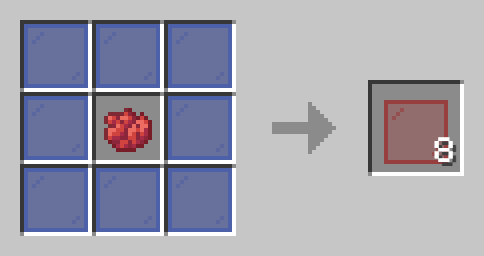
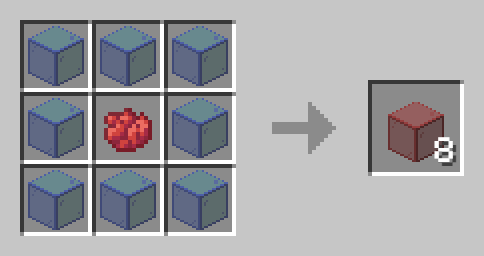
(https://www.youtube.com/@Sunny223_) **|** (https://twitter.com/thesunny223?s=21&t=PgF-ne2R7Hi2_JHJWNlRMQ) **|** (https://modrinth.com/user/Sunny223) **——————————————** ## Summary Enhance your Minecraft experience with the Revised Glass data pack, which provides a simple and user-friendly way to recolor your existing colored glass. ## How To Craft Simply open a crafting table and place your chosen dye color in the center slot. Then, surround the dye with eight pieces of colored glass. The crafting table will transform these materials into your newly recolored glass, allowing you to customize your glass blocks and panes with the desired color. !(https://cdn.modrinth.com/data/MDjkYPLb/images/78e04af60edd142279d60afa79967a8e4f872410.png) ## Installation Installing the Revised Glass data pack on your server is straightforward. First, locate the data packs folder within your server files. Once found, simply drag the Revised Glass data pack, which should be in a .zip file format, into that folder. Afterward, restart your server, and you're all set to enjoy the changes. **——————————————** Have any questions or concerns please contact sunny223#0 on Discord.
(https://www.youtube.com/@Sunny223_) | (https://twitter.com/thesunny223?s=21&t=PgF-ne2R7Hi2_JHJWNlRMQ) | (https://modrinth.com/user/Sunny223)
—————————————— ## Summary
Enhance your Minecraft experience with the Revised Glass data pack, which provides a simple and user-friendly way to recolor your existing colored glass.
## How To Craft
Simply open a crafting table and place your chosen dye color in the center slot. Then, surround the dye with eight pieces of colored glass. The crafting table will transform these materials into your newly recolored glass, allowing you to customize your glass blocks and panes with the desired color.
!(https://cdn.modrinth.com/data/MDjkYPLb/images/78e04af60edd142279d60afa79967a8e4f872410.png)
## Installation
Installing the Revised Glass data pack on your server is straightforward. First, locate the data packs folder within your server files. Once found, simply drag the Revised Glass data pack, which should be in a .zip file format, into that folder. Afterward, restart your server, and you're all set to enjoy the changes.
——————————————
Have any questions or concerns please contact sunny223#0 on Discord.
📊 Mod Details
- Game
- Minecraft Mods
- Author
- Sunny223
- Version
- 1.1+mod
- Downloads
- 611
- Endorsements
- 7
- Category
- datapack
- Created
- 11/8/2023
- Updated
- 8/18/2024
- Game Versions
- 1.21
- Tags
- decoration, game-mechanics, utility
🔧 How to Install Minecraft Mods Mods
Download from Modrinth. Use Prism Launcher or drop into your mods folder.
📖 Full step-by-step install guide for Minecraft Mods →
Visit the official mod page for specific installation instructions for this mod.
🎮 Need cheat codes or console commands? Check ur gaming wiki for Minecraft Mods commands, item IDs, and more.
❓ Frequently Asked Questions
Which Minecraft Mods versions does Revised Glass support?
The author lists 1.21. Other versions may work but are untested by the author.
What is the latest version of Revised Glass?
Version 1.1+mod, published 2024-08-18 with 611 downloads recorded at the source.
Keep browsing — more Minecraft Mods mods await