Retail
⚪ Last updated 2022⚠️ Install Order · 2 steps
Install in this order, then this mod last — most mods fail to load without their framework and dependencies in place.
Preview

🔍 Analysis
- 👍 0.7% endorsement rate
- 🏆 #122 of 874 fabric mods in this game by downloads
📋 About This Mod
!(https://f000.backblazeb2.com/file/junkbucket/inworld.png) The Vending Block allows players to easily accept item trades. ## Crafting !(https://f000.backblazeb2.com/file/junkbucket/crafted.png) ## How to Use To set up a Vending Block, place it on the ground and right-click to open a menu. The player that placed it is the only player that can open the configuration/inventory. !(https://f000.backblazeb2.com/file/junkbucket/gui.png) The blue slot on the left is the stack accepted for trade, and the orange slot on the right is the stack that will be returned to the customer. These slots don't consume items, but can be clicked with a stack to set them. In the center is the inventory of the block, which should contain the stock of items to distribute. Items paid by users will also appear here, so make sure to leave space for them. Once configured, players can exchange items by right-clicking on the block with the required item in hand.
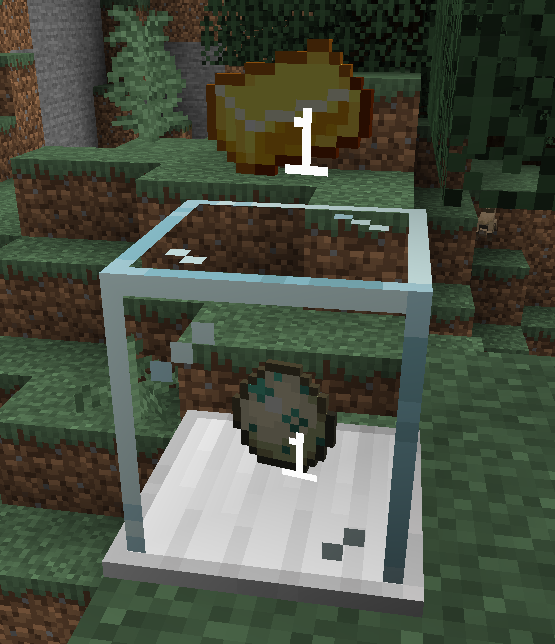
The Vending Block allows players to easily accept item trades.
## Crafting !(https://f000.backblazeb2.com/file/junkbucket/crafted.png)
## How to Use To set up a Vending Block, place it on the ground and right-click to open a menu. The player that placed it is the only player that can open the configuration/inventory.
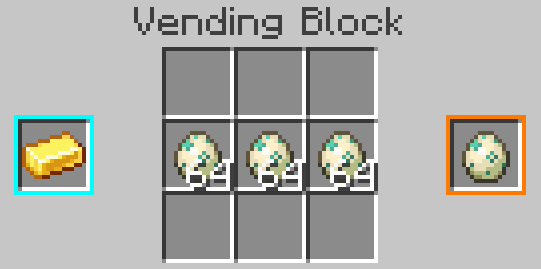
The blue slot on the left is the stack accepted for trade, and the orange slot on the right is the stack that will be returned to the customer. These slots don't consume items, but can be clicked with a stack to set them.
In the center is the inventory of the block, which should contain the stock of items to distribute. Items paid by users will also appear here, so make sure to leave space for them.
Once configured, players can exchange items by right-clicking on the block with the required item in hand.
📊 Mod Details
- Game
- Minecraft Mods
- Author
- vpzom
- Version
- 0.3.8
- Downloads
- 2,021
- Endorsements
- 15
- Category
- fabric
- Created
- 12/26/2020
- Updated
- 11/28/2022
- Game Versions
- 1.19
- Tags
- utility
🔧 How to Install Minecraft Mods Mods
Download from Modrinth. Use Prism Launcher or drop into your mods folder.
📖 Full step-by-step install guide for Minecraft Mods →
Visit the official mod page for specific installation instructions for this mod.
🎮 Need cheat codes or console commands? Check ur gaming wiki for Minecraft Mods commands, item IDs, and more.
❓ Frequently Asked Questions
Which Minecraft Mods versions does Retail support?
The author lists 1.19. Other versions may work but are untested by the author.
What is the latest version of Retail?
Version 0.3.8, published 2022-11-28 with 2,021 downloads recorded at the source.
Keep browsing — more Minecraft Mods mods await