Restricted Inventory
🟡 Updated this year⚠️ Install Order · 2 steps
Install in this order, then this mod last — most mods fail to load without their framework and dependencies in place.
🖼️ Gallery (3 images)
🔍 Analysis
- 👍 0.3% endorsement rate
- 🏆 #549 of 885 fabric mods in this game by downloads
📋 About This Mod
# Restricted Inventory **Lock player inventory slots to specific items or item tags.** Ever wanted to keep a dedicated slot for your sword, always have slot 0 as your torch, or enforce item organization across your server? Restricted Inventory lets you do exactly that — configure any inventory slot (0–35) to only accept a specific item or item tag, server-wide or per player. ## Features - **Slot restrictions** — Lock any hotbar or inventory slot to a specific item (e.g. `minecraft:torch`) or an entire item tag (e.g. `#minecraft:swords`) - **Server or per-client mode** — Apply the same rules to all players from the server config, or let each player define their own restrictions in their client config - **Visual feedback** — Restricted slots display a ghost preview of the required item so players always know what goes where - **Slot index overlay** — Hold **Tab** in any inventory screen to reveal each slot's index number, making config setup a breeze - **Smart item routing** — Picked-up items automatically go to their designated slots first before filling unrestricted ones ## Commands All commands use the `/restrictedinventory` prefix. | Command | Description | Permission | |---------|-------------|------------| | `/restrictedinventory config` | Opens the Restriction Config Screen | Admin (OP level 4), or any player when `useClientRestriction` is enabled | ### Permission rules - When `useClientRestriction` is **false** (server-wide mode): only server operators (OP level 4) can open the config screen. - When `useClientRestriction` is **true** (per-client mode): every player can open their own config screen. ## Restriction Config Screen The config screen is the in-game GUI for editing slot restrictions. Open it with `/restrictedinventory config`. ### Item / Tag picker (top panel) - **Items tab** — lists every registered item at ¾ scale. Hover for the item name and registry ID. Click to select. - **Tags tab** — lists every registered item tag. Each tag cycles through its members as a live preview. Hover for the tag ID. Click to select. - Scroll with the mouse wheel or drag the scrollbar on the right. ### Slot grid (middle panel) - Displays all 36 player inventory slots (0–35) laid out in the standard inventory arrangement. - Each slot shows a cycling preview of its current restriction, or is empty if unrestricted. - Left-Click a slot to **select** it (highlighted in white). The selected slot will receive the item or tag chosen in the picker. - Right-Click a slot to remove the item or tag chosen. - Hover a slot to see its current restriction value as a tooltip. ## Configuration Restrictions are defined in a simple JSON config file. Both specific items and item tags are supported. Nbt/Components is also supported. ```json { "useClientRestriction": false, "useTeamAndTagRestrictions": true, "restrictedSlots": { "0": "minecraft:torch", "1": { "item": "#minecraft:swords", "display": { // this is an example with item with nbt/component "components": { // use "tag" for 1.20.1 "minecraft:stored_enchantments": { "mineraft:silk_touch": 1 }, } }, "2": { "item": "minecraft:enchanted_book", "components": { // use "tag" for 1.20.1 "minecraft:stored_enchantments": { "mineraft:silk_touch": 1 }, "display": "minecraft:dirt" // this is an example with plain item } }, "3": { "group": "group_name" } }, "groups": { // Only available in common config "group_name": }, "teamRestrictions": { "team": { "restrictedSlots": { "0": "minecraft:dirt" } } }, "tagRestrictions": { "dirt": { "restrictedSlots": { "1": "minecraft:grass_block" } } } } ``` | Slot range | Location | |------------|----------| | 0–8 | Hotbar (survival mode only) | | 9–35 | Main inventory | > **Note:** Slot indices 0–8 correspond to the hotbar in survival mode. In creative mode, the hotbar uses a different inventory layout and slot restrictions will **not** apply there. ## Compatibility Note This mod hooks into vanilla's slot placement and item pickup logic via Mixin. Mods or block entities that insert items directly into the player inventory (bypassing standard slot logic) may not respect the restrictions. Mods that also modify `Slot`, `Inventory`, or `AbstractContainerScreen` may conflict.
# Restricted Inventory
Lock player inventory slots to specific items or item tags.
Ever wanted to keep a dedicated slot for your sword, always have slot 0 as your torch, or enforce item organization across your server? Restricted Inventory lets you do exactly that — configure any inventory slot (0–35) to only accept a specific item or item tag, server-wide or per player.
## Features
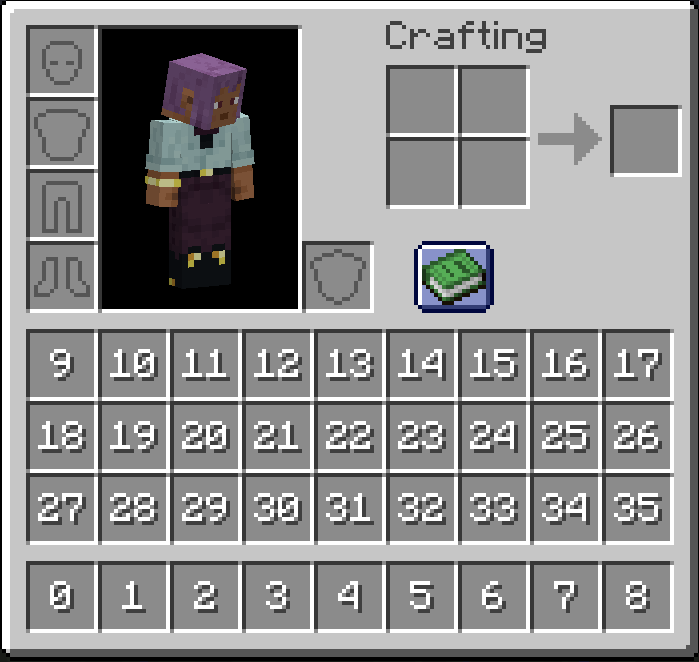
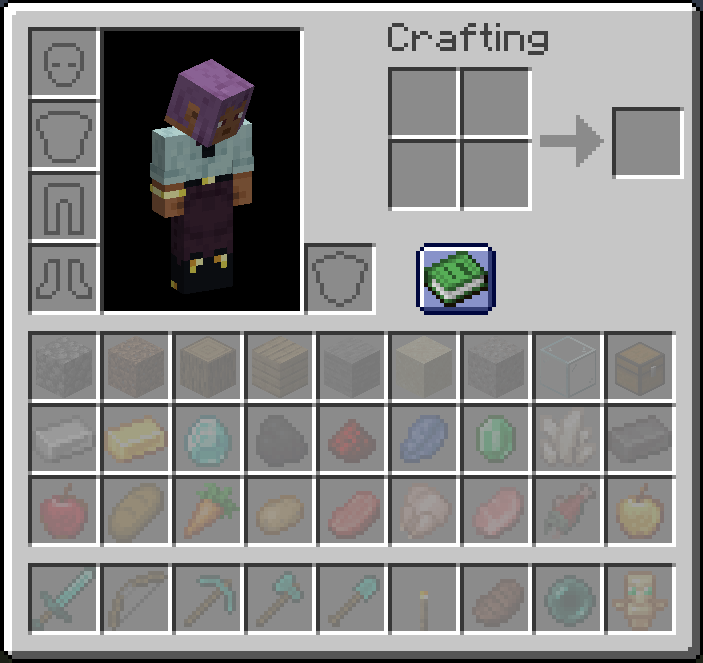
- Slot restrictions — Lock any hotbar or inventory slot to a specific item (e.g. `minecraft:torch`) or an entire item tag (e.g. `#minecraft:swords`)
- Server or per-client mode — Apply the same rules to all players from the server config, or let each player define their own restrictions in their client config
- Visual feedback — Restricted slots display a ghost preview of the required item so players always know what goes where
- Slot index overlay — Hold Tab in any inventory screen to reveal each slot's index number, making config setup a breeze
- Smart item routing — Picked-up items automatically go to their designated slots first before filling unrestricted ones
## Commands
All commands use the `/restrictedinventory` prefix.
| Command | Description | Permission | |---------|-------------|------------| | `/restrictedinventory config` | Opens the Restriction Config Screen | Admin (OP level 4), or any player when `useClientRestriction` is enabled |
### Permission rules
- When `useClientRestriction` is false (server-wide mode): only server operators (OP level 4) can open the config screen.
- When `useClientRestriction` is true (per-client mode): every player can open their own config screen.
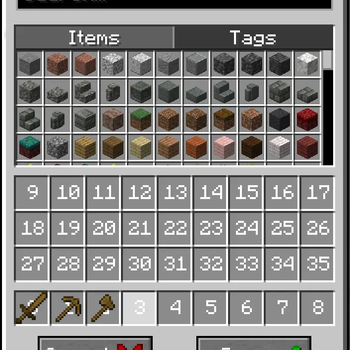
## Restriction Config Screen
The config screen is the in-game GUI for editing slot restrictions. Open it with `/restrictedinventory config`.
### Item / Tag picker (top panel)
- Items tab — lists every registered item at ¾ scale. Hover for the item name and registry ID. Click to select.
- Tags tab — lists every registered item tag. Each tag cycles through its members as a live preview. Hover for the tag ID. Click to select.
- Scroll with the mouse wheel or drag the scrollbar on the right.
### Slot grid (middle panel)
- Displays all 36 player inventory slots (0–35) laid out in the standard inventory arrangement.
- Each slot shows a cycling preview of its current restriction, or is empty if unrestricted.
- Left-Click a slot to select it (highlighted in white). The selected slot will receive the item or tag chosen in the picker.
- Right-Click a slot to remove the item or tag chosen.
- Hover a slot to see its current restriction value as a tooltip.
## Configuration
Restrictions are defined in a simple JSON config file. Both specific items and item tags are supported. Nbt/Components is also supported.
```json { "useClientRestriction": false, "useTeamAndTagRestrictions": true, "restrictedSlots": { "0": "minecraft:torch", "1": { "item": "#minecraft:swords", "display": { // this is an example with item with nbt/component "components": { // use "tag" for 1. 20. 1 "minecraft:stored_enchantments": { "mineraft:silk_touch": 1 }, } }, "2": { "item": "minecraft:enchanted_book", "components": { // use "tag" for 1. 20. 1 "minecraft:stored_enchantments": { "mineraft:silk_touch": 1 }, "display": "minecraft:dirt" // this is an example with plain item } }, "3": { "group": "group_name" } }, "groups": { // Only available in common config "group_name": [ {"item": "minecraft:dirt"}, { "item": "minecraft:enchanted_book", "components": { // use "tag" for 1. 20. 1 "minecraft:stored_enchantments": { "mineraft:silk_touch": 1 } } ] }, "teamRestrictions": { "team": { "restrictedSlots": { "0": "minecraft:dirt" } } }, "tagRestrictions": { "dirt": { "restrictedSlots": { "1": "minecraft:grass_block" } } } } ```
| Slot range | Location | |------------|----------| | 0–8 | Hotbar (survival mode only) | | 9–35 | Main inventory |
> Note: Slot indices 0–8 correspond to the hotbar in survival mode. In creative mode, the hotbar uses a different inventory layout and slot restrictions will not apply there.
## Compatibility Note
This mod hooks into vanilla's slot placement and item pickup logic via Mixin. Mods or block entities that insert items directly into the player inventory (bypassing standard slot logic) may not respect the restrictions. Mods that also modify `Slot`, `Inventory`, or `AbstractContainerScreen` may conflict.
📊 Mod Details
- Game
- Minecraft Mods
- Author
- CoolerProYT
- Version
- 20.1.9
- Downloads
- 1,034
- Endorsements
- 3
- Category
- fabric
- Created
- 6/13/2026
- Updated
- 8/16/2026
- Game Versions
- 1.20.1
- Tags
- game-mechanics, utility
🔧 How to Install Minecraft Mods Mods
Download from Modrinth. Use Prism Launcher or drop into your mods folder.
📖 Full step-by-step install guide for Minecraft Mods →
Visit the official mod page for specific installation instructions for this mod.
🎮 Need cheat codes or console commands? Check ur gaming wiki for Minecraft Mods commands, item IDs, and more.
❓ Frequently Asked Questions
Which Minecraft Mods versions does Restricted Inventory support?
The author lists 1.20.1. Other versions may work but are untested by the author.
What is the latest version of Restricted Inventory?
Version 20.1.9, published 2026-08-16 with 1,034 downloads recorded at the source.
Keep browsing — more Minecraft Mods mods await