Resource Pack Editor Mod
🟡 Updated this year⚠️ Install Order · 2 steps
Install in this order, then this mod last — most mods fail to load without their framework and dependencies in place.
🖼️ Gallery (4 images)
🔍 Analysis
- 🏆 #493 of 909 fabric mods in this game by downloads
📋 About This Mod
# Resource Pack Editor Mod A Fabric mod for **Minecraft 1.21.1** that lets you create, edit, and share resource packs without ever leaving the game. No external image editor required — pixel-edit any block or item texture from inside Minecraft, and export the finished pack as a `.zip` with one click. ## Requirements - Minecraft **1.21.1** - (https://fabricmc.net/use/installer/) **0.16.10** or newer - (https://modrinth.com/mod/fabric-api) **0.116.10+1.21.1** or newer - Java **21** ## Installation 1. Install the Fabric Loader for Minecraft 1.21.1. 2. Drop **Fabric API** into your `mods/` folder. 3. Drop **`resourcepackeditormod-1.0.0.jar`** into the same `mods/` folder. 4. Launch Minecraft. Your `mods/` folder lives at: - **Windows:** `%APPDATA%\.minecraft\mods` - **macOS:** `~/Library/Application Support/minecraft/mods` - **Linux:** `~/.minecraft/mods` ## Usage Everything lives inside the vanilla **Options → Resource Packs** screen. The mod adds two buttons above the existing row: ### Create New Pack With **no pack selected** (or only the default selected), the left button reads **Create New Pack**. Click it to: 1. Enter a **name** and a **description**. 2. Hit **Create** — the mod generates a new folder under `resourcepacks/<name>/`, writes a valid `pack.mcmeta`, creates a white default icon, and extracts every block/item texture from your currently-loaded resources as a starting template. 3. You'll land in the **Texture Selector** — see (#editing). ### Edit Pack When you **select an existing pack** in the list, the left button changes to **Edit Pack: <name>**. Click it and the mod opens the **Texture Selector** pointed at that pack's `assets/minecraft/textures/` directory. **Edits save directly to the original pack — no copy is made.** ### Share Pack The right button, **Share Pack**, is greyed out until you select a pack. When active, click it to open your operating system's native file dialog. Choose a destination, and the mod zips the entire pack folder into a `<PackName>.zip` you can drop into Discord, upload to Modrinth, send to a friend, etc. The zipping runs in the background so the game doesn't freeze on large packs. ## Editing ### Texture Selector A file browser scoped to your pack's textures. Click a `` entry to descend; click a `.png` to open it in the **Pixel Editor**. Use **Back** to go up a folder (or to return to the resource pack screen from the root). The **Edit Icon** button jumps straight to your pack's `pack.png`. ### Pixel Editor The pixel editor renders the texture at high zoom with a grid overlay and a checkered transparency background. Click and drag to draw. **Tools** (right side of the screen — hover for tooltips): | Button | Tool | Behavior | |--------|---------------|----------| | **P** | Pencil | Click or drag to paint single pixels. | | **L** | Line | Click-drag from start to end, release to draw a straight line. | | **R** | Rectangle | Click-drag a rectangle outline. | | **C** | Circle | Click-drag from center to define radius. | | **F** | Flood Fill | Click to fill a contiguous area with the current color. | **Color palette** (left side): 20 preset colors. Click to select; hover to see the hex code. Scroll if your screen is too short to show them all. **Undo / Redo**: arrows under the tool list. History is capped at 50 steps. A whole pencil drag counts as one step, so you can revert a full stroke without spamming undo. **Save**: writes the edited image back to its original file. **Cancel** discards changes. ## Tips - Edits are saved straight to disk — if the pack is currently active in Minecraft, hit **F3+T** (or toggle the pack off/on) to reload textures and see your changes immediately. - Resource pack format version is set to **34** (Minecraft 1.21.1). If you want to use the exported zip on a different Minecraft version, edit `pack.mcmeta` accordingly. - The default texture extraction pulls from **all currently-loaded resources**, so if you have other resource packs enabled when you click **Create New Pack**, those packs' textures will be used as the baseline. - The texture editor uses nearest-neighbor sampling — what you see in the editor is exactly what Minecraft will render. ## License (https://everett2323.github.io/rpemodLICENSE/)
# Resource Pack Editor Mod
A Fabric mod for Minecraft 1. 21. 1 that lets you create, edit, and share resource packs without ever leaving the game. No external image editor required — pixel-edit any block or item texture from inside Minecraft, and export the finished pack as a `.zip` with one click.
## Requirements
- Minecraft 1. 21. 1
- (https://fabricmc.net/use/installer/) 0. 16. 10 or newer
- (https://modrinth.com/mod/fabric-api) 0. 116. 10+1. 21. 1 or newer
- Java 21
## Installation
1. Install the Fabric Loader for Minecraft 1. 21. 1. 2. Drop Fabric API into your `mods/` folder. 3. Drop `resourcepackeditormod-1. 0. 0.jar` into the same `mods/` folder. 4. Launch Minecraft.
Your `mods/` folder lives at:
- Windows: `%APPDATA%\.minecraft\mods`
- macOS: `~/Library/Application Support/minecraft/mods`
- Linux: `~/.minecraft/mods`
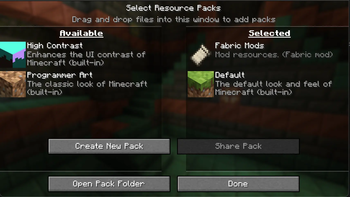
Everything lives inside the vanilla Options → Resource Packs screen. The mod adds two buttons above the existing row:
### Create New Pack
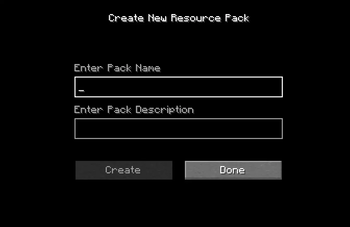
With no pack selected (or only the default selected), the left button reads Create New Pack. Click it to:
1. Enter a name and a description.
2. Hit Create — the mod generates a new folder under `resourcepacks/
### Edit Pack
When you select an existing pack in the list, the left button changes to Edit Pack:
Edits save directly to the original pack — no copy is made.
### Share Pack
The right button, Share Pack, is greyed out until you select a pack. When active, click it to open your operating system's native file dialog. Choose a destination, and the mod zips the entire pack folder into a `
The zipping runs in the background so the game doesn't freeze on large packs.
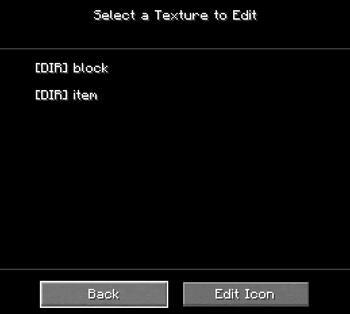
### Texture Selector
A file browser scoped to your pack's textures. Click a `` entry to descend; click a `.png` to open it in the Pixel Editor. Use Back to go up a folder (or to return to the resource pack screen from the root). The Edit Icon button jumps straight to your pack's `pack.png`.
### Pixel Editor
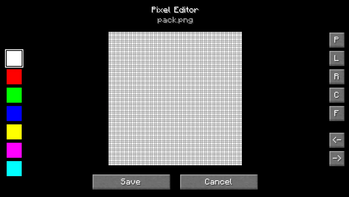
The pixel editor renders the texture at high zoom with a grid overlay and a checkered transparency background. Click and drag to draw.
Tools (right side of the screen — hover for tooltips):
| Button | Tool | Behavior | |--------|---------------|----------| | P | Pencil | Click or drag to paint single pixels. | | L | Line | Click-drag from start to end, release to draw a straight line. | | R | Rectangle | Click-drag a rectangle outline. | | C | Circle | Click-drag from center to define radius. | | F | Flood Fill | Click to fill a contiguous area with the current color. |
Color palette (left side): 20 preset colors. Click to select; hover to see the hex code. Scroll if your screen is too short to show them all.
Undo / Redo: arrows under the tool list. History is capped at 50 steps. A whole pencil drag counts as one step, so you can revert a full stroke without spamming undo.
Save: writes the edited image back to its original file. Cancel discards changes.
- Edits are saved straight to disk — if the pack is currently active in Minecraft, hit F3+T (or toggle the pack off/on) to reload textures and see your changes immediately.
- Resource pack format version is set to 34 (Minecraft 1. 21. 1). If you want to use the exported zip on a different Minecraft version, edit `pack.mcmeta` accordingly.
- The default texture extraction pulls from all currently-loaded resources, so if you have other resource packs enabled when you click Create New Pack, those packs' textures will be used as the baseline.
- The texture editor uses nearest-neighbor sampling — what you see in the editor is exactly what Minecraft will render.
(https://everett2323.github.io/rpemodLICENSE/)
📊 Mod Details
- Game
- Minecraft Mods
- Author
- everett2323
- Version
- 1.0.0
- Downloads
- 266
- Endorsements
- 2
- Category
- fabric
- Created
- 5/25/2026
- Updated
- 5/23/2026
- Game Versions
- 1.21.1, 1.21.2, 1.21.3, 1.21.4, 1.21.5
🔧 How to Install Minecraft Mods Mods
Download from Modrinth. Use Prism Launcher or drop into your mods folder.
📖 Full step-by-step install guide for Minecraft Mods →
Visit the official mod page for specific installation instructions for this mod.
🎮 Need cheat codes or console commands? Check ur gaming wiki for Minecraft Mods commands, item IDs, and more.
❓ Frequently Asked Questions
Which Minecraft Mods versions does Resource Pack Editor Mod support?
The author lists 1.21.1, 1.21.2, 1.21.3, 1.21.4, 1.21.5, 1.21.6. Other versions may work but are untested by the author.
What is the latest version of Resource Pack Editor Mod?
Version 1.0.0, published 2026-05-23 with 266 downloads recorded at the source.
Keep browsing — more Minecraft Mods mods await