Remote Access
🟡 Updated this year⚠️ Install Order · 2 steps
Install in this order, then this mod last — most mods fail to load without their framework and dependencies in place.
🖼️ Gallery (1 images)
🔍 Analysis
- 🏆 #803 of 896 fabric mods in this game by downloads
📋 About This Mod
# Side Access Stop reopening workstations one by one. Side Access lets you seamlessly switch between nearby functional blocks directly from inside your current interface. Open a crafting table, then cycle to nearby anvils, enchanting tables, cartography tables, looms, smithing tables, stonecutters, and more without ever closing the screen. When compatible workstations are detected nearby, small navigation icons appear on the left and right sides of your inventory screen. Press your configured keys to instantly move to the previous or next workstation in range. Perfect for: * compact workshop builds * multiplayer bases * technical crafting rooms * builders with dense utility setups ## Features * Seamless workstation switching * Minimal vanilla-style UI * Configurable detection radius * Configurable keybinds * Supports multiple vanilla functional blocks * Lightweight and performance-friendly * Client-side quality of life improvement ## Supported Workstations * Crafting Table * Anvil variants * Enchanting Table * Cartography Table * Loom * Stonecutter * Smithing Table * Grindstone * Furnaces * Blast Furnaces * Smokers * Brewing Stands * More planned ## Configuration The mod includes configurable: * workstation detection radius * navigation keybinds * icon size * supported block behavior Default detection radius: ```ini radius = 5 ``` Designed to feel like a natural extension of Minecraft’s inventory system rather than a separate modded interface.
# Side Access
Stop reopening workstations one by one.
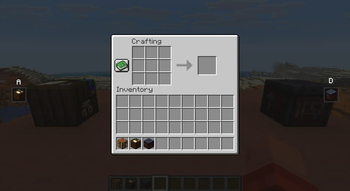
Side Access lets you seamlessly switch between nearby functional blocks directly from inside your current interface. Open a crafting table, then cycle to nearby anvils, enchanting tables, cartography tables, looms, smithing tables, stonecutters, and more without ever closing the screen.
When compatible workstations are detected nearby, small navigation icons appear on the left and right sides of your inventory screen. Press your configured keys to instantly move to the previous or next workstation in range.
Perfect for:
compact workshop builds multiplayer bases technical crafting rooms builders with dense utility setups
## Features
Seamless workstation switching Minimal vanilla-style UI Configurable detection radius Configurable keybinds Supports multiple vanilla functional blocks Lightweight and performance-friendly Client-side quality of life improvement
## Supported Workstations
Crafting Table Anvil variants Enchanting Table Cartography Table Loom Stonecutter Smithing Table Grindstone Furnaces Blast Furnaces Smokers Brewing Stands More planned
## Configuration
The mod includes configurable:
workstation detection radius navigation keybinds icon size supported block behavior
Default detection radius:
```ini radius = 5 ```
Designed to feel like a natural extension of Minecraft’s inventory system rather than a separate modded interface.
📊 Mod Details
- Game
- Minecraft Mods
- Author
- Icywhenhot
- Version
- 1.0.1
- Downloads
- 483
- Endorsements
- 6
- Category
- fabric
- Created
- 5/29/2026
- Updated
- 6/30/2026
- Game Versions
- 1.21.11
- Tags
- game-mechanics, management, utility
🔧 How to Install Minecraft Mods Mods
Download from Modrinth. Use Prism Launcher or drop into your mods folder.
📖 Full step-by-step install guide for Minecraft Mods →
Visit the official mod page for specific installation instructions for this mod.
🎮 Need cheat codes or console commands? Check ur gaming wiki for Minecraft Mods commands, item IDs, and more.
❓ Frequently Asked Questions
Which Minecraft Mods versions does Remote Access support?
The author lists 1.21.11. Other versions may work but are untested by the author.
What is the latest version of Remote Access?
Version 1.0.1, published 2026-06-30 with 483 downloads recorded at the source.
Keep browsing — more Minecraft Mods mods await