Wueffis RegReader for Computational Redstone
🟡 Updated this year⚠️ Install Order · 2 steps
Install in this order, then this mod last — most mods fail to load without their framework and dependencies in place.
🖼️ Gallery (3 images)

🔍 Analysis
- 👍 0.6% endorsement rate
- 🏆 #795 of 874 fabric mods in this game by downloads
📋 About This Mod
# RegReader - A Register Tracking HUD for Minecraft **RegReader** is a lightweight yet powerful Minecraft mod that adds a customizable **HUD overlay** to keep track of your register values in-game! This does not only work for Registers, you can use it on Lamps and Torches too! Whether you're debugging, programming, or just want an easy way to monitor values, RegReader provides an intuitive and user-friendly experience. ### **Features:** - **HUD Overlay** – Displays register values in real-time directly on your screen. - **Enable/Disable On Demand** – Toggle the HUD with F9 or per command whenever you need it. - **Custom HUD** - Color and move your HUD on the Screen how you like! - **Customizable Bit Width and Spacing & Inverted RegFile Support** – Adjust how your registers are built for broad ranges of RegFiles! - **Custom Register Names** – Assign meaningful names to your registers for easier tracking. - **Add & Delete Registers** – Fully manage your Registers per Build with ease. - **Move & Rename Registers** – Fully sort and organize your Register-HUD easily. - **Persistent Config** – Your settings are saved and across servers for a seamless experience. - **Profiles** - Save the current config and Regs as a Profile for Later! --- ### Aliases: `regreader`, `rr` | Command | Arguments | Description | | -------------- | ----------------------------------------------------------- | --------------------------------------------------------------------------------------------------- | | **addreg** | `name` `bits (≥1)` `spacing (≥1)` `inverted (bool)` `` | Add a register with given name, bit size, spacing, inverted flag, optional HUD (default "Default"). | | **assignHUD** | `name` `HUD` | Assign an existing register to a HUD. | | **defaultadd** | `hud` `name` | Add a register with default bits, spacing, inverted for a HUD. | | **deletereg** | `name` | Delete a register by name. | | **deleteall** | — | Delete all registers. | | **movereg** | `name` `direction (up/down)` OR `name` `position (int≥0)` | Move a register up/down or to specific position. | | **renamereg** | `oldName` `newName` | Rename a register from oldName to newName. | --- ### HUD Management Commands | Command | Arguments | Description | | ----------------------- | ------------------------- | ------------------------------------ | | **hud toggle/on/off** | `state` (toggle/on/off) | Enable/disable all HUDs. | | **hud color** | `HUD` `color (#AARRGGBB)` | Set HUD color with ARGB hex. | | **hud add** | `name` | Add new HUD with default settings. | | **hud remove** | `name` | Remove HUD by name. | | **hud rename** | `name` `newName` | Rename a HUD. | | **hud setDisplayBase** | `HUD` `base (2,8,10,16)` | Set display base for a HUD. | | **hud setColoredNames** | `HUD` `bool` | Enable/disable colored names on HUD. | | **hud setHUDSize** | `HUD` `Width (int)` | Set HUD width. | | **hud setHUDPos** | `HUD` `X`/ `Y` `position (int)`| Set HUD X or Y position. | --- ### Configuration Commands | Command | Arguments | Description | | ------------------------------- | ------------------------ | ----------------------------------- | | **config reload** | — | Reload the config file. | | **config reset** | — | Reset config to defaults. | | **config setTitleMode** | `titleMode (bool)` | Enable/disable title mode. | | **config setDefaults Bits** | `defaultBits (2-32)` | Set default bit size for registers. | | **config setDefaults Spacing** | `defaultSpacing (>2)` | Set default spacing. | | **config setDefaults Inverted** | `defaultInverted (bool)` | Set default inverted flag. | --- ### Profile Commands | Command | Arguments | Description | | ------------------ | ----
# RegReader - A Register Tracking HUD for Minecraft
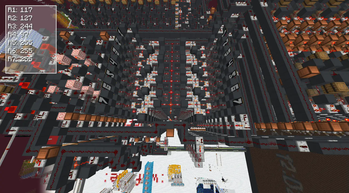
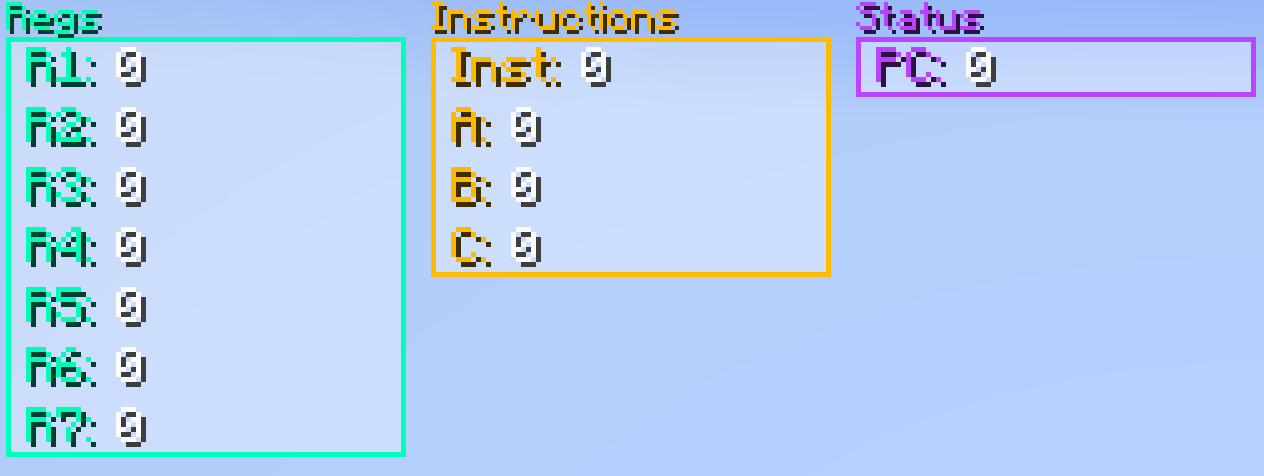
RegReader is a lightweight yet powerful Minecraft mod that adds a customizable HUD overlay to keep track of your register values in-game! This does not only work for Registers, you can use it on Lamps and Torches too! Whether you're debugging, programming, or just want an easy way to monitor values, RegReader provides an intuitive and user-friendly experience.
### Features: - HUD Overlay – Displays register values in real-time directly on your screen. - Enable/Disable On Demand – Toggle the HUD with F9 or per command whenever you need it. - Custom HUD - Color and move your HUD on the Screen how you like! - Customizable Bit Width and Spacing & Inverted RegFile Support – Adjust how your registers are built for broad ranges of RegFiles! - Custom Register Names – Assign meaningful names to your registers for easier tracking. - Add & Delete Registers – Fully manage your Registers per Build with ease. - Move & Rename Registers – Fully sort and organize your Register-HUD easily. - Persistent Config – Your settings are saved and across servers for a seamless experience. - Profiles - Save the current config and Regs as a Profile for Later!
### Aliases: `regreader`, `rr`
| Command | Arguments | Description | | -------------- | ----------------------------------------------------------- | --------------------------------------------------------------------------------------------------- | | addreg | `name` `bits (≥1)` `spacing (≥1)` `inverted (bool)` `` | Add a register with given name, bit size, spacing, inverted flag, optional HUD (default "Default"). | | assignHUD | `name` `HUD` | Assign an existing register to a HUD. | | defaultadd | `hud` `name` | Add a register with default bits, spacing, inverted for a HUD. | | deletereg | `name` | Delete a register by name. | | deleteall | — | Delete all registers. | | movereg | `name` `direction (up/down)` OR `name` `position (int≥0)` | Move a register up/down or to specific position. | | renamereg | `oldName` `newName` | Rename a register from oldName to newName. |
### HUD Management Commands
| Command | Arguments | Description | | ----------------------- | ------------------------- | ------------------------------------ | | hud toggle/on/off | `state` (toggle/on/off) | Enable/disable all HUDs. | | hud color | `HUD` `color (#AARRGGBB)` | Set HUD color with ARGB hex. | | hud add | `name` | Add new HUD with default settings. | | hud remove | `name` | Remove HUD by name. | | hud rename | `name` `newName` | Rename a HUD. | | hud setDisplayBase | `HUD` `base (2,8,10,16)` | Set display base for a HUD. | | hud setColoredNames | `HUD` `bool` | Enable/disable colored names on HUD. | | hud setHUDSize | `HUD` `Width (int)` | Set HUD width. | | hud setHUDPos | `HUD` `X`/ `Y` `position (int)`| Set HUD X or Y position. |
### Configuration Commands
| Command | Arguments | Description | | ------------------------------- | ------------------------ | ----------------------------------- | | config reload | — | Reload the config file. | | config reset | — | Reset config to defaults. | | config setTitleMode | `titleMode (bool)` | Enable/disable title mode. | | config setDefaults Bits | `defaultBits (2-32)` | Set default bit size for registers. | | config setDefaults Spacing | `defaultSpacing (>2)` | Set default spacing. | | config setDefaults Inverted | `defaultInverted (bool)` | Set default inverted flag. |
### Profile Commands
| Command | Arguments | Description | | ------------------ | ----
📊 Mod Details
- Game
- Minecraft Mods
- Author
- Wueffi
- Version
- 1.6.0
- Downloads
- 1,626
- Endorsements
- 10
- Category
- fabric
- Created
- 2/8/2025
- Updated
- 8/8/2026
- Game Versions
- 26.1, 26.1.1, 26.1.2, 26.2
- Tags
- management, technology, utility
🔧 How to Install Minecraft Mods Mods
Download from Modrinth. Use Prism Launcher or drop into your mods folder.
📖 Full step-by-step install guide for Minecraft Mods →
Visit the official mod page for specific installation instructions for this mod.
🎮 Need cheat codes or console commands? Check ur gaming wiki for Minecraft Mods commands, item IDs, and more.
❓ Frequently Asked Questions
Which Minecraft Mods versions does Wueffis RegReader for Computational Redstone support?
The author lists 26.1, 26.1.1, 26.1.2, 26.2. Other versions may work but are untested by the author.
What is the latest version of Wueffis RegReader for Computational Redstone?
Version 1.6.0, published 2026-08-08 with 1,626 downloads recorded at the source.
Keep browsing — more Minecraft Mods mods await