Recolor
🟡 Updated this year⚠️ Install Order · 2 steps
Install in this order, then this mod last — most mods fail to load without their framework and dependencies in place.
🖼️ Gallery (2 images)
🔍 Analysis
- 👍 0.2% endorsement rate
- 🏆 #135 of 274 decoration mods in this game by downloads
📋 About This Mod
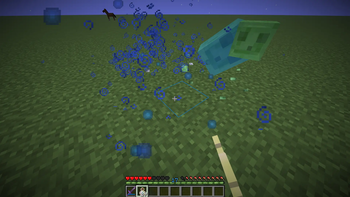
That mod allows resourcepack creators to change the color of a hard coded minecraft value into any color they want. This allows them to work with other resourcepack without using core shaders.
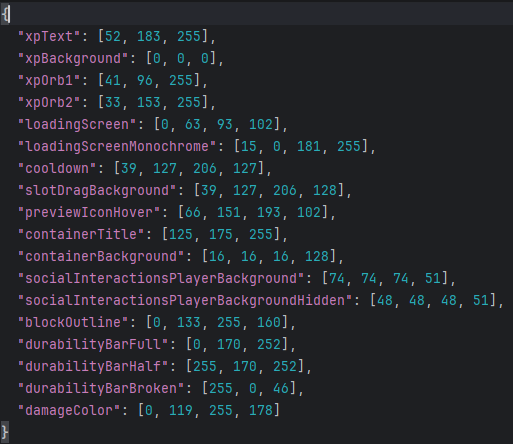
Some examples are: - XP text color - Reloading textures background - Item cooldowns - Container text - Experience orb colors - Block outline - Durability bar colors
As far as versions go, supporting all versions 1. 21+ is a pain since Mojang changed rendering code every single update. I will probably iron out some bugs in those versions then drop support for adding new features to them. I will try to support at least the last 3 drops. Versions below 1. 21 are not planned.
## Changing Colors with a Resource Pack In order to change the color of something, you find the corresponding entry and replace it with the value you want. You should only put the values you modify in your pack so packs below it can modify other ones without them interfering.
If there is something that you want to be added, create a feature request in the (https://github.com/BluebirdDevs/recolor/issues).
### Data type Accepts an array of ints or or a hex string "#rrggbb" or "#aarrggbb"
### Path ``` assets/recolor/colors.json ``` ### Example Values
colors.json ``` { "xpText": "#34b7ff", "loadingScreenMonochrome": "#660f00b5", "containerTitle": , "loadingScreen": } ``` 1. "#rrggbb" format 2. "#aarrggbb" format 3. format 4. format
### Current options:
Options
> xpText > xpTextBackground > xpAnvilTextFail
Experience Orb interpolation colors > xpOrb1 > xpOrb2
> loadingScreen > loadingScreenMonochrome > cooldown (Item cooldowns) > slotDragBackground
World icon and Resource Pack hover background > previewIconHover
> containerTitle > containerBackground
> socialInteractionsPlayerBackground > socialInteractionsPlayerBackgroundHidden
> blockOutline
Interpolates between these colors based on the durability > durabilityBarFull > durabilityBarHalf > durabilityBarBroken
> damageColor
📊 Mod Details
- Game
- Minecraft Mods
- Author
- Bluebird
- Version
- 1.1+26.2-fabric
- Downloads
- 1,848
- Endorsements
- 4
- Category
- decoration
- Created
- 4/28/2026
- Updated
- 6/16/2026
- Game Versions
- 26.2
- Tags
- decoration, utility
🔧 How to Install Minecraft Mods Mods
Download from Modrinth. Use Prism Launcher or drop into your mods folder.
📖 Full step-by-step install guide for Minecraft Mods →
Visit the official mod page for specific installation instructions for this mod.
🎮 Need cheat codes or console commands? Check ur gaming wiki for Minecraft Mods commands, item IDs, and more.
❓ Frequently Asked Questions
Which Minecraft Mods versions does Recolor support?
The author lists 26.2. Other versions may work but are untested by the author.
What is the latest version of Recolor?
Version 1.1+26.2-fabric, published 2026-06-16 with 1,848 downloads recorded at the source.
Keep browsing — more Minecraft Mods mods await