Recall
⚪ Last updated 2022⚠️ Install Order · 2 steps
Install in this order, then this mod last — most mods fail to load without their framework and dependencies in place.
🖼️ Gallery (1 images)
🔍 Analysis
- 👍 0.6% endorsement rate
- 🏆 #272 of 538 adventure mods in this game by downloads
📋 About This Mod
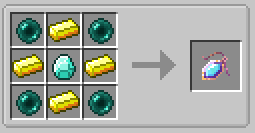
Adds a single item, the Recall Amulet, that let's you teleport back to your bed (in whatever dimension you are in). It also has the following config options: Max Damage - how often you can teleport Cast Time - How long it takes to use the item Play Sounds - Enable/Disable any sounds the item does Emit Particles - Enable/Disable any particles the item emits
# Villager Workforce Mod A Minecraft Forge mod that transforms villagers into specialized workers who automate resource gathering, crafting, and defense tasks. ## Overview Turn your villagers into a productive workforce! Assign them jobs, equip them with tools and armor, and watch them autonomously gather resources, smelt items, farm crops, or defend your base. Workers persist in the world, won't despawn, and can be managed through an intuitive GUI system. ## Features - 5 Worker Jobs: Lumberjack, Miner, Farmer, Guard, and Smelter - Equipment System: Workers can wear armor, use tools/weapons, and carry items - Automation: Workers gather resources and deposit them into assigned chests - Customization: Name your workers and monitor their health/status - Scheduling: Set work schedules for different times of day - Recall System: Call all workers back to their home positions - Survival-Friendly: All items are craftable in survival mode ## Getting Started ### Crafting the Essential Items Workforce Manager Staff ``` EG SE S S = Stick E = Emerald G = Gold Ingot ``` Worker Horn ``` C CG CC C = Copper Ingot G = Goat Horn (any variant) ``` ### Converting a Villager to a Worker 1. Craft a Workforce Manager Staff 2. Right-click a villager with the staff 3. The Workforce GUI will open 4. Click "CONVERT TO WORKER" to transform the villager into a WorkerEntity Note: Converting is permanent! Workers have better AI for tasks but lose trading abilities. ## Assigning Jobs ### Using the Workforce GUI 1. Right-click a worker with the Workforce Manager Staff 2. Select a job type (Lumberjack, Miner, Farmer, Guard, or Smelter) 3. Assign a workstation block (the block they'll work near) 4. (Optional) Assign an output chest where they'll deposit gathered resources 5. Click "START" to begin working ### Job Types and Requirements #### Lumberjack - Workstation: Any log block - Tool Required: Axe (placed in main hand slot) - Tasks: - Chops down nearby trees (logs and leaves) - Searches within 16 blocks of workstation - Deposits logs/saplings/apples to output chest - Tips: Give them a better axe for faster chopping #### Miner - Workstation: Any ore block or stone - Tool Required: Pickaxe (placed in main hand slot) - Tasks: - Mines ores and stone within range - Searches within 16 blocks of workstation - Deposits ores/cobblestone to output chest - Tips: Assign near exposed ore veins or caves #### Farmer - Workstation: Composter or farmland - Seeds Required: Plant corresponding crops in inventory - Tasks: - Plants crops on nearby farmland - Harvests fully grown crops - Searches within 16 blocks of workstation - Deposits harvested crops to output chest - Tips: Build a fenced farm area and give them seeds #### Guard - Workstation: Any block marking patrol area - Weapon Required: Sword or axe (placed in main hand slot) - Armor: Can equip helmet, chestplate, leggings, boots - Tasks:
📊 Mod Details
- Game
- Minecraft Mods
- Author
- SeriousCreeper
- Version
- 1.3.1
- Downloads
- 1,816
- Endorsements
- 11
- Category
- adventure
- Created
- 5/20/2022
- Updated
- 6/20/2022
- Game Versions
- 1.19
- Tags
- adventure, equipment, magic
🔧 How to Install Minecraft Mods Mods
Download from Modrinth. Use Prism Launcher or drop into your mods folder.
📖 Full step-by-step install guide for Minecraft Mods →
Visit the official mod page for specific installation instructions for this mod.
🎮 Need cheat codes or console commands? Check ur gaming wiki for Minecraft Mods commands, item IDs, and more.
❓ Frequently Asked Questions
Which Minecraft Mods versions does Recall support?
The author lists 1.19. Other versions may work but are untested by the author.
What is the latest version of Recall?
Version 1.3.1, published 2022-06-20 with 1,816 downloads recorded at the source.
Keep browsing — more Minecraft Mods mods await