Realistic Furnace
🟡 Updated this year⚠️ Install Order · 2 steps
Install in this order, then this mod last — most mods fail to load without their framework and dependencies in place.
🖼️ Gallery (4 images)

🔍 Analysis
- 👍 1.5% endorsement rate — high engagement, a strong quality signal
- 🏆 #134 of 243 decoration mods in this game by downloads
📋 About This Mod
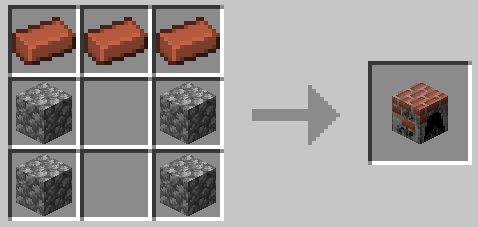
# Realistic Furnace Furnaces are cheap, overpowered and boring, aren't they? Time to add some extra layers to the progression! Features: - Some earlygame grind to gather the required materials - A new heat mechanic that requires your attention - Heat thresholds that enable you to lock items behind specific fuels - Toggle between Celsius and Fahrenheit in the configs - JEI Integration with required heat display - Customizable fuel - Customizable recipes, also for modded items - with the option to add an "overheated" outcome for each individual processed item - Read the (https://github.com/FireI3laze/RealisticFurnace/wiki) for more information - Customizable max temperature (experimental) ### Multiblock This mod adds a Furnace Controller as the core of the **Multiblock Furnace**. Right clicking the Controller allows to toggle and disable the ghost block rendering for intuitive building. You don't like how it looks like? No worries! From version 1.1.0 on you can build **your own multiblock structure** Setup the block palette in the configs, scan, save and select your multiblock in game with ``` /realistic_furnace * ``` commands and enjoy your personal touch in game! Need a more detailed instruction? Watch the tutorial below or read the (https://github.com/FireI3laze/RealisticFurnace/wiki) for a very detailed walk through! <iframe width="560" height="315" src="https://www.youtube-nocookie.com/embed/6LAJoSPkuG8" title="Custom Multiblock Tutorial" frameborder="0" allow="accelerometer; autoplay; clipboard-write; encrypted-media; gyroscope; picture-in-picture; web-share" allowfullscreen></iframe> **Warning! The original Design is incompatible with (https://modrinth.com/mod/diagonal-walls/versions).** Following the tutorial above with the modded walls installed will fix that. ### Fuel Items & Heat Requirements By default the Furnace Controller only accepts the Vanilla Fuel Items Coal, Char Coal, Sticks and *Planks. These items vary in the amount of provided heat and burn duration. You can add new fuels by holding them in your hand and using the command: ``` /realistic_furnace fuel add * ``` Alternatively you can also navigate to configs > realistic_furnace and edit the fuels.json. Again, read the (https://github.com/FireI3laze/RealisticFurnace/wiki) for details. Every Item that can be smelted in the Furnace has an individual heat requirement (check JEI). To start the smelting process, it needs to be somewhat near that requirement and to finish it, it has to at least fit the requirement. But watch out! If the item overheats, it may be lost forever or turn to an unexpected product. !(https://cdn.modrinth.com/data/cached_images/6c0260e495777033d757a1acb22ee82b8af8a222.png) ### Heat Mechanic The heat can be raised by providing fuel. Consider the fuels properties! Additionally, while building the Multiblock you may've noticed that you installed a trapdoor inside the shaft. If you open it, it causes the furnace to quickly drop heat. This does not only help you to keep the right temperature when smelting items, but may also safe you from an explosion if the furnace gets into a dangerous heat threshold! You can install Lever or Buttons on the shaft for better access to the trapdoor. Note: Higher heat also increases the smelting process speed ### Optional Dependencies While this mod is completed in it's functionality, it doesn't really make sense on it's own, since it requires you to craft a vanilla furnace to burn clay into bricks and with that furnace you don't need the realistic furnace from this mod anymore. Therefore I highly recommend checking out (https://www.curseforge.com/minecraft/mc-mods/simply-immersive-bricks) to obtain bricks without the need of a furnace and disabling the interaction with the furnace in the configs of this mod. You may also want to use KubeJS to modify the recipes for this mod (explanation provided in the (https://github.com/FireI3laze/RealisticFurnace/wiki))
# Realistic Furnace Furnaces are cheap, overpowered and boring, aren't they? Time to add some extra layers to the progression! Features: - Some earlygame grind to gather the required materials - A new heat mechanic that requires your attention - Heat thresholds that enable you to lock items behind specific fuels - Toggle between Celsius and Fahrenheit in the configs - JEI Integration with required heat display - Customizable fuel - Customizable recipes, also for modded items - with the option to add an "overheated" outcome for each individual processed item - Read the (https://github.com/FireI3laze/RealisticFurnace/wiki) for more information - Customizable max temperature (experimental)
### Multiblock This mod adds a Furnace Controller as the core of the Multiblock Furnace. Right clicking the Controller allows to toggle and disable the ghost block rendering for intuitive building.
You don't like how it looks like? No worries! From version 1. 1. 0 on you can build your own multiblock structure
Setup the block palette in the configs, scan, save and select your multiblock in game with ``` /realistic_furnace ``` commands and enjoy your personal touch in game!
Need a more detailed instruction? Watch the tutorial below or read the (https://github.com/FireI3laze/RealisticFurnace/wiki) for a very detailed walk through!
### Fuel Items & Heat Requirements By default the Furnace Controller only accepts the Vanilla Fuel Items Coal, Char Coal, Sticks and Planks. These items vary in the amount of provided heat and burn duration. You can add new fuels by holding them in your hand and using the command: ``` /realistic_furnace fuel add * ``` Alternatively you can also navigate to configs > realistic_furnace and edit the fuels.json. Again, read the (https://github.com/FireI3laze/RealisticFurnace/wiki) for details.
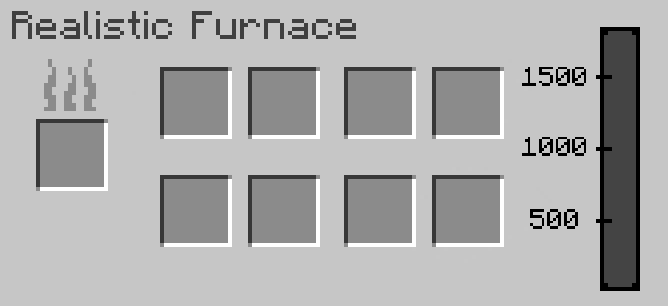
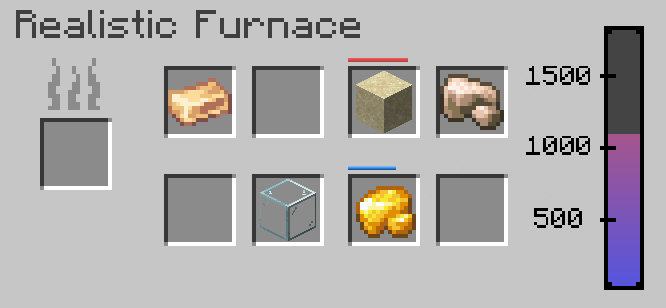
Every Item that can be smelted in the Furnace has an individual heat requirement (check JEI). To start the smelting process, it needs to be somewhat near that requirement and to finish it, it has to at least fit the requirement. But watch out! If the item overheats, it may be lost forever or turn to an unexpected product.
!(https://cdn.modrinth.com/data/cached_images/6c0260e495777033d757a1acb22ee82b8af8a222.png)
### Heat Mechanic The heat can be raised by providing fuel. Consider the fuels properties! Additionally, while building the Multiblock you may've noticed that you installed a trapdoor inside the shaft. If you open it, it causes the furnace to quickly drop heat. This does not only help you to keep the right temperature when smelting items, but may also safe you from an explosion if the furnace gets into a dangerous heat threshold! You can install Lever or Buttons on the shaft for better access to the trapdoor.
### Optional Dependencies While this mod is completed in it's functionality, it doesn't really make sense on it's own, since it requires you to craft a vanilla furnace to burn clay into bricks and with that furnace you don't need the realistic furnace from this mod anymore. Therefore I highly recommend checking out (https://www.curseforge.com/minecraft/mc-mods/simply-immersive-bricks) to obtain bricks without the need of a furnace and disabling the interaction with the furnace in the configs of this mod. You may also want to use KubeJS to modify the recipes for this mod (explanation provided in the (https://github.com/FireI3laze/RealisticFurnace/wiki))
📊 Mod Details
- Game
- Minecraft Mods
- Author
- Fire_I3laze
- Version
- 1.1.3-1.20.1
- Downloads
- 650
- Endorsements
- 10
- Category
- decoration
- Created
- 10/14/2025
- Updated
- 5/3/2026
- Game Versions
- 1.20.1
- Tags
- decoration, game-mechanics, technology
🔧 How to Install Minecraft Mods Mods
Download from Modrinth. Use Prism Launcher or drop into your mods folder.
📖 Full step-by-step install guide for Minecraft Mods →
Visit the official mod page for specific installation instructions for this mod.
🎮 Need cheat codes or console commands? Check ur gaming wiki for Minecraft Mods commands, item IDs, and more.
❓ Frequently Asked Questions
Which Minecraft Mods versions does Realistic Furnace support?
The author lists 1.20.1. Other versions may work but are untested by the author.
What is the latest version of Realistic Furnace?
Version 1.1.3-1.20.1, published 2026-05-03 with 650 downloads recorded at the source.
Keep browsing — more Minecraft Mods mods await