Ratatouille
🟡 Updated this year⚠️ Install Order · 2 steps
Install in this order, then this mod last — most mods fail to load without their framework and dependencies in place.
🖼️ Gallery (2 images)
🔍 Analysis
- 👍 0.0% endorsement rate
- 🏆 #1027 of 1284 fabric mods in this game by downloads
📋 About This Mod
<div align="center"> <h1>Ratatouille</h1> <a href="https://modrinth.com/mod/fabric-api"><img src="https://raw.githubusercontent.com/intergrav/devins-badges/c7fd18efdadd1c3f12ae56b49afd834640d2d797/assets/cozy/requires/fabric-api_vector.svg"></a> <a href="https://discord.gg/rattiestgang"><img src="https://raw.githubusercontent.com/intergrav/devins-badges/c7fd18efdadd1c3f12ae56b49afd834640d2d797/assets/cozy/social/discord-plural_vector.svg"></a> <a href="https://ko-fi.com/doctor4t"><img src="https://raw.githubusercontent.com/intergrav/devins-badges/c7fd18efdadd1c3f12ae56b49afd834640d2d797/assets/cozy/donate/kofi-singular_vector.svg"></a> <h3>A library for doctor4t's mods and supporter cosmetics</h3> </div> ## Features ### Library - Rendering utils derived from (https://modrinth.com/mod/lodestonelib) (by Sammy; and Lodestar, removed with 1.21.1) - **Cosmetics customization util**: Made for my supporter cosmetics but can also be used out of the box for more general cosmetic mods who need simple customization - **Item custom hit sound and particle utils** - **First person feature rendering util**: Allows adding features that render on the player's hand in first person by implementing the `RendersArmInFirstPerson` interface in your feature renderer. - **Custom model armor util**: Allows adding armor with custom models with a single method call (and custom model), bypassing the requirements of making a model layer, feature renderer, mixins to inject said feature renderer into player and armor stand rendering, coding display conditions, etc... as well as automatically display said custom armor on a player's hands in first person. *A usage guide can be found further down.* ### Additional Goodies - RAT Plushies (Rat Maid, Folly and Mauve) - Can be honked - Noteblocks can be placed on top to play the plush's honk sound as the instrument - Mobs can be given items and armor by interacting with them while in creative and sneaking with an item in hand. Hitting them in creative while sneaking with an empty hand will make them drop all their equipped items. ### Supporter Cosmetics - For Ko-Fi or YouTube members - Icon next to your name as well as colored name - Head plushies: Sneak-use any plush item while not aiming at a block to open the cosmetics screen ## Gallery <details> <summary>Expand gallery</summary> !(https://cdn.modrinth.com/data/yufdeaJg/images/63d0d1ffabe3dc2037e9fa534bba377da1c59cb3.png) !(https://cdn.modrinth.com/data/yufdeaJg/images/ad8d1a1aa39d9534d7fd41a824bea09bc1129e5a.png) </details> ## Documentation <details> <summary>Expand documentation</summary> ## Setup (build.gradle) <details> <summary>Expand Gradle details</summary> ``` repositories { maven { name = 'Ladysnake Mods' url = 'https://maven.ladysnake.org/releases' } dependencies { modImplementation "dev.doctor4t:ratatouille:${project.ratatouille_version}" } ``` </details> ### Custom model armor util <details> <summary>Expand Custom model armor util details</summary> This util allows you to easily register new armor sets that use a custom model with a single method call (and that custom model as the game does need to know what you wish to render). #### Step 1: Defining the model Before we can add our custom armor, we need a model that respects a few rules. You can find an armor template model (Blockbench model file) and texture in the `RESOURCES` folder of the repository. While you can edit this model and texture freely in order to shape up the armor of your dreams, please note that the existing groups are very important and while you can add new sub-groups to them, you cannot and should not delete any existing group as they allow the library to know what should be displayed when a player (or armor stand or mob) dons armor pieces: - `helmet` displays when the helmet item is equipped - `body_chestplate`, `right_arm_chestplate` and `left_arm_chestplate` display when the chestplate item is equipped - `body_leggings`, `right_leg_leggings` and `left_leg_leggings` display when the leggings item is equipped - `right_leg_boot` and `left_leg_boot` display when the boots item is equipped Once you have finalized your model, you can export it with Blockbench: `File -> Export -> Export Java Entity`. Open the generated Java class and copy the lines between `ModelPartData modelPartData = modelData.getRoot();` and the line right before the return (included) in `getTexturedModelData()`. Ratatouille adds a new model class type that simplifies armor model definition called `CustomArmorModelDefinition`; extend that class and implement the `addModelParts` method by pasting the snippet you copied from the generated model class. Then implement `getTexture()`; the simplest way to do so is to have a static Identifier for your armor texture in your Model Definition class and return that, but if you wish to do a special logic that varies the returned texture you can naturally
Ratatouille


A library for doctor4t's mods and supporter cosmetics
## Features
### Library - Rendering utils derived from (https://modrinth.com/mod/lodestonelib) (by Sammy; and Lodestar, removed with 1. 21. 1) - Cosmetics customization util: Made for my supporter cosmetics but can also be used out of the box for more general cosmetic mods who need simple customization - Item custom hit sound and particle utils - First person feature rendering util: Allows adding features that render on the player's hand in first person by implementing the `RendersArmInFirstPerson` interface in your feature renderer. - Custom model armor util: Allows adding armor with custom models with a single method call (and custom model), bypassing the requirements of making a model layer, feature renderer, mixins to inject said feature renderer into player and armor stand rendering, coding display conditions, etc... as well as automatically display said custom armor on a player's hands in first person. A usage guide can be found further down.
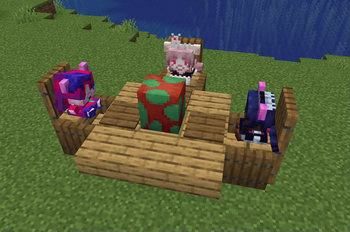
### Additional Goodies - RAT Plushies (Rat Maid, Folly and Mauve) - Can be honked - Noteblocks can be placed on top to play the plush's honk sound as the instrument - Mobs can be given items and armor by interacting with them while in creative and sneaking with an item in hand. Hitting them in creative while sneaking with an empty hand will make them drop all their equipped items.
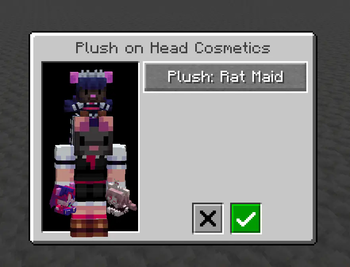
### Supporter Cosmetics - For Ko-Fi or YouTube members - Icon next to your name as well as colored name - Head plushies: Sneak-use any plush item while not aiming at a block to open the cosmetics screen
Expand gallery
!(https://cdn.modrinth.com/data/yufdeaJg/images/63d0d1ffabe3dc2037e9fa534bba377da1c59cb3.png) !(https://cdn.modrinth.com/data/yufdeaJg/images/ad8d1a1aa39d9534d7fd41a824bea09bc1129e5a.png)
## Documentation
Expand documentation
## Setup (build.gradle)
Expand Gradle details
``` repositories { maven { name = 'Ladysnake Mods' url = 'https://maven.ladysnake.org/releases' }
dependencies { modImplementation "dev.doctor4t:ratatouille:${project.ratatouille_version}" } ```
### Custom model armor util
Expand Custom model armor util details
This util allows you to easily register new armor sets that use a custom model with a single method call (and that custom model as the game does need to know what you wish to render).
#### Step 1: Defining the model
Before we can add our custom armor, we need a model that respects a few rules. You can find an armor template model (Blockbench model file) and texture in the `RESOURCES` folder of the repository. While you can edit this model and texture freely in order to shape up the armor of your dreams, please note that the existing groups are very important and while you can add new sub-groups to them, you cannot and should not delete any existing group as they allow the library to know what should be displayed when a player (or armor stand or mob) dons armor pieces:
- `helmet` displays when the helmet item is equipped
- `body_chestplate`, `right_arm_chestplate` and `left_arm_chestplate` display when the chestplate item is equipped
- `body_leggings`, `right_leg_leggings` and `left_leg_leggings` display when the leggings item is equipped
- `right_leg_boot` and `left_leg_boot` display when the boots item is equipped
Once you have finalized your model, you can export it with Blockbench: `File -> Export -> Export Java Entity`. Open the generated Java class and copy the lines between `ModelPartData modelPartData = modelData.getRoot();` and the line right before the return (included) in `getTexturedModelData()`. Ratatouille adds a new model class type that simplifies armor model definition called `CustomArmorModelDefinition`; extend that class and implement the `addModelParts` method by pasting the snippet you copied from the generated model class. Then implement `getTexture()`; the simplest way to do so is to have a static Identifier for your armor texture in your Model Definition class and return that, but if you wish to do a special logic that varies the returned texture you can naturally
📊 Mod Details
- Game
- Minecraft Mods
- Author
- RAT
- Version
- 1.4.3-1.21.1
- Downloads
- 667,231
- Endorsements
- 235
- Category
- fabric
- Created
- 11/26/2024
- Updated
- 12/18/2025
- Game Versions
- 1.21.1
- Tags
- library, utility
🔧 How to Install Minecraft Mods Mods
Download from Modrinth. Use Prism Launcher or drop into your mods folder.
📖 Full step-by-step install guide for Minecraft Mods →
Visit the official mod page for specific installation instructions for this mod.
🎮 Need cheat codes or console commands? Check ur gaming wiki for Minecraft Mods commands, item IDs, and more.
❓ Frequently Asked Questions
Which Minecraft Mods versions does Ratatouille support?
The author lists 1.21.1. Other versions may work but are untested by the author.
What is the latest version of Ratatouille?
Version 1.4.3-1.21.1, published 2025-12-18 with 667,231 downloads recorded at the source.
Keep browsing — more Minecraft Mods mods await