Random Troll Commands
🟡 Updated this year⚠️ Install Order · 2 steps
Install in this order, then this mod last — most mods fail to load without their framework and dependencies in place.
🖼️ Gallery (6 images)


🔍 Analysis
- 👍 0.2% endorsement rate
- 🏆 #146 of 896 fabric mods in this game by downloads
📋 About This Mod
# RMD Commands Adds fun troll commands to prank your friends on a server. Type **`/rmd help`** in-game to see all commands. ## Commands on other players <details> <summary><strong>/loadingscreen <player></strong></summary> **What it does** Stuck on the **"Loading terrain…"** screen. Looks like the world is still loading. **How to turn off** Run the command again on the same player. **After rejoin** Goes away when they leave the server. </details> <details> <summary><strong>/demoscreen <player></strong></summary> **What it does** Shows the demo screen on their screen and they can't close it (only operators can close it without problem). **How to turn off** Run the command again, or use `/demoscreen off <player>`. **After rejoin** Stays on until you turn it off. </details> <details> <summary><strong>/credit <player></strong></summary> **What it does** Plays the **end credits** on their screen. **How long** Happens once when you run it. **Note** They can leave it the same way as on the normal end credits screen. </details> <details> <summary><strong>/resourcepack <player> <url></strong></summary> **What it does** Makes them download and use a **resource pack** from a link you send (must start with `http://` or `https://`). **How to turn off** Use `/resourcepack <player> off`. </details> <details> <summary><strong>/fakedc <player></strong></summary> **What it does** Kicks them with a **fake error** message. Looks like their internet or the connection broke, not a normal server kick. **How long** Instant. Happens once when you run it. </details> <details> <summary><strong>/serverjoin <player> <host></strong></summary> **What it does** Sends them to **another server**. **Example** `play.example.com` or `play.example.com:25565` </details> <details> <summary><strong>/invsee <player></strong></summary> **What it does** Opens their **inventory** in a chest screen so you can look at and change their items. **How long** Only while that screen is open. </details> ## Commands for yourself <details> <summary><strong>/vanish</strong> or <strong>/v</strong></summary> **What it does** Hide from other players. You can fly and you won't take damage. **How to turn off** Run `/vanish` or `/v` again. **After rejoin** Stays on until you turn it off. </details> <details> <summary><strong>/deathvanish</strong></summary> **What it does** When you **die**, others see you dying and get the normal death message. But you switch into **vanish** and stay at that position. **Watch out** You still lose your items if **keepInventory** is off. **How to turn off** Run `/deathvanish` again before you die. </details> <details> <summary><strong>/fakeleave</strong></summary> **What it does** Sends a fake **"left the game"** message in chat and hides you from the player list. **How to turn off** Use `/fakejoin`. </details> <details> <summary><strong>/fakejoin</strong></summary> **What it does** Undoes `/fakeleave` and sends a fake **"joined the game"** message. </details> ## In-game help <details> <summary><strong>/rmd help</strong></summary> Shows all commands in chat. </details> ## Requirements Minecraft **26.1**, **Fabric**, and **Fabric API**.
# RMD Commands
Adds fun troll commands to prank your friends on a server.
Type `/rmd help` in-game to see all commands.
## Commands on other players
/loadingscreen <player>
What it does Stuck on the "Loading terrain…" screen. Looks like the world is still loading.
How to turn off Run the command again on the same player.
After rejoin Goes away when they leave the server.
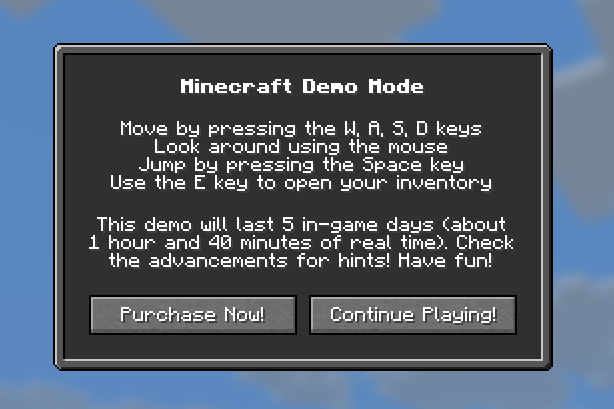
/demoscreen <player>
What it does Shows the demo screen on their screen and they can't close it (only operators can close it without problem).
How to turn off
Run the command again, or use `/demoscreen off `.
After rejoin Stays on until you turn it off.
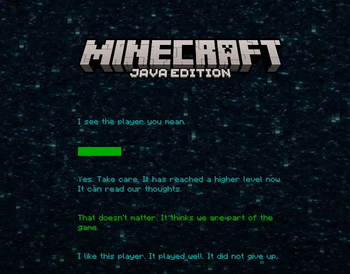
/credit <player>
What it does Plays the end credits on their screen.
How long Happens once when you run it.
Note They can leave it the same way as on the normal end credits screen.
/resourcepack <player> <url>
What it does Makes them download and use a resource pack from a link you send (must start with `http://` or `https://`).
How to turn off
Use `/resourcepack off`.
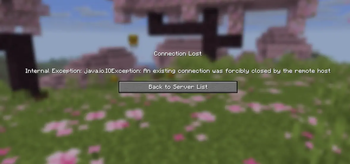
/fakedc <player>
What it does Kicks them with a fake error message. Looks like their internet or the connection broke, not a normal server kick.
How long Instant. Happens once when you run it.
/serverjoin <player> <host>
What it does Sends them to another server.
Example `play.example.com` or `play.example.com:25565`
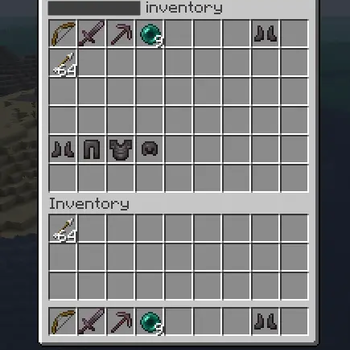
/invsee <player>
What it does Opens their inventory in a chest screen so you can look at and change their items.
How long Only while that screen is open.
## Commands for yourself
/vanish or /v
What it does Hide from other players. You can fly and you won't take damage.
How to turn off Run `/vanish` or `/v` again.
After rejoin Stays on until you turn it off.
/deathvanish
What it does When you die, others see you dying and get the normal death message. But you switch into vanish and stay at that position.
Watch out You still lose your items if keepInventory is off.
How to turn off Run `/deathvanish` again before you die.
/fakeleave
What it does Sends a fake "left the game" message in chat and hides you from the player list.
How to turn off Use `/fakejoin`.
/fakejoin
What it does Undoes `/fakeleave` and sends a fake "joined the game" message.
## In-game help
/rmd help
Shows all commands in chat.
## Requirements
Minecraft 26. 1, Fabric, and Fabric API.
📊 Mod Details
- Game
- Minecraft Mods
- Author
- Melworks
- Version
- 1.0.1
- Downloads
- 565
- Endorsements
- 1
- Category
- fabric
- Created
- 5/24/2026
- Updated
- 6/18/2026
- Game Versions
- 26.2
- Tags
- game-mechanics, management, social
🔧 How to Install Minecraft Mods Mods
Download from Modrinth. Use Prism Launcher or drop into your mods folder.
📖 Full step-by-step install guide for Minecraft Mods →
Visit the official mod page for specific installation instructions for this mod.
🎮 Need cheat codes or console commands? Check ur gaming wiki for Minecraft Mods commands, item IDs, and more.
❓ Frequently Asked Questions
Which Minecraft Mods versions does Random Troll Commands support?
The author lists 26.2. Other versions may work but are untested by the author.
What is the latest version of Random Troll Commands?
Version 1.0.1, published 2026-06-18 with 565 downloads recorded at the source.
Keep browsing — more Minecraft Mods mods await