Raised
🟡 Updated this year⚠️ Install Order · 2 steps
Install in this order, then this mod last — most mods fail to load without their framework and dependencies in place.
🖼️ Gallery (2 images)

🔍 Analysis
- 👍 0.0% endorsement rate
- 🏆 #503 of 1284 fabric mods in this game by downloads
📋 About This Mod
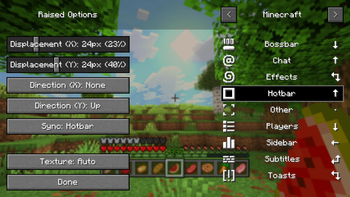
*Take control of the position of your GUI and fix the broken hotbar selection texture!* ### Move around the GUI! Raised lets you move around both vanilla and modded GUI layers (that are supported)! Want the hotbar closer to the middle of the screen? Raised has got your back! Take control of a layer and move it where you please! Control them individually or sync them to make the entire in-game GUI move together! ### Working with mods! Raised allows mods to register layer entries for their own GUI overlays for you to configure their movement. However, Raised can also natively work with mods in several ways that do not require their support! Any mod that registers their (Neo)Forge overlay via the respective registry is automatically captured and added to Raised's layer registry. This allows you to individually control the layers of many mods without any special support! Any mod that renders its overlay solely via a (Neo)Forge render event for one of the vanilla layers that Raised supports will be moved along with that vanilla layer. Much the same on Fabric, any mod that injects its overlay render within the scope of Raised's targets in the code will also be moved! ### Set it up however you like! You can edit the layer configurations directly from the config, from a suite of commands, or from the options screen (openable via `~` by default or from the (Neo)Forge mods screen). Please note that the options screen limits the amount that a layer may be displaced to accommodate the use of slider controls. For unlimited displacement, use commands or directly edit the config! ### Get the goods! You can find releases of Raised on both ** and ** and also access development builds on **! Raised supports Fabric 1.16+, Forge 1.16+, and NeoForge 1.20.2+. ### Figure it all out! You can delve into the ** for details or submit a ** if something isn't quite right! Still need something? Head on over to the ** forum for support, to read announcements, or discuss anything about the mod! : https://modrinth.com/mod/raised : https://www.curseforge.com/minecraft/mc-mods/raised : https://github.com/yurisuika/raised : https://github.com/yurisuika/raised/wiki : https://github.com/yurisuika/raised/issues : https://github.com/yurisuika/raised/discussions : https://discord.gg/0zdNEkQle7Qg9C1H
Take control of the position of your GUI and fix the broken hotbar selection texture!
### Move around the GUI! Raised lets you move around both vanilla and modded GUI layers (that are supported)!
Want the hotbar closer to the middle of the screen? Raised has got your back! Take control of a layer and move it where you please! Control them individually or sync them to make the entire in-game GUI move together!
### Working with mods! Raised allows mods to register layer entries for their own GUI overlays for you to configure their movement. However, Raised can also natively work with mods in several ways that do not require their support!
Any mod that registers their (Neo)Forge overlay via the respective registry is automatically captured and added to Raised's layer registry. This allows you to individually control the layers of many mods without any special support!
Any mod that renders its overlay solely via a (Neo)Forge render event for one of the vanilla layers that Raised supports will be moved along with that vanilla layer. Much the same on Fabric, any mod that injects its overlay render within the scope of Raised's targets in the code will also be moved!
### Set it up however you like! You can edit the layer configurations directly from the config, from a suite of commands, or from the options screen (openable via `~` by default or from the (Neo)Forge mods screen). Please note that the options screen limits the amount that a layer may be displaced to accommodate the use of slider controls. For unlimited displacement, use commands or directly edit the config!
### Get the goods! You can find releases of Raised on both and and also access development builds on !
Raised supports Fabric 1. 16+, Forge 1. 16+, and NeoForge 1. 20. 2+.
### Figure it all out! You can delve into the for details or submit a if something isn't quite right!
Still need something? Head on over to the forum for support, to read announcements, or discuss anything about the mod!
: https://modrinth.com/mod/raised : https://www.curseforge.com/minecraft/mc-mods/raised : https://github.com/yurisuika/raised : https://github.com/yurisuika/raised/wiki : https://github.com/yurisuika/raised/issues : https://github.com/yurisuika/raised/discussions : https://discord.gg/0zdNEkQle7Qg9C1H
📊 Mod Details
- Game
- Minecraft Mods
- Author
- yurisuika
- Version
- Fabric-26.2-5.1.2
- Downloads
- 2,572,736
- Endorsements
- 1,178
- Category
- fabric
- Created
- 1/19/2022
- Updated
- 7/6/2026
- Game Versions
- 26.2
- Tags
- utility
🔧 How to Install Minecraft Mods Mods
Download from Modrinth. Use Prism Launcher or drop into your mods folder.
📖 Full step-by-step install guide for Minecraft Mods →
Visit the official mod page for specific installation instructions for this mod.
🎮 Need cheat codes or console commands? Check ur gaming wiki for Minecraft Mods commands, item IDs, and more.
❓ Frequently Asked Questions
Which Minecraft Mods versions does Raised support?
The author lists 26.2. Other versions may work but are untested by the author.
What is the latest version of Raised?
Version Fabric-26.2-5.1.2, published 2026-07-06 with 2.6M downloads recorded at the source.
Keep browsing — more Minecraft Mods mods await