Quilt Bisect
⚪ Last updated 2024⚠️ Install Order · 2 steps
Install in this order, then this mod last — most mods fail to load without their framework and dependencies in place.
🖼️ Gallery (5 images)
🔍 Analysis
- 👍 1.0% endorsement rate — high engagement, a strong quality signal
- 🏆 #6 of 188 cursed mods in this game by downloads
📋 About This Mod
# Quilt Bisect A Quilt mod & loader plugin for finding mods responsible for issues using a search algorithm derived from binary search. This includes n-way mod incompatibilities in the form of crashes or user-detected issues. ## A word of warning **Quilt Bisect is still experimental. However, I consider it ready for most use cases. Some functions are untested (Realms support), and it depends on an experimental API in quilt loader. Please test all issues (especially with Quilt Loader) without Quilt Bisect before reporting them to other projects. Alternatively, join my discord and get support there.** ## Usage - This project uses Loader Plugins, `-Dloader.experimental.allow_loading_plugins=true` needs to be added to your JVM arguments. - Install this mod - If your game crashes, a dialog will open asking if you want to bisect, else click the start bisect button at the top of your screen, and you will be prompted to give your issue a name. - The game will automatically restart. Try to reproduce the issues you had before. - If everything is fine, click the `No Issue` button - If you have an issue click the `Manual Issue` button, and select the issue you are having or create a new one - Note that it is recommended to keep the number of issues in one bisect down, and instead run multiple bisects with previous fixes applied. See Bisecting multiple issues at once - once an issue is isolated, bisect will verify the solution(s) and continue bisecting the other issues - once bisect is done, it will provide a summary of issues and solutions encountered. Please treat those with care though, due to the way bisect works - ### Configuring The file `<config>/quilt_bisect/main.json` contains most things a user may want to configure, see (https://github.com/anonymous123-code/quilt-bisect/blob/main/src/main/java/io/github/anonymous123_code/quilt_bisect/shared/MainConfig.java) for now. The file `<config>/quilt_bisect/active_bisect.json` contains information about the active bisect, including the settings, all tried mod sets and their respective log, and issue information. The files `<config>/quilt_bisect/modSet.txt`, `<config>/quilt_bisect/sections.txt`, and `<config>/quilt_bisect/lastActiveJoin.txt` contain internal information and shouldn't be modified. ## How does it work ### Bisecting multiple issues at once While bisecting multiple issues works, there are a few assumptions bisect makes that are essential when multiple issues are present: - Only removing a mod can fix an issue, not adding one - A common example for this would be indium, which fixes compatibility issues between sodium and other mods, if it wouldn't be declared by the other mods involved - There is a constant priority order between issues - If a subset B of a mod set with issue A has an issue different from issue A, issue A won't occur on any subset of B. This means that issues (even if marked by the user) must always be tested for in the same order ### Automatically mark things as working When starting a new bisect, you can configure bisect to - automatically join a world, server, realm, or the last joined one (Note that realms rely on ids and not on names) - automatically accept a mod set as working after a given time - The time is in 1/20 seconds, and will start on world join if auto join is active, else when the title screen shows. If in single player, it will also wait for enough ticks to pass - automatically run commands or sending chat messages after auto joining. - It will be treated as if you sent them from chat, and also work with client side commands - disable world saving - This is to help reproduction of issues where the state of the world is relevant. No single player world will be changed after a relaunch if this is active. It also allows for testing content mods - For maximum compatibility it is currently implemented by making a backup of the worlds folder and resetting the worlds that have been backed up to the stored state before launch if active ### Handling crashes Being a loader plugin, bisect hooks into the Quilt's loader process at an incredibly early stage. There, it can create a new process that is actually running the game, and wait for that process to end. After that bisect checks if minecraft crashed by searching for a new crash log, copies the latest.log, and updates `config/quilt_bisect/active_bisect.json`. (if no bisect is active and it crashed it asks if a new one should be started) If minecraft didn't quit normally (either through a crash or through the bisect menu) and a bisect is active, the parent process will restart the game. (https://github.com/anonymous123-code/quilt-bisect/blob/main/src/main/java/io/github/anonymous123_code/quilt_bisect/plugin/BisectPluginProcessManager.java) there is a lot more stuff going on making sure that for example killing the parent or child process makes them behave as expected. ### Detecting issues Bisect will - Handle cras
# Quilt Bisect
A Quilt mod & loader plugin for finding mods responsible for issues using a search algorithm derived from binary search. This includes n-way mod incompatibilities in the form of crashes or user-detected issues.
## A word of warning Quilt Bisect is still experimental. However, I consider it ready for most use cases. Some functions are untested (Realms support), and it depends on an experimental API in quilt loader. Please test all issues (especially with Quilt Loader) without Quilt Bisect before reporting them to other projects. Alternatively, join my discord and get support there.
- This project uses Loader Plugins, `-Dloader.experimental.allow_loading_plugins=true` needs to be added to your JVM arguments.
- Install this mod
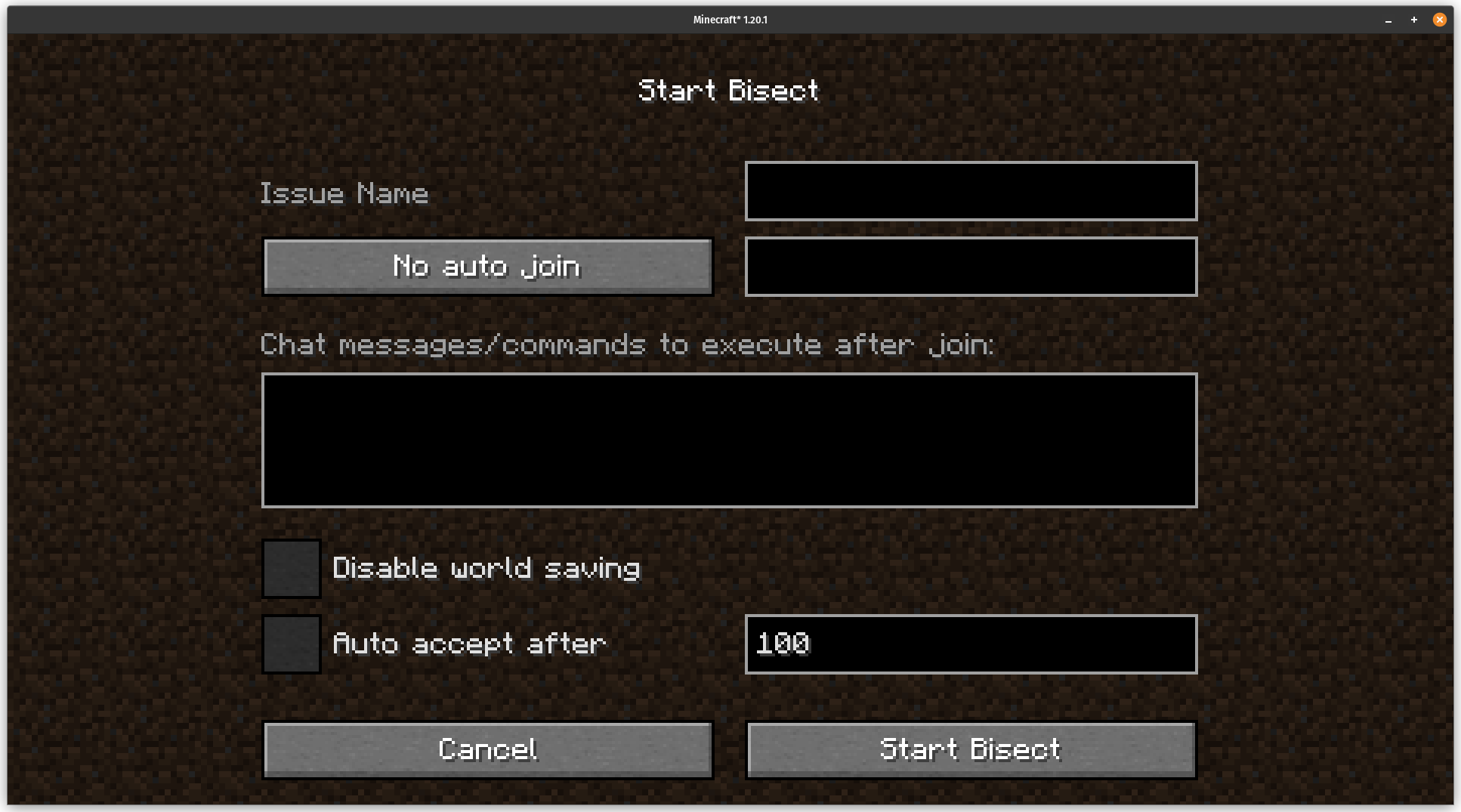
- If your game crashes, a dialog will open asking if you want to bisect, else click the start bisect button at the top of your screen, and you will be prompted to give your issue a name.
- The game will automatically restart. Try to reproduce the issues you had before.
- - If everything is fine, click the `No Issue` button
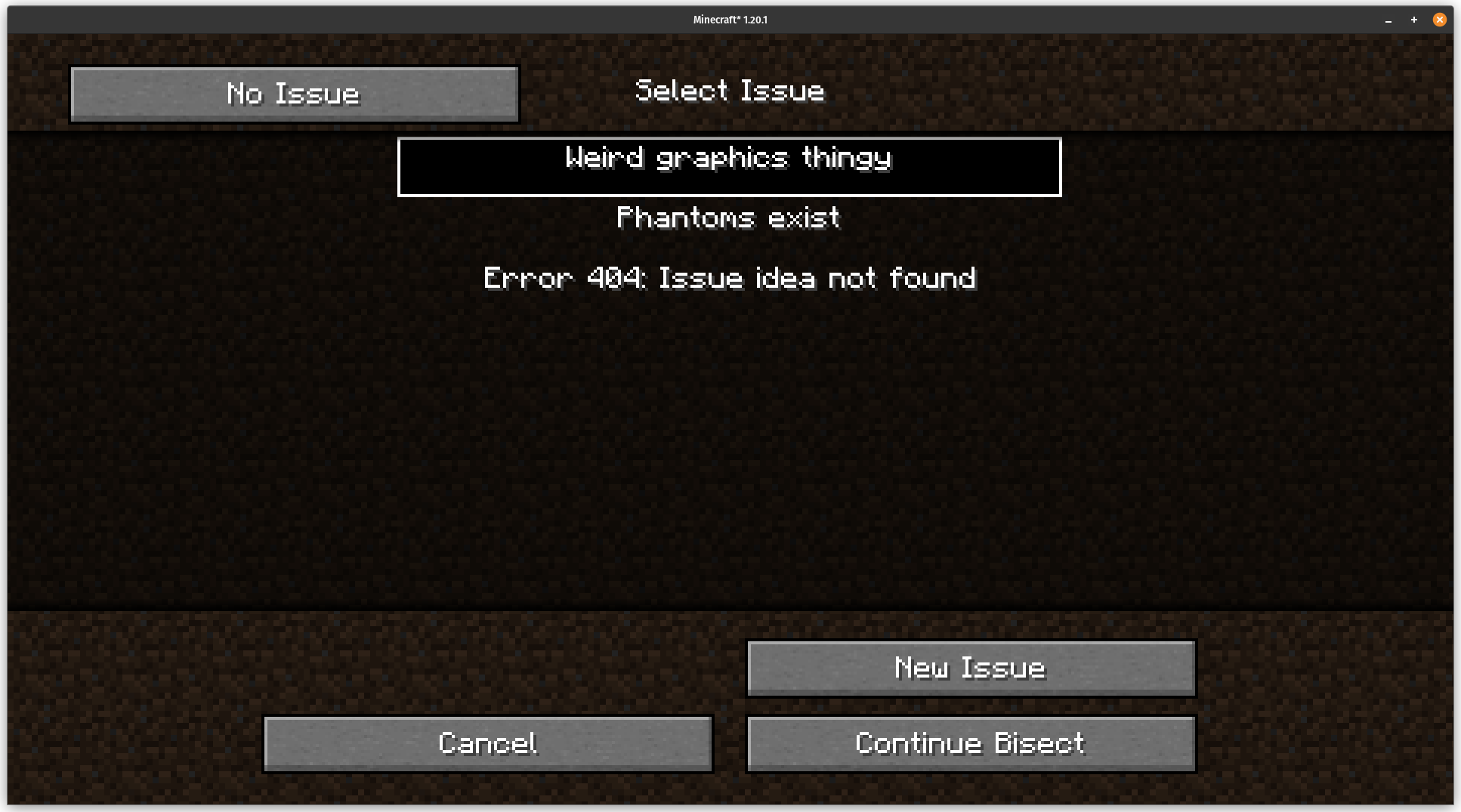
- - If you have an issue click the `Manual Issue` button, and select the issue you are having or create a new one
- - Note that it is recommended to keep the number of issues in one bisect down, and instead run multiple bisects with previous fixes applied. See Bisecting multiple issues at once
- once an issue is isolated, bisect will verify the solution(s) and continue bisecting the other issues
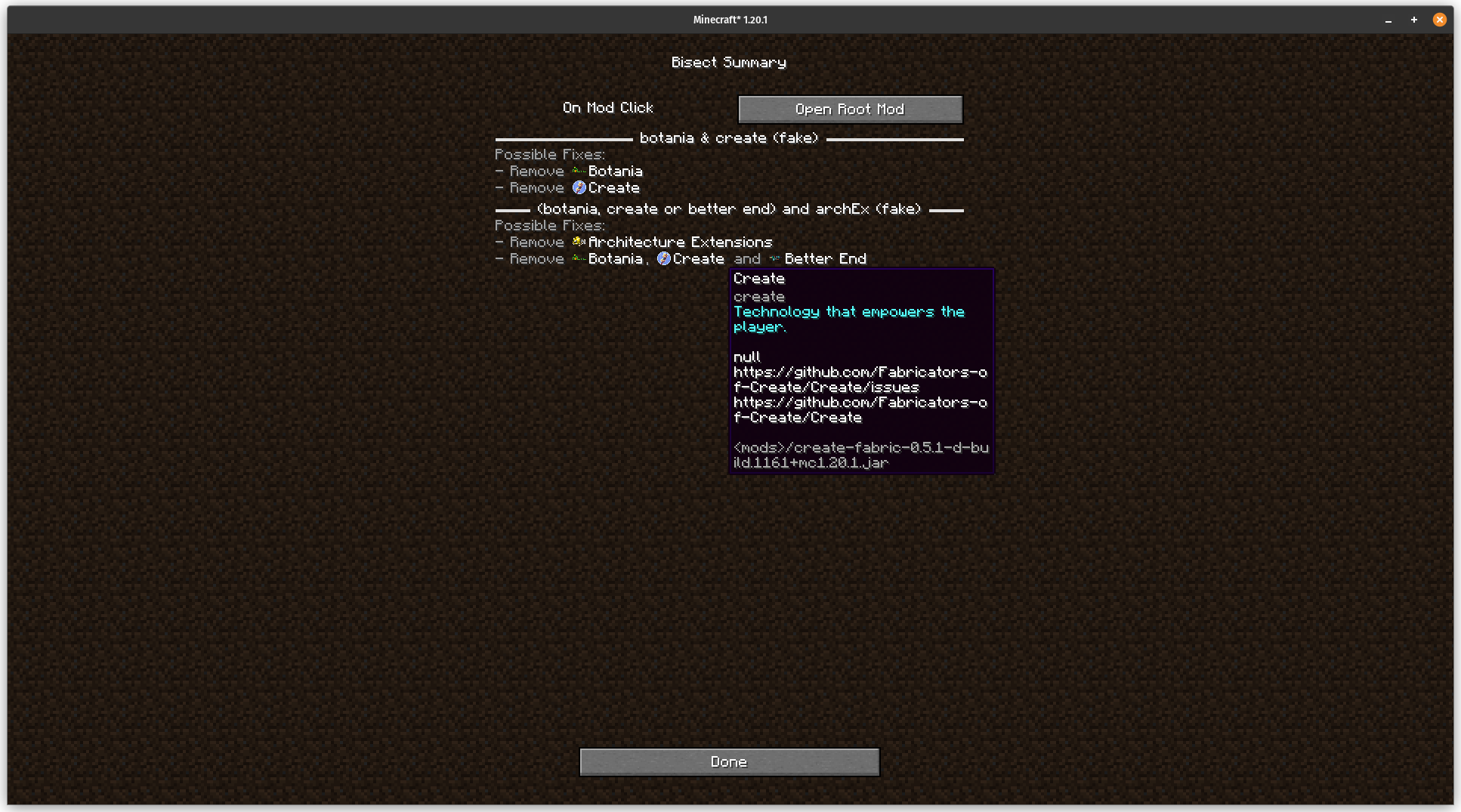
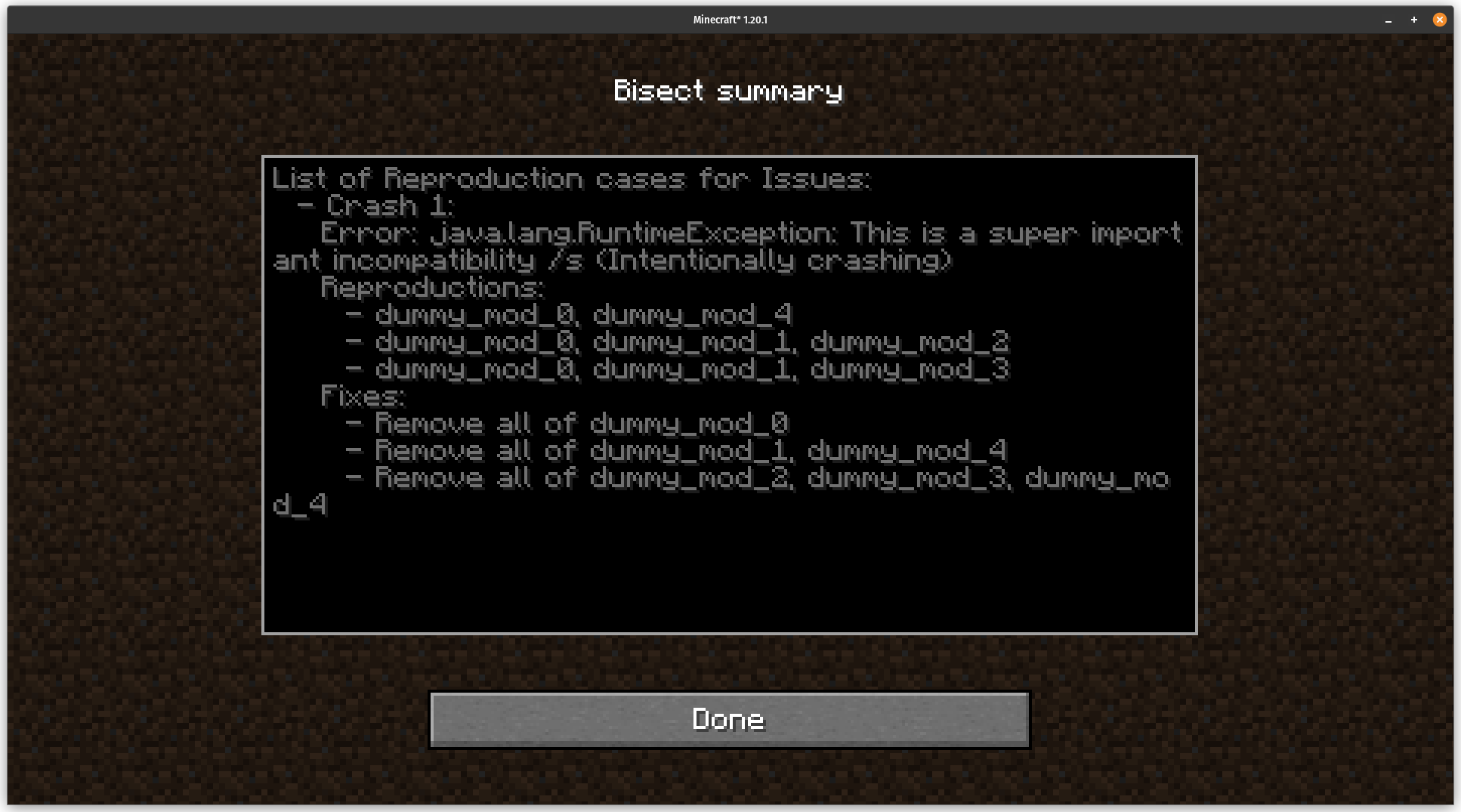
- once bisect is done, it will provide a summary of issues and solutions encountered. Please treat those with care though, due to the way bisect works
- ### Configuring
- The file `
/quilt_bisect/main.json` contains most things a user may want to configure, see (https://github.com/anonymous123-code/quilt-bisect/blob/main/src/main/java/io/github/anonymous123_code/quilt_bisect/shared/MainConfig.java) for now.
The file `
The files `
## How does it work ### Bisecting multiple issues at once While bisecting multiple issues works, there are a few assumptions bisect makes that are essential when multiple issues are present: - Only removing a mod can fix an issue, not adding one - A common example for this would be indium, which fixes compatibility issues between sodium and other mods, if it wouldn't be declared by the other mods involved - There is a constant priority order between issues - If a subset B of a mod set with issue A has an issue different from issue A, issue A won't occur on any subset of B. This means that issues (even if marked by the user) must always be tested for in the same order
### Automatically mark things as working When starting a new bisect, you can configure bisect to - automatically join a world, server, realm, or the last joined one (Note that realms rely on ids and not on names) - automatically accept a mod set as working after a given time - The time is in 1/20 seconds, and will start on world join if auto join is active, else when the title screen shows. If in single player, it will also wait for enough ticks to pass - automatically run commands or sending chat messages after auto joining. - It will be treated as if you sent them from chat, and also work with client side commands - disable world saving - This is to help reproduction of issues where the state of the world is relevant. No single player world will be changed after a relaunch if this is active. It also allows for testing content mods - For maximum compatibility it is currently implemented by making a backup of the worlds folder and resetting the worlds that have been backed up to the stored state before launch if active
### Handling crashes Being a loader plugin, bisect hooks into the Quilt's loader process at an incredibly early stage. There, it can create a new process that is actually running the game, and wait for that process to end. After that bisect checks if minecraft crashed by searching for a new crash log, copies the latest.log, and updates `config/quilt_bisect/active_bisect.json`. (if no bisect is active and it crashed it asks if a new one should be started) If minecraft didn't quit normally (either through a crash or through the bisect menu) and a bisect is active, the parent process will restart the game. (https://github.com/anonymous123-code/quilt-bisect/blob/main/src/main/java/io/github/anonymous123_code/quilt_bisect/plugin/BisectPluginProcessManager.java) there is a lot more stuff going on making sure that for example killing the parent or child process makes them behave as expected.
### Detecting issues Bisect will - Handle cras
📊 Mod Details
- Game
- Minecraft Mods
- Author
- anonymous123-code
- Version
- 0.3.0-alpha.2+1.20.2
- Downloads
- 2,084
- Endorsements
- 21
- Category
- cursed
- Created
- 2/24/2024
- Updated
- 6/13/2024
- Game Versions
- 1.20.2
- Tags
- cursed, technology, utility
🔧 How to Install Minecraft Mods Mods
Download from Modrinth. Use Prism Launcher or drop into your mods folder.
📖 Full step-by-step install guide for Minecraft Mods →
Visit the official mod page for specific installation instructions for this mod.
🎮 Need cheat codes or console commands? Check ur gaming wiki for Minecraft Mods commands, item IDs, and more.
❓ Frequently Asked Questions
Which Minecraft Mods versions does Quilt Bisect support?
The author lists 1.20.2. Other versions may work but are untested by the author.
What is the latest version of Quilt Bisect?
Version 0.3.0-alpha.2+1.20.2, published 2024-06-13 with 2,084 downloads recorded at the source.
Keep browsing — more Minecraft Mods mods await