Quick Menu
🟠 Updated over a year ago⚠️ Install Order · 2 steps
Install in this order, then this mod last — most mods fail to load without their framework and dependencies in place.
🖼️ Gallery (3 images)
🔍 Analysis
- 👍 0.2% endorsement rate
- 🏆 #844 of 1032 fabric mods in this game by downloads
📋 About This Mod
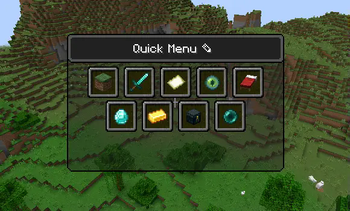
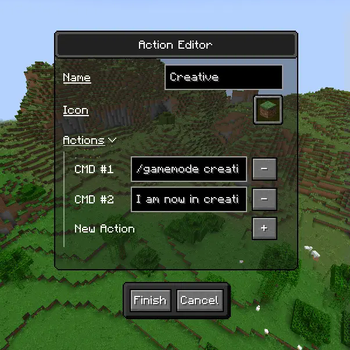
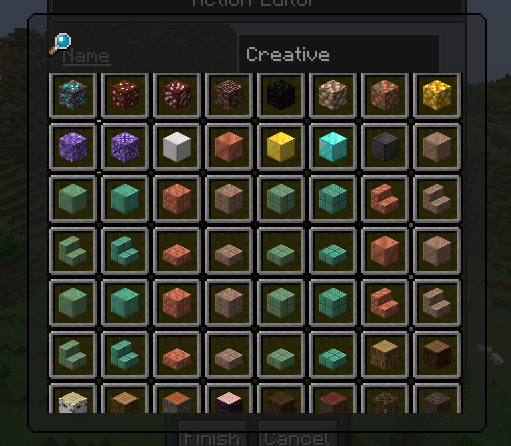
### Where are versions 1.21.4+? The project is currently on **hiatus** for an **indeterminable about of time**.<br> For **newer version's**, check out this **(https://github.com/tehbeard/quick-menu/releases)** by **(https://github.com/tehbeard)**! --- !(https://i.imgur.com/1MvlOoD.png) **Quick Menu** is a **client-side** mod for Minecraft that adds a **configurable easy-to-access menu** that runs **basic repetitive commands**.<br> It aims to save you time by giving you a place to put all the commands you may need for a given context. The mod requires the (https://github.com/wisp-forest/owo-lib) modding library and (https://modrinth.com/mod/fabric-api).<br> ## Features <p align="center"> <img src="https://github.com/ImCodist/quick-menu/assets/50346006/e6ce7cf2-43f5-442e-bf90-8d912eb0fa58" alt="In-Game Preview"/> </p> - Easy to access menu with a **keybind** *(Default: G)* - A simple action button **editor**. - Each action button can run **as many actions** as you want. - The **icon** for an action button can be selected with a **dedicated GUI**. ## How to Use **Open the menu** in-game with the **chosen keybind** *(Default: G)*.<br> To enter **edit mode** click the pencil icon next to the title or press E on the keyboard.<br> In **edit mode** you can: - Create a new action using the button below the main menu. - Delete an action button by right-clicking the button you'd like to delete. --- License: (https://www.gnu.org/licenses/gpl-3.0.en.html)\ Version Format: (https://semver.org/)
### Where are versions 1. 21. 4+? The project is currently on hiatus for an indeterminable about of time.
For newer version's, check out this (https://github.com/tehbeard/quick-menu/releases)** by (https://github.com/tehbeard)**!
!(https://i.imgur.com/1MvlOoD.png)
Quick Menu is a client-side mod for Minecraft that adds a configurable easy-to-access menu that runs basic repetitive commands.
It aims to save you time by giving you a place to put all the commands you may need for a given context.
The mod requires the (https://github.com/wisp-forest/owo-lib) modding library and (https://modrinth.com/mod/fabric-api).
## Features
- Easy to access menu with a keybind (Default: G)
- A simple action button editor.
- Each action button can run as many actions as you want.
- The icon for an action button can be selected with a dedicated GUI.
## How to Use Open the menu in-game with the chosen keybind (Default: G).
To enter edit mode click the pencil icon next to the title or press E on the keyboard.
In edit mode you can: - Create a new action using the button below the main menu. - Delete an action button by right-clicking the button you'd like to delete.
License: (https://www.gnu.org/licenses/gpl-3. 0.en.html)\ Version Format: (https://semver.org/)
📊 Mod Details
- Game
- Minecraft Mods
- Author
- ImCodist
- Version
- 1.2.6
- Downloads
- 114,847
- Endorsements
- 211
- Category
- fabric
- Created
- 6/29/2023
- Updated
- 2/3/2025
- Game Versions
- 1.21.4
- Tags
- utility
🔧 How to Install Minecraft Mods Mods
Download from Modrinth. Use Prism Launcher or drop into your mods folder.
📖 Full step-by-step install guide for Minecraft Mods →
Visit the official mod page for specific installation instructions for this mod.
🎮 Need cheat codes or console commands? Check ur gaming wiki for Minecraft Mods commands, item IDs, and more.
❓ Frequently Asked Questions
Which Minecraft Mods versions does Quick Menu support?
The author lists 1.21.4. Other versions may work but are untested by the author.
What is the latest version of Quick Menu?
Version 1.2.6, published 2025-02-03 with 114,847 downloads recorded at the source.
Keep browsing — more Minecraft Mods mods await