Quick Chat
🟠 Updated over a year ago⚠️ Install Order · 2 steps
Install in this order, then this mod last — most mods fail to load without their framework and dependencies in place.
🖼️ Gallery (3 images)
🔍 Analysis
- 👍 0.0% endorsement rate
- 🏆 #566 of 983 fabric mods in this game by downloads
📋 About This Mod
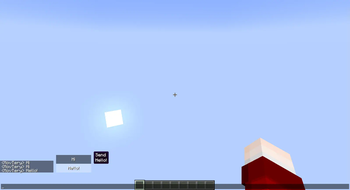
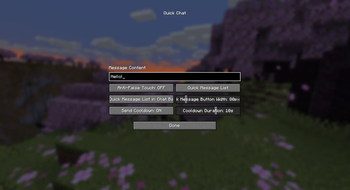
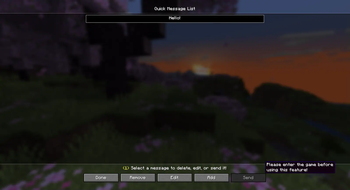
# Quick Chat This is a straightforward Minecraft Mod that allows you to send preset messages in the game by pressing a button. Additionally, the Mod provides a simple quick message list screen where you can add, modify, and delete custom quick messages. To access this screen, you can press the designated button set in the key bindings within the game. Double-click on the selected quick message, or select it and click the "Send" button to quickly send the message to the chat bar! ## Please note: - The mod includes a cooldown mechanism for sending messages, with a default cooldown time of 10 seconds. The cooldown time can be set within the range of 1 to 10 seconds. - You can configure the mod by navigating to the "config" folder within your game version's directory and finding the configuration file for this mod, named "quick_chat.json". Open it to make changes. - If you prefer not to manually edit the configuration file, you can easily adjust the mod settings by pressing the "J" key in-game to open the configuration screen. In the NeoForge version, you can access the configuration screen through the Mod Menu. For the Fabric version, you'll need to install the Mod Menu Mod to access the configuration screen. **Please bear in mind that this is a strictly client-side Mod. While you can use it in multiplayer games to quickly send messages, please refrain from abusing it (such as spamming the server and disrupting other players)!**
# Quick Chat This is a straightforward Minecraft Mod that allows you to send preset messages in the game by pressing a button.
Additionally, the Mod provides a simple quick message list screen where you can add, modify, and delete custom quick messages. To access this screen, you can press the designated button set in the key bindings within the game. Double-click on the selected quick message, or select it and click the "Send" button to quickly send the message to the chat bar!
## Please note: - The mod includes a cooldown mechanism for sending messages, with a default cooldown time of 10 seconds. The cooldown time can be set within the range of 1 to 10 seconds. - You can configure the mod by navigating to the "config" folder within your game version's directory and finding the configuration file for this mod, named "quick_chat.json". Open it to make changes. - If you prefer not to manually edit the configuration file, you can easily adjust the mod settings by pressing the "J" key in-game to open the configuration screen. In the NeoForge version, you can access the configuration screen through the Mod Menu. For the Fabric version, you'll need to install the Mod Menu Mod to access the configuration screen.
Please bear in mind that this is a strictly client-side Mod. While you can use it in multiplayer games to quickly send messages, please refrain from abusing it (such as spamming the server and disrupting other players)!
📊 Mod Details
- Game
- Minecraft Mods
- Author
- MovTery
- Version
- 1.5.2
- Downloads
- 49,547
- Endorsements
- 9
- Category
- fabric
- Created
- 4/23/2024
- Updated
- 6/8/2025
- Game Versions
- 1.21.5
- Tags
- utility
🔧 How to Install Minecraft Mods Mods
Download from Modrinth. Use Prism Launcher or drop into your mods folder.
📖 Full step-by-step install guide for Minecraft Mods →
Visit the official mod page for specific installation instructions for this mod.
🎮 Need cheat codes or console commands? Check ur gaming wiki for Minecraft Mods commands, item IDs, and more.
❓ Frequently Asked Questions
Which Minecraft Mods versions does Quick Chat support?
The author lists 1.21.5. Other versions may work but are untested by the author.
What is the latest version of Quick Chat?
Version 1.5.2, published 2025-06-08 with 49,547 downloads recorded at the source.
Keep browsing — more Minecraft Mods mods await